> ## Documentation Index
> Fetch the complete documentation index at: https://docs.tesouro.com/llms.txt
> Use this file to discover all available pages before exploring further.
# Onboarding
> Embed the onboarding component to guide users through KYC/KYB sign-up for an embedded bank account.
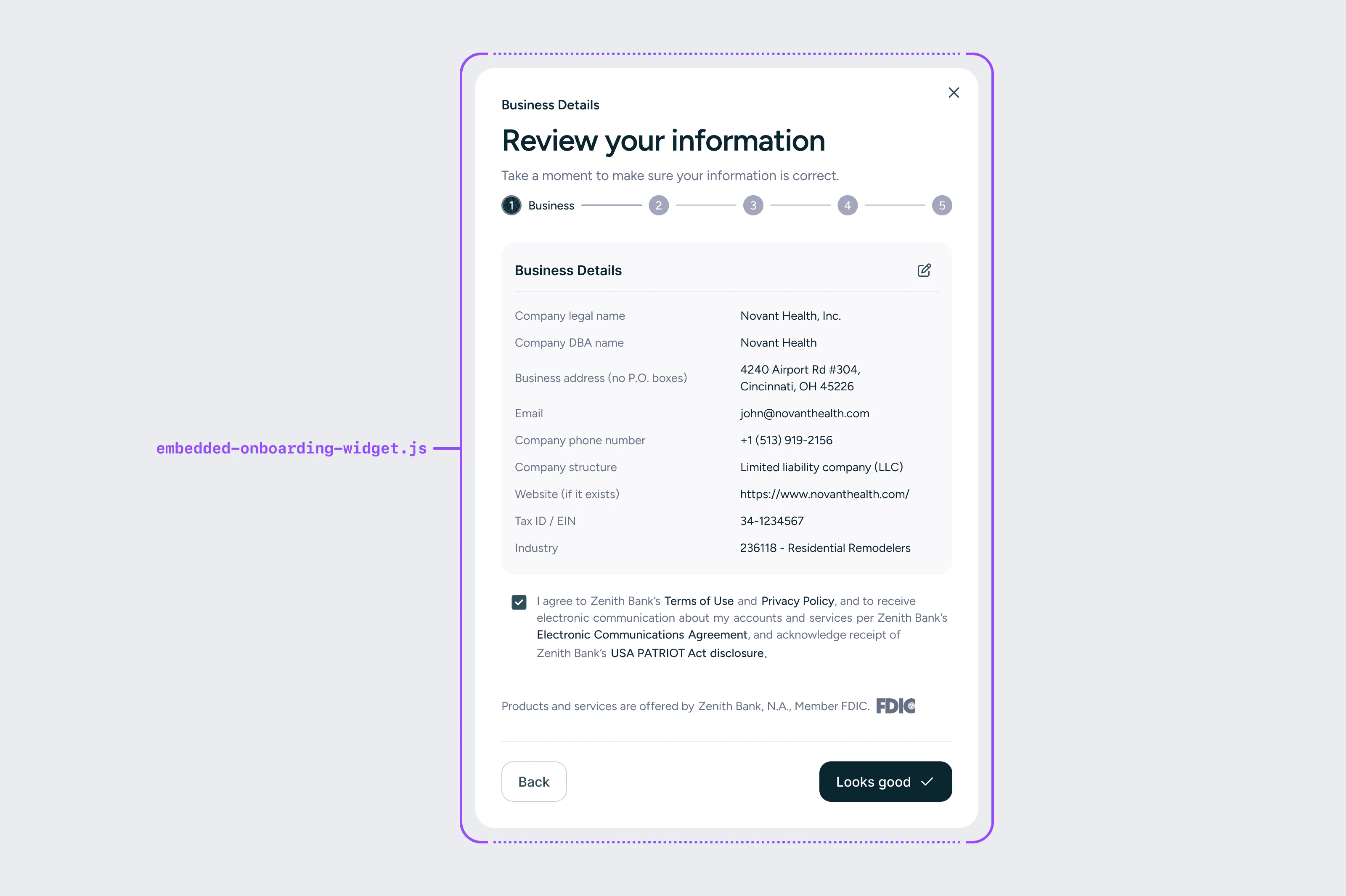 The onboarding component shows users marketing information about the embedded account and kicks off the KYC/KYB onboarding flow. It pulls in your logo, bank account name, and marketing text from Tesouro's database — content that is defined collaboratively by you, Tesouro, and the bank, and must be bank-approved.
After the user views the marketing information, the component transitions into the onboarding flow where business users submit their information for KYC/KYB validation. The flow collects information on three entities:
* **Business entity** — Legal information about the business itself
* **Business controller** — An individual with the power to direct or significantly influence the financial activities of the business (e.g. CEO, CFO, VP)
* **Beneficial owners** — Any person who owns 25% or more of the company's ownership interests
## Authentication and application lifecycle
The component authenticates against a single bank account application using a short-lived [application client secret](/embedded-banking/guides/authentication/application-client-secret), not a backend bearer token. Your backend creates the application server-to-server, receives the secret in the create response, and passes it to the component so the rest of the flow — edits, verification, submission — runs in the browser. If the applicant returns after the secret has expired, your backend re-issues one through the resume endpoint and the new secret reaches the applicant by email.
For the full sequence — states, transitions, and which auth method is required at each step — see the [application lifecycle guide](/embedded-banking/guides/bank-account-applications/overview).
## Onboarding outcomes
| Outcome | Description |
| :------------------- | :------------------------------------------------------------------------------------- |
| **Instant approval** | The user can immediately access the banking dashboard and start using the account |
| **Manual review** | The bank requires additional review time; the user is notified via email when complete |
| **Denied** | The application is denied if it appears fraudulent or too risky for the bank |
## React
```tsx lines theme={null}
import { EmbeddedProvider, OnboardingWidget } from "@tesouro/embedded-components-react";
export default function OnboardingPage() {
return (
);
}
```
| Prop | Required | Description |
| :------------------------- | :------- | :------------------------------------------------------------------ |
| `bankingDashboardHref` | No | URL to redirect users to after successful onboarding |
| `shouldRedirect` | No | Whether to automatically redirect after approval (default: `false`) |
| `businessDetailsForm` | No | Pre-filled business entity data (see pre-fill table below) |
| `personalDetailsForm` | Yes | Pre-filled business controller data; must include `workEmail` |
| `additionalBusinessOwners` | No | Array of pre-filled beneficial owner data |
## Web components
```html lines theme={null}
```
Use [`setWidgetDefaults`](/embedded-banking/guides/embedded-components/web-components#customization) to set shared values like `data-user-id` and `data-widget-token-refresh-url` globally instead of repeating them on each component.
## Pre-filling onboarding data
If you already store any of the following fields, pass them in to pre-fill the form and reduce friction for your users. Users can always edit pre-filled values. The `workEmail` field is required and must be passed via the `personalDetailsForm` prop:
```tsx lines theme={null}
```
### `data-personal-details-form` fields (controller)
| Field | Parameter | Type | Example |
| :----------------------- | :-------------------- | :------------------------------ | :----------------- |
| Controller first name | `firstName` | `string` | `Jack` |
| Controller last name | `lastName` | `string` | `Smith` |
| Controller date of birth | `dateOfBirth` | `string` | `03-01-1997` |
| Controller SSN | `ssn` | `string` | `123-45-6789` |
| Controller home address | `homeAddress` | `string` | `234 Main St.` |
| Controller city | `city` | `string` | `Phoenix` |
| Controller state | `state` | `string` | `Arizona` |
| Controller ZIP code | `zipCode` | `string` | `85001` |
| Controller phone | `mobilePhoneNumber` | `string` | `555-345-2343` |
| Controller owns 25%+ | `ownsOver25Percent` | `'yes' \| 'no' \| 'unselected'` | `yes` |
| Controller ownership % | `ownershipPercentage` | `string` | `50` |
| Controller work email | `workEmail` | `string` | `jack@example.com` |
`workEmail` is required for onboarding.
### `data-business-details-form` fields
| Field | Parameter | Type | Example |
| :------------------ | :------------------- | :-------------------- | :------------------------- |
| Company legal name | `companyLegalName` | `string` | `Nail It Technology, Inc.` |
| Company DBA name | `companyDbaName` | `string` | `Nail It` |
| Company address | `businessAddress` | `string` | `123 Main St.` |
| Company city | `city` | `string` | `Phoenix` |
| Company state | `state` | `string` | `Arizona` |
| Company ZIP code | `zipCode` | `string` | `85001` |
| Company phone | `companyPhoneNumber` | `string` | `555-345-3434` |
| Business structure | `companyStructure` | `string` | `llc` |
| Company website | `website` | `string` | `https://www.example.com` |
| EIN / Tax ID | `taxId` | `string` | `123456789` |
| NAICS industry code | `naicsCode` | `NaicsOption \| null` | `111331` |
| Industry code | `industryCode` | `string` | `111331` |
You can pass either `industryCode` or `naicsCode`. `industryCode` is supported and translated to `naicsCode` internally.
### `data-additional-business-owners` fields (beneficial owners array)
Each owner object includes:
| Field | Parameter | Type | Example |
| :-------------------------- | :-------------------- | :------- | :------------- |
| Beneficial owner ID | `id` | `string` | `owner_1` |
| Beneficial owner first name | `firstName` | `string` | `Jane` |
| Beneficial owner last name | `lastName` | `string` | `Doe` |
| Beneficial owner DOB | `dateOfBirth` | `string` | `02-15-1990` |
| Beneficial owner SSN | `ssn` | `string` | `123456789` |
| Beneficial owner address | `homeAddress` | `string` | `123 Main St.` |
| Beneficial owner city | `city` | `string` | `Phoenix` |
| Beneficial owner state | `state` | `string` | `Arizona` |
| Beneficial owner ZIP code | `zipCode` | `string` | `85001` |
| Beneficial owner phone | `phoneNumber` | `string` | `5552344456` |
| Beneficial owner % | `ownershipPercentage` | `string` | `25` |
The onboarding component shows users marketing information about the embedded account and kicks off the KYC/KYB onboarding flow. It pulls in your logo, bank account name, and marketing text from Tesouro's database — content that is defined collaboratively by you, Tesouro, and the bank, and must be bank-approved.
After the user views the marketing information, the component transitions into the onboarding flow where business users submit their information for KYC/KYB validation. The flow collects information on three entities:
* **Business entity** — Legal information about the business itself
* **Business controller** — An individual with the power to direct or significantly influence the financial activities of the business (e.g. CEO, CFO, VP)
* **Beneficial owners** — Any person who owns 25% or more of the company's ownership interests
## Authentication and application lifecycle
The component authenticates against a single bank account application using a short-lived [application client secret](/embedded-banking/guides/authentication/application-client-secret), not a backend bearer token. Your backend creates the application server-to-server, receives the secret in the create response, and passes it to the component so the rest of the flow — edits, verification, submission — runs in the browser. If the applicant returns after the secret has expired, your backend re-issues one through the resume endpoint and the new secret reaches the applicant by email.
For the full sequence — states, transitions, and which auth method is required at each step — see the [application lifecycle guide](/embedded-banking/guides/bank-account-applications/overview).
## Onboarding outcomes
| Outcome | Description |
| :------------------- | :------------------------------------------------------------------------------------- |
| **Instant approval** | The user can immediately access the banking dashboard and start using the account |
| **Manual review** | The bank requires additional review time; the user is notified via email when complete |
| **Denied** | The application is denied if it appears fraudulent or too risky for the bank |
## React
```tsx lines theme={null}
import { EmbeddedProvider, OnboardingWidget } from "@tesouro/embedded-components-react";
export default function OnboardingPage() {
return (
);
}
```
| Prop | Required | Description |
| :------------------------- | :------- | :------------------------------------------------------------------ |
| `bankingDashboardHref` | No | URL to redirect users to after successful onboarding |
| `shouldRedirect` | No | Whether to automatically redirect after approval (default: `false`) |
| `businessDetailsForm` | No | Pre-filled business entity data (see pre-fill table below) |
| `personalDetailsForm` | Yes | Pre-filled business controller data; must include `workEmail` |
| `additionalBusinessOwners` | No | Array of pre-filled beneficial owner data |
## Web components
```html lines theme={null}
```
Use [`setWidgetDefaults`](/embedded-banking/guides/embedded-components/web-components#customization) to set shared values like `data-user-id` and `data-widget-token-refresh-url` globally instead of repeating them on each component.
## Pre-filling onboarding data
If you already store any of the following fields, pass them in to pre-fill the form and reduce friction for your users. Users can always edit pre-filled values. The `workEmail` field is required and must be passed via the `personalDetailsForm` prop:
```tsx lines theme={null}
```
### `data-personal-details-form` fields (controller)
| Field | Parameter | Type | Example |
| :----------------------- | :-------------------- | :------------------------------ | :----------------- |
| Controller first name | `firstName` | `string` | `Jack` |
| Controller last name | `lastName` | `string` | `Smith` |
| Controller date of birth | `dateOfBirth` | `string` | `03-01-1997` |
| Controller SSN | `ssn` | `string` | `123-45-6789` |
| Controller home address | `homeAddress` | `string` | `234 Main St.` |
| Controller city | `city` | `string` | `Phoenix` |
| Controller state | `state` | `string` | `Arizona` |
| Controller ZIP code | `zipCode` | `string` | `85001` |
| Controller phone | `mobilePhoneNumber` | `string` | `555-345-2343` |
| Controller owns 25%+ | `ownsOver25Percent` | `'yes' \| 'no' \| 'unselected'` | `yes` |
| Controller ownership % | `ownershipPercentage` | `string` | `50` |
| Controller work email | `workEmail` | `string` | `jack@example.com` |
`workEmail` is required for onboarding.
### `data-business-details-form` fields
| Field | Parameter | Type | Example |
| :------------------ | :------------------- | :-------------------- | :------------------------- |
| Company legal name | `companyLegalName` | `string` | `Nail It Technology, Inc.` |
| Company DBA name | `companyDbaName` | `string` | `Nail It` |
| Company address | `businessAddress` | `string` | `123 Main St.` |
| Company city | `city` | `string` | `Phoenix` |
| Company state | `state` | `string` | `Arizona` |
| Company ZIP code | `zipCode` | `string` | `85001` |
| Company phone | `companyPhoneNumber` | `string` | `555-345-3434` |
| Business structure | `companyStructure` | `string` | `llc` |
| Company website | `website` | `string` | `https://www.example.com` |
| EIN / Tax ID | `taxId` | `string` | `123456789` |
| NAICS industry code | `naicsCode` | `NaicsOption \| null` | `111331` |
| Industry code | `industryCode` | `string` | `111331` |
You can pass either `industryCode` or `naicsCode`. `industryCode` is supported and translated to `naicsCode` internally.
### `data-additional-business-owners` fields (beneficial owners array)
Each owner object includes:
| Field | Parameter | Type | Example |
| :-------------------------- | :-------------------- | :------- | :------------- |
| Beneficial owner ID | `id` | `string` | `owner_1` |
| Beneficial owner first name | `firstName` | `string` | `Jane` |
| Beneficial owner last name | `lastName` | `string` | `Doe` |
| Beneficial owner DOB | `dateOfBirth` | `string` | `02-15-1990` |
| Beneficial owner SSN | `ssn` | `string` | `123456789` |
| Beneficial owner address | `homeAddress` | `string` | `123 Main St.` |
| Beneficial owner city | `city` | `string` | `Phoenix` |
| Beneficial owner state | `state` | `string` | `Arizona` |
| Beneficial owner ZIP code | `zipCode` | `string` | `85001` |
| Beneficial owner phone | `phoneNumber` | `string` | `5552344456` |
| Beneficial owner % | `ownershipPercentage` | `string` | `25` |