> ## Documentation Index
> Fetch the complete documentation index at: https://docs.tesouro.com/llms.txt
> Use this file to discover all available pages before exploring further.
# Manual status transition
> Learn how to manually change the status of the payables and move them through the workflow until their payment.
## Overview
Users can manually control the transit of a payable across its lifecycle by displaying approve/reject buttons to the approvers. The chart below shows all the different ways that a [payable](/finops/support/glossary#payable) can transition from status to status:
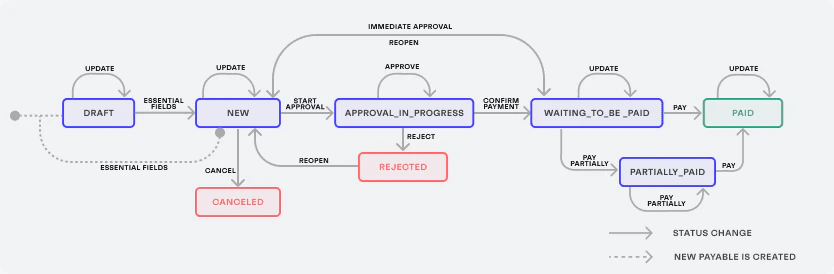 Once a [payable is uploaded](/finops/guides/accounts-payable/payables/collect), its status is set to either `draft` (if any of the [essential fields](/finops/guides/accounts-payable/payables/index#statuses) are missing) or `new` (if the uploaded payable already contains all essential fields during its creation).
After a payable in the `draft` status has [all essential fields filled out](/finops/guides/accounts-payable/payables/index#statuses), its status automatically changes to `new`.
This payable then needs to go through additional approval statuses before it is cleared for payment:
1. `approve_in_progress`
2. `waiting_to_be_paid`
When a manual approval/rejection is triggered, any pending approval requests linked to the payable are automatically cancelled.
The allowed status transitions depend on the **current status** of a payable. They are:
## Cancel a payable
**Current status:** `draft`, `new`
A payable that is not confirmed during the [organization user](/finops/support/glossary#organization-user) review can be canceled by sending a `POST` request to the `/payables/{payable_id}/cancel` endpoint:
```sh lines theme={null}
curl -X POST 'https://api.sandbox.tesouro.com/v1/payables/{payable_id}/cancel' \
-H 'X-Finops-Version: 2025-06-23' \
-H 'X-Organization-Id: ORGANIZATION_ID' \
-H 'Authorization: Bearer YOUR_ACCESS_TOKEN'
```
The successful response reflects the new status of the payable:
```json lines theme={null}
{
...
"status": "canceled",
...
}
```
To use the `/payables/{payable_id}/cancel` endpoint with an [organization user
token](/finops/guides/organizations/users#get-organization-user-token), this organization user must have a
[role](/finops/guides/organizations/users#create-role) that includes the `cancel` permission.
## Start approval
**Current status:** `new`
After an uploaded payable has been validated, the approval process can be started by sending a `POST` request to the `/payables/{payable_id}/submit-for-approval` endpoint:
```sh lines theme={null}
curl -X POST 'https://api.sandbox.tesouro.com/v1/payables/{payable_id}/submit-for-approval' \
-H 'X-Finops-Version: 2025-06-23' \
-H 'X-Organization-Id: ORGANIZATION_ID' \
-H 'Authorization: Bearer YOUR_ACCESS_TOKEN'
```
The successful response reflects the new status of the payable:
```json lines theme={null}
{
...
"status": "approve_in_progress",
...
}
```
Once the payable is sent for approval, it cannot be updated anymore. The counterpart [auto-linking](/finops/guides/common/counterparts/index#auto-linking) and [auto-creation](/finops/guides/common/counterparts/index#auto-creation) may happen during this transition. If the `payable.enforce_approval_policy_id` is set, the system applies only the specified policy. The enforced policy runs regardless of whether the payable matches its trigger conditions, and policy priority is ignored - only the specified policy is considered.
## Confirm for payment
**Current status:** `new`, `approve_in_progress`
After the payable is approved by all the required approvers, it is ready to be sent for payment. To confirm that a payable is ready to be paid, send a `POST` request to the `/payables/{payable_id}/approve_payment_operation` endpoint:
```sh lines theme={null}
curl -X POST 'https://api.sandbox.tesouro.com/v1/payables/{payable_id}/approve_payment_operation' \
-H 'X-Finops-Version: 2025-06-23' \
-H 'X-Organization-Id: ORGANIZATION_ID' \
-H 'Authorization: Bearer YOUR_ACCESS_TOKEN' \
```
The successful response reflects the new status of the payable:
```json lines theme={null}
{
...
"status": "waiting_to_be_paid",
...
}
```
## Reject
**Current status:** `approval_in_progress`
If an approver finds any mismatch or discrepancies in the payable, they can decline it by sending a `POST` request to the `POST /payables/{payable_id}/reject` endpoint:
```sh lines theme={null}
curl -X POST 'https://api.sandbox.tesouro.com/v1/payables/{payable_id}/reject' \
-H 'X-Finops-Version: 2025-06-23' \
-H 'X-Organization-Id: ORGANIZATION_ID' \
-H 'Authorization: Bearer YOUR_ACCESS_TOKEN' \
```
The successful response reflects the new status of the payable:
```json lines theme={null}
{
...
"status": "rejected",
...
}
```
## Reopen
**Current status:** `rejected`, `waiting_to_be_paid`
A payable in the `rejected` and `waiting_to_be_paid` statuses can be moved back to `new`. It makes it possible to fix any mismatch or discrepancies in the payable and then send it for approval again, repeating this process as many times as necessary.
To reopen a payable, send a `POST` request to the `POST /payables/{payable_id}/reopen` endpoint:
```sh lines theme={null}
curl -X POST 'https://api.sandbox.tesouro.com/v1/payables/{payable_id}/reopen' \
-H 'X-Finops-Version: 2025-06-23' \
-H 'X-Organization-Id: ORGANIZATION_ID' \
-H 'Authorization: Bearer YOUR_ACCESS_TOKEN' \
```
The successful response reflects the new status of the payable:
```json lines theme={null}
{
...
"status": "new",
...
}
```
* To use the `/payables/{payable_id}/reopen` endpoint with an [organization user token](/finops/guides/organizations/users#get-organization-user-token), this organization user must have a [role](/finops/guides/organizations/users#create-role) that includes the `reopen` permission.
* Reopening a payable triggers the webhook `payable.reopened`.
## Mark as partially paid
**Current status:** `waiting_to_be_paid`, `partially_paid`
If the payable is partially paid, its status is moved to `partially_paid`. To mark a payable as `partially_paid`, send a `POST` request to the `/payables/{payable_id}/mark-as-partially-paid` endpoint with the request body containing the new `amount_paid` (value of the partial payment, in minor units). The value of the `amount_paid` field must be the sum of all payments made, not only the last one:
```sh lines theme={null}
curl -X POST 'https://api.sandbox.tesouro.com/v1/payables/411dc6eb...6289b3/mark-as-partially-paid' \
-H 'X-Finops-Version: 2025-06-23' \
-H 'X-Organization-Id: ORGANIZATION_ID' \
-H 'Authorization: Bearer ACCESS_TOKEN' \
-H 'Content-Type: application/json' \
-d '{
"amount_paid": 300
}'
```
The successful response contains information about the payable, including the `amount_due` field, which represents the remaining amount to be paid. This field is automatically calculated by the result of `total` - `amount_paid`:
```json expandable lines theme={null}
{
"partner_metadata": {},
"id": "3fa85f64-5717-4562-b3fc-2c963f66afa6",
"entity_id": "3fa85f64-5717-4562-b3fc-2c963f66afa6",
"marked_as_paid_with_comment": null,
"marked_as_paid_by_entity_user_id": "71e8875a-43b3-434f-b12a-54c84c176ef3",
"amount_due": 700,
"amount_paid": 300,
"amount_to_pay": 1000,
"status": "draft",
"source_of_payable_data": "ocr",
"currency": "USD",
"amount": 1000,
"description": "Restock office supplies",
"due_date": "2023-08-23",
"payment_terms": {..},
"issued_at": "2023-08-23",
"payable_origin": "upload",
"was_created_by_user_id": "3fa85f64-5717-4562-b3fc-2c963f66afa6",
"currency_exchange": {
"default_currency_code": "USD",
"rate": 10.0,
"total": 0
},
"file": {
"id": "3fa85f64-5717-4562-b3fc-2c963f66afa6",
"created_at": "2023-08-23T08:17:59.671Z",
"file_type": "payables",
"name": "invoice.pdf",
"region": "eu-central-1",
"md5": "31d1a2dd1ad3dfc39be849d70a68dac0",
"mimetype": "application/pdf",
"url": "https://bucketname.s3.amazonaws.com/12345/67890.pdf",
"size": 24381,
"previews": [],
"pages": []
},
"tags": [
{
"name": "Marketing",
"id": "ea837e28-509b-4b6a-a600-d54b6aa0b1f5",
"created_at": "2022-09-07T16:35:18.484507+00:00",
"updated_at": "2022-09-07T16:35:18.484507+00:00",
"created_by_entity_user_id": "ea837e28-509b-4b6a-a600-d54b6aa0b1f5"
}
],
"created_at": "2023-08-23T08:17:59.671Z",
"updated_at": "2023-08-23T08:17:59.671Z",
"approval_policy_id": "3fa85f64-5717-4562-b3fc-2c963f66afa6",
"document_id": "DE2287",
"subtotal": 1250,
"tax": 1900,
"sender": "hello@example.com",
"line_items": [..],
"ocr_request_id": "3fa85f64-5717-4562-b3fc-2c963f66afa6",
"counterpart_bank_id": "ACMEUSAAXXX",
"counterpart_account_id": "123456789012",
"counterpart_name": "Acme Inc.",
"counterpart_tax_id": "47-1234567",
"counterpart_address": {
"country": "US",
"city": "Austin",
"postal_code": "78701",
"state": "TX",
"line1": "123 Congress Ave",
"line2": null
},
"counterpart_id": "3fa85f64-5717-4562-b3fc-2c963f66afa6",
"counterpart_bank_account_id": "3fa85f64-5717-4562-b3fc-2c963f66afa6",
"counterpart_address_id": "3fa85f64-5717-4562-b3fc-2c963f66afa6",
"counterpart_vat_id_id": "3fa85f64-5717-4562-b3fc-2c963f66afa6",
"counterpart": {..},
"counterpart_raw_data": {..}
}
```
Notes:
* This endpoint can be used for payables in the `waiting_to_be_paid` [status](/finops/guides/accounts-payable/payables/index#statuses).
* The `amount_paid` must be greater than 0 and less than the total payable amount specified by the `amount` field.
* Make a `POST` request to `/payables/{payable_id}/mark-as-paid` to mark the payable as fully paid.
* You can make `POST` requests to `/payables/{payable_id}/mark-as-partially-paid` multiple times for the same payable to reflect multiple partial payments, always setting the sum of all payments made.
* To use the `/payables/{payable_id}/mark-as-partially-paid` endpoint with an [organization user token](/finops/guides/organizations/users#get-organization-user-token), this organization user must have a [role](/finops/guides/organizations/users#create-role) that includes the `pay` permission for payables.
* The `amount_to_pay` field is automatically calculated based on the `amount_due` less the percentage described in the `payment_terms.discount` value.
## Mark as paid
**Current status:** `waiting_to_be_paid`
Payables can be paid using the payment channels offered by Tesouro or through external payment channels. In the latter case, the invoice is not automatically marked as `paid` in the system and needs to be converted to the `paid` status manually.
To mark a payable as `paid`, send a `POST` request to the `/payables/{payable_id}/mark-as-paid` endpoint. Optionally, it is possible to pass the `comment` field in the request body, to describe how and when the invoice was paid:
```sh lines theme={null}
curl -X 'POST https://api.sandbox.tesouro.com/v1/payables/{payable_id}/mark-as-paid' \
-H 'X-Finops-Version: 2025-06-23' \
-H 'X-Organization-Id: ORGANIZATION_ID' \
-H 'Authorization: Bearer YOUR_ACCESS_TOKEN' \
-d '{"comment": "Optional text that describes how and when the invoice was paid."}'
```
The successful response contains the ID of the user who marked the invoice as paid, the new status of the payable, and the comment:
```json expandable lines theme={null}
{
....
"currency": "USD",
"total_amount": 1500,
"due_date": "2023-12-18",
"payment_terms": {
"name": "2/10, 1/20, net 30",
"term_1": {
"number_of_days": 10,
"discount": 200
},
"term_2": {
"number_of_days": 20,
"discount": 100
},
"term_final": {
"number_of_days": 30
}
},
"suggested_payment_term": {
"date": "2023-07-25",
"discount": 200
},
"issued_at": "2023-12-18",
"payable_origin": "upload",
"was_created_by_user_id": "3fa85f64-5717-4562-b3fc-2c963f66afa6",
"marked_as_paid_with_comment": "Optional text that describes how and when the invoice was paid.",
"marked_as_paid_by_entity_user_id": "71e8875a-43b3-434f-b12a-54c84c176ef3",
"status": "paid",
....
}
```
* To use the `/payables/{payable_id}/mark-as-paid` endpoint with an [organization user token](/finops/guides/organizations/users#get-organization-user-token), this organization user must have a [role](/finops/guides/organizations/users#create-role) that includes the `pay` permission for payables.
* The `amount_to_pay` field is automatically calculated based on the `amount_due` less the percentage described in the `payment_terms.discount` value.
Once a [payable is uploaded](/finops/guides/accounts-payable/payables/collect), its status is set to either `draft` (if any of the [essential fields](/finops/guides/accounts-payable/payables/index#statuses) are missing) or `new` (if the uploaded payable already contains all essential fields during its creation).
After a payable in the `draft` status has [all essential fields filled out](/finops/guides/accounts-payable/payables/index#statuses), its status automatically changes to `new`.
This payable then needs to go through additional approval statuses before it is cleared for payment:
1. `approve_in_progress`
2. `waiting_to_be_paid`
When a manual approval/rejection is triggered, any pending approval requests linked to the payable are automatically cancelled.
The allowed status transitions depend on the **current status** of a payable. They are:
## Cancel a payable
**Current status:** `draft`, `new`
A payable that is not confirmed during the [organization user](/finops/support/glossary#organization-user) review can be canceled by sending a `POST` request to the `/payables/{payable_id}/cancel` endpoint:
```sh lines theme={null}
curl -X POST 'https://api.sandbox.tesouro.com/v1/payables/{payable_id}/cancel' \
-H 'X-Finops-Version: 2025-06-23' \
-H 'X-Organization-Id: ORGANIZATION_ID' \
-H 'Authorization: Bearer YOUR_ACCESS_TOKEN'
```
The successful response reflects the new status of the payable:
```json lines theme={null}
{
...
"status": "canceled",
...
}
```
To use the `/payables/{payable_id}/cancel` endpoint with an [organization user
token](/finops/guides/organizations/users#get-organization-user-token), this organization user must have a
[role](/finops/guides/organizations/users#create-role) that includes the `cancel` permission.
## Start approval
**Current status:** `new`
After an uploaded payable has been validated, the approval process can be started by sending a `POST` request to the `/payables/{payable_id}/submit-for-approval` endpoint:
```sh lines theme={null}
curl -X POST 'https://api.sandbox.tesouro.com/v1/payables/{payable_id}/submit-for-approval' \
-H 'X-Finops-Version: 2025-06-23' \
-H 'X-Organization-Id: ORGANIZATION_ID' \
-H 'Authorization: Bearer YOUR_ACCESS_TOKEN'
```
The successful response reflects the new status of the payable:
```json lines theme={null}
{
...
"status": "approve_in_progress",
...
}
```
Once the payable is sent for approval, it cannot be updated anymore. The counterpart [auto-linking](/finops/guides/common/counterparts/index#auto-linking) and [auto-creation](/finops/guides/common/counterparts/index#auto-creation) may happen during this transition. If the `payable.enforce_approval_policy_id` is set, the system applies only the specified policy. The enforced policy runs regardless of whether the payable matches its trigger conditions, and policy priority is ignored - only the specified policy is considered.
## Confirm for payment
**Current status:** `new`, `approve_in_progress`
After the payable is approved by all the required approvers, it is ready to be sent for payment. To confirm that a payable is ready to be paid, send a `POST` request to the `/payables/{payable_id}/approve_payment_operation` endpoint:
```sh lines theme={null}
curl -X POST 'https://api.sandbox.tesouro.com/v1/payables/{payable_id}/approve_payment_operation' \
-H 'X-Finops-Version: 2025-06-23' \
-H 'X-Organization-Id: ORGANIZATION_ID' \
-H 'Authorization: Bearer YOUR_ACCESS_TOKEN' \
```
The successful response reflects the new status of the payable:
```json lines theme={null}
{
...
"status": "waiting_to_be_paid",
...
}
```
## Reject
**Current status:** `approval_in_progress`
If an approver finds any mismatch or discrepancies in the payable, they can decline it by sending a `POST` request to the `POST /payables/{payable_id}/reject` endpoint:
```sh lines theme={null}
curl -X POST 'https://api.sandbox.tesouro.com/v1/payables/{payable_id}/reject' \
-H 'X-Finops-Version: 2025-06-23' \
-H 'X-Organization-Id: ORGANIZATION_ID' \
-H 'Authorization: Bearer YOUR_ACCESS_TOKEN' \
```
The successful response reflects the new status of the payable:
```json lines theme={null}
{
...
"status": "rejected",
...
}
```
## Reopen
**Current status:** `rejected`, `waiting_to_be_paid`
A payable in the `rejected` and `waiting_to_be_paid` statuses can be moved back to `new`. It makes it possible to fix any mismatch or discrepancies in the payable and then send it for approval again, repeating this process as many times as necessary.
To reopen a payable, send a `POST` request to the `POST /payables/{payable_id}/reopen` endpoint:
```sh lines theme={null}
curl -X POST 'https://api.sandbox.tesouro.com/v1/payables/{payable_id}/reopen' \
-H 'X-Finops-Version: 2025-06-23' \
-H 'X-Organization-Id: ORGANIZATION_ID' \
-H 'Authorization: Bearer YOUR_ACCESS_TOKEN' \
```
The successful response reflects the new status of the payable:
```json lines theme={null}
{
...
"status": "new",
...
}
```
* To use the `/payables/{payable_id}/reopen` endpoint with an [organization user token](/finops/guides/organizations/users#get-organization-user-token), this organization user must have a [role](/finops/guides/organizations/users#create-role) that includes the `reopen` permission.
* Reopening a payable triggers the webhook `payable.reopened`.
## Mark as partially paid
**Current status:** `waiting_to_be_paid`, `partially_paid`
If the payable is partially paid, its status is moved to `partially_paid`. To mark a payable as `partially_paid`, send a `POST` request to the `/payables/{payable_id}/mark-as-partially-paid` endpoint with the request body containing the new `amount_paid` (value of the partial payment, in minor units). The value of the `amount_paid` field must be the sum of all payments made, not only the last one:
```sh lines theme={null}
curl -X POST 'https://api.sandbox.tesouro.com/v1/payables/411dc6eb...6289b3/mark-as-partially-paid' \
-H 'X-Finops-Version: 2025-06-23' \
-H 'X-Organization-Id: ORGANIZATION_ID' \
-H 'Authorization: Bearer ACCESS_TOKEN' \
-H 'Content-Type: application/json' \
-d '{
"amount_paid": 300
}'
```
The successful response contains information about the payable, including the `amount_due` field, which represents the remaining amount to be paid. This field is automatically calculated by the result of `total` - `amount_paid`:
```json expandable lines theme={null}
{
"partner_metadata": {},
"id": "3fa85f64-5717-4562-b3fc-2c963f66afa6",
"entity_id": "3fa85f64-5717-4562-b3fc-2c963f66afa6",
"marked_as_paid_with_comment": null,
"marked_as_paid_by_entity_user_id": "71e8875a-43b3-434f-b12a-54c84c176ef3",
"amount_due": 700,
"amount_paid": 300,
"amount_to_pay": 1000,
"status": "draft",
"source_of_payable_data": "ocr",
"currency": "USD",
"amount": 1000,
"description": "Restock office supplies",
"due_date": "2023-08-23",
"payment_terms": {..},
"issued_at": "2023-08-23",
"payable_origin": "upload",
"was_created_by_user_id": "3fa85f64-5717-4562-b3fc-2c963f66afa6",
"currency_exchange": {
"default_currency_code": "USD",
"rate": 10.0,
"total": 0
},
"file": {
"id": "3fa85f64-5717-4562-b3fc-2c963f66afa6",
"created_at": "2023-08-23T08:17:59.671Z",
"file_type": "payables",
"name": "invoice.pdf",
"region": "eu-central-1",
"md5": "31d1a2dd1ad3dfc39be849d70a68dac0",
"mimetype": "application/pdf",
"url": "https://bucketname.s3.amazonaws.com/12345/67890.pdf",
"size": 24381,
"previews": [],
"pages": []
},
"tags": [
{
"name": "Marketing",
"id": "ea837e28-509b-4b6a-a600-d54b6aa0b1f5",
"created_at": "2022-09-07T16:35:18.484507+00:00",
"updated_at": "2022-09-07T16:35:18.484507+00:00",
"created_by_entity_user_id": "ea837e28-509b-4b6a-a600-d54b6aa0b1f5"
}
],
"created_at": "2023-08-23T08:17:59.671Z",
"updated_at": "2023-08-23T08:17:59.671Z",
"approval_policy_id": "3fa85f64-5717-4562-b3fc-2c963f66afa6",
"document_id": "DE2287",
"subtotal": 1250,
"tax": 1900,
"sender": "hello@example.com",
"line_items": [..],
"ocr_request_id": "3fa85f64-5717-4562-b3fc-2c963f66afa6",
"counterpart_bank_id": "ACMEUSAAXXX",
"counterpart_account_id": "123456789012",
"counterpart_name": "Acme Inc.",
"counterpart_tax_id": "47-1234567",
"counterpart_address": {
"country": "US",
"city": "Austin",
"postal_code": "78701",
"state": "TX",
"line1": "123 Congress Ave",
"line2": null
},
"counterpart_id": "3fa85f64-5717-4562-b3fc-2c963f66afa6",
"counterpart_bank_account_id": "3fa85f64-5717-4562-b3fc-2c963f66afa6",
"counterpart_address_id": "3fa85f64-5717-4562-b3fc-2c963f66afa6",
"counterpart_vat_id_id": "3fa85f64-5717-4562-b3fc-2c963f66afa6",
"counterpart": {..},
"counterpart_raw_data": {..}
}
```
Notes:
* This endpoint can be used for payables in the `waiting_to_be_paid` [status](/finops/guides/accounts-payable/payables/index#statuses).
* The `amount_paid` must be greater than 0 and less than the total payable amount specified by the `amount` field.
* Make a `POST` request to `/payables/{payable_id}/mark-as-paid` to mark the payable as fully paid.
* You can make `POST` requests to `/payables/{payable_id}/mark-as-partially-paid` multiple times for the same payable to reflect multiple partial payments, always setting the sum of all payments made.
* To use the `/payables/{payable_id}/mark-as-partially-paid` endpoint with an [organization user token](/finops/guides/organizations/users#get-organization-user-token), this organization user must have a [role](/finops/guides/organizations/users#create-role) that includes the `pay` permission for payables.
* The `amount_to_pay` field is automatically calculated based on the `amount_due` less the percentage described in the `payment_terms.discount` value.
## Mark as paid
**Current status:** `waiting_to_be_paid`
Payables can be paid using the payment channels offered by Tesouro or through external payment channels. In the latter case, the invoice is not automatically marked as `paid` in the system and needs to be converted to the `paid` status manually.
To mark a payable as `paid`, send a `POST` request to the `/payables/{payable_id}/mark-as-paid` endpoint. Optionally, it is possible to pass the `comment` field in the request body, to describe how and when the invoice was paid:
```sh lines theme={null}
curl -X 'POST https://api.sandbox.tesouro.com/v1/payables/{payable_id}/mark-as-paid' \
-H 'X-Finops-Version: 2025-06-23' \
-H 'X-Organization-Id: ORGANIZATION_ID' \
-H 'Authorization: Bearer YOUR_ACCESS_TOKEN' \
-d '{"comment": "Optional text that describes how and when the invoice was paid."}'
```
The successful response contains the ID of the user who marked the invoice as paid, the new status of the payable, and the comment:
```json expandable lines theme={null}
{
....
"currency": "USD",
"total_amount": 1500,
"due_date": "2023-12-18",
"payment_terms": {
"name": "2/10, 1/20, net 30",
"term_1": {
"number_of_days": 10,
"discount": 200
},
"term_2": {
"number_of_days": 20,
"discount": 100
},
"term_final": {
"number_of_days": 30
}
},
"suggested_payment_term": {
"date": "2023-07-25",
"discount": 200
},
"issued_at": "2023-12-18",
"payable_origin": "upload",
"was_created_by_user_id": "3fa85f64-5717-4562-b3fc-2c963f66afa6",
"marked_as_paid_with_comment": "Optional text that describes how and when the invoice was paid.",
"marked_as_paid_by_entity_user_id": "71e8875a-43b3-434f-b12a-54c84c176ef3",
"status": "paid",
....
}
```
* To use the `/payables/{payable_id}/mark-as-paid` endpoint with an [organization user token](/finops/guides/organizations/users#get-organization-user-token), this organization user must have a [role](/finops/guides/organizations/users#create-role) that includes the `pay` permission for payables.
* The `amount_to_pay` field is automatically calculated based on the `amount_due` less the percentage described in the `payment_terms.discount` value.