> ## Documentation Index
> Fetch the complete documentation index at: https://docs.tesouro.com/llms.txt
> Use this file to discover all available pages before exploring further.
# Credit note lifecycle (accounts payable)
> Learn about the statuses that a credit note goes through inside Tesouro.
This guide covers credit notes in accounts payable. Tesouro also supports [credit notes for
accounts receivable](/finops/guides/accounts-receivable/credit-notes).
## Overview
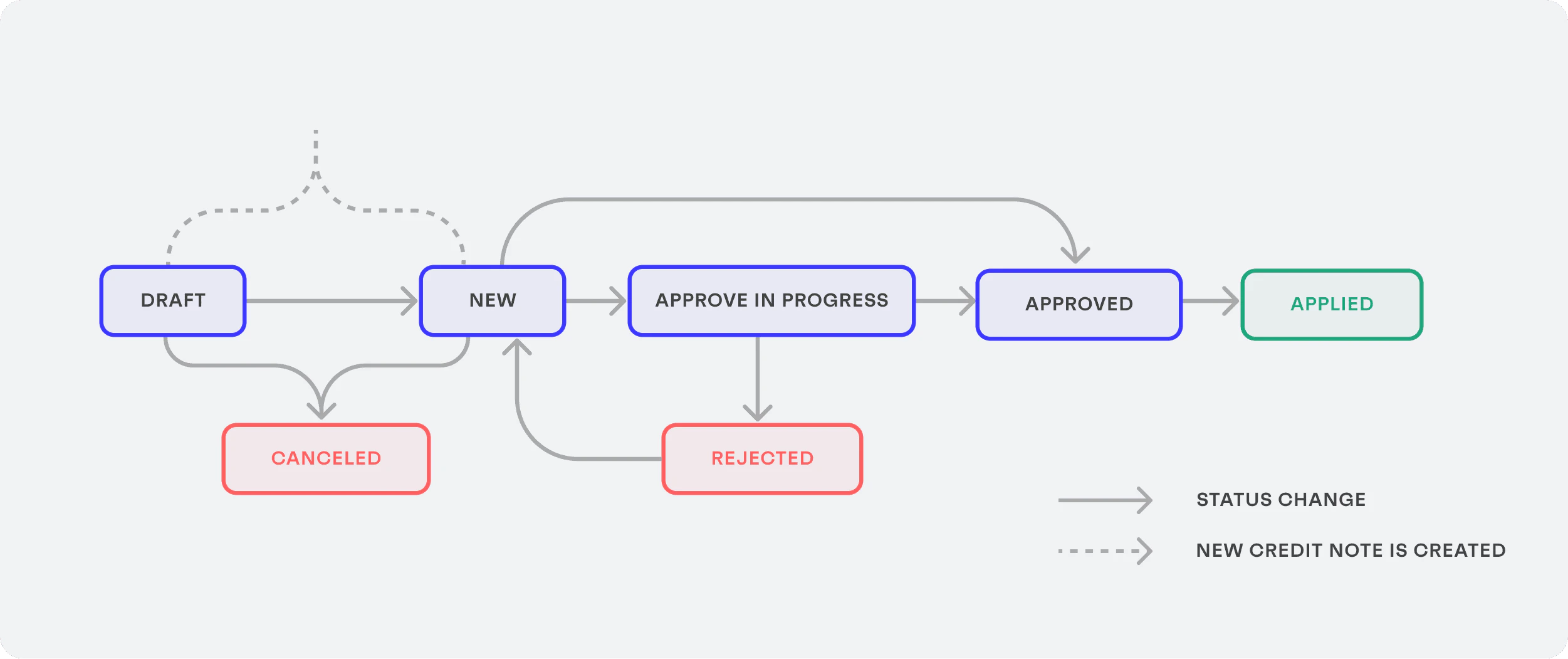
Each credit note is allocated with a status that indicates its progress throughout the credit note lifecycle, from its creation until its application.
 ## Credit note statuses
Check out below a detailed explanation of the credit note statuses and the credit note approval process:
### Draft
**Status value:** `draft`
This is the initial status for all uploaded credit notes that have any of the required fields set as `null` during their creation. The required fields are:
* `currency`
* `document_id`
* `issued_at`
* `based_on`
* `tax_amount`
* `total_amount`
* `subtotal`
A draft credit note is not approved yet and can still be edited.
Only one draft credit note can exist per payable. Before you can create the second draft credit
note for the same payable, you need to apply (or delete) the previous draft credit note.
***
#### Customize the list of required fields
You can change and customize the list of required fields that are necessary to move a credit note to the `new` state by sending a `PUT` request to the [`/payable-credit-notes/validations`](/finops/reference/openapi/credit-notes/put-payable-credit-notes-validations) endpoint passing the new list of required fields as an array of strings:
```sh lines theme={null}
curl -X PUT 'https://api.sandbox.tesouro.com/v1/payable-credit-notes/validations' \
-H 'X-Finops-Version: 2025-06-23' \
-H 'X-Organization-Id: ORGANIZATION_ID' \
-H 'Authorization: Bearer ACCESS_TOKEN' \
-d '{
"required_fields": [
"description",
"tax"
]
}'
```
The successful `200` response returns the new list of required fields:
```json lines theme={null}
{
"required_fields": ["description", "tax"]
}
```
* A successful request overwrites the existing list of required fields and replaces them with the newly defined array of required fields.
* If a composed field is specified, e.g. `line_items`, a minimum of one item will be required.
* It is possible to specify fields of different levels, e.g. `line_items.subtotal`.
* If the custom required fields list is not specified, the default validation is applied.
* To list the current required fields, send a `GET` request to the [`/payable-credit-notes/validations`](/finops/reference/openapi/credit-notes/get-payable-credit-notes-validations) endpoint.
* To remove the custom required fields and return the validation to the default one, send a `POST` request to the [`/payable-credit-notes/validations/reset`](/finops/reference/openapi/credit-notes/post-payable-credit-notes-validations-reset) endpoint. The default behavior will be applied to the future payables created.
* Credit notes that have already passed the `new` status will not be affected by newly updated required fields.
#### Validate mandatory fields
To understand what information is missing to move a credit note from `draft` to the `new` state, send a `POST` request to the [`/payable-credit-notes/{credit_note_id}/validate`](/finops/reference/openapi/credit-notes/get-payable-credit-notes-id-validate) endpoint:
```sh lines theme={null}
curl -X POST 'https://api.sandbox.tesouro.com/v1/payable-credit-notes/{credit_note_id}/validate' \
-H 'X-Finops-Version: 2025-06-23' \
-H 'X-Organization-Id: ORGANIZATION_ID' \
-H 'Authorization: Bearer ACCESS_TOKEN' \
-d ''
```
The successful `200` response returns the fields that need to be filled for the transition:
```json expandable lines theme={null}
{
"id": "d1d5da69-9c1b-42fc-a1d2-9dcc4c3c691f",
"validation_errors": [
{
"loc": ["tax_amount"],
"msg": "none is not an allowed value",
"type": "type_error.none.not_allowed"
},
{
"loc": ["line_items"],
"msg": "ensure this value has at least 1 items",
"type": "value_error.list.min_items",
"ctx": {
"limit_value": 1
}
}
]
}
```
### New
**Status value:** `new`
If the credit note already contains all essential fields (`currency`, `document_id`, `issued_at`, `based_on`, `tax_amount`, `total_amount`, and `subtotal`), its initial status is directly set to `new`.
Only credit notes in the `new` status can be sent for approval. To do this, call `POST /payable-credit-notes/{credit_note_id}/submit-for-approval`:
```sh lines theme={null}
curl -X POST 'https://api.sandbox.tesouro.com/v1/payable-credit-notes/{credit_note_id}/submit-for-approval' \
-H 'X-Finops-Version: 2025-06-23' \
-H 'X-Organization-Id: ORGANIZATION_ID' \
-H 'Authorization: Bearer ACCESS_TOKEN' \
-H 'Content-Type: application/json' \
-d ''
```
The successful response indicates that the status of the credit note has changed to `approve_in_progress`. Once the credito note is sent for approval, it cannot be updated anymore.
The organization users can also directly [approve the credit note](#approve-in-progress) from the `new` status.
***
### Canceled
**Status value:** `canceled`
The `canceled` credit notes are the ones that were not validated during the organization user review.
For example, if the organization user uploads the wrong file or the document is not compliant with regulations, this credit note can be canceled before being sent for approval.
To cancel a credit note, call `POST /payable-credit-notes/{credit_note_id}/cancel`:
```sh lines theme={null}
curl -X POST 'https://api.sandbox.tesouro.com/v1/payable-credit-notes/{credit_note_id}/cancel' \
-H 'accept: application/json' \
-H 'X-Finops-Version: 2025-06-23' \
-H 'X-Organization-Id: ORGANIZATION_ID' \
-d ''
```
There is no possible status change when a credit note is canceled.
***
### Approve in progress
**Status value:** `approve_in_progress`
After the initial validation, the credit note is ready to be approved by an organization user. To do this, call `POST /payable-credit-notes/{credit_note_id}/approve`:
```sh lines theme={null}
curl -X POST 'https://api.sandbox.tesouro.com/v1/payable-credit-notes/{credit_note_id}/approve' \
-H 'accept: application/json' \
-H 'X-Finops-Version: 2025-06-23' \
-H 'X-Organization-Id: ORGANIZATION_ID' \
-d ''
```
***
### Rejected
**Status value:** `rejected`
The credit notes that are refused during the `approve_in_progress` status. By adding a reason for the refusal, the organization user who uploaded the payable knows what went wrong. To do this, call `POST /payable-credit-notes/{credit_note_id}/reject`:
```sh lines theme={null}
curl -X POST 'https://api.sandbox.tesouro.com/v1/payable-credit-notes/{credit_note_id}/reject' \
-H 'accept: application/json' \
-H 'X-Finops-Version: 2025-06-23' \
-H 'X-Organization-Id: ORGANIZATION_ID' \
-d ''
```
There is no possible status change when a credit note is rejected.
***
### Approved
**Status value:** `approved`
This status indicates that the credit note has been approved by all the required approvers and is ready to be applied.
***
### Applied
**Status value:** `applied`
Organization users can access all applied credit notes to view any details and export these documents for accounting reasons.
## Credit note statuses
Check out below a detailed explanation of the credit note statuses and the credit note approval process:
### Draft
**Status value:** `draft`
This is the initial status for all uploaded credit notes that have any of the required fields set as `null` during their creation. The required fields are:
* `currency`
* `document_id`
* `issued_at`
* `based_on`
* `tax_amount`
* `total_amount`
* `subtotal`
A draft credit note is not approved yet and can still be edited.
Only one draft credit note can exist per payable. Before you can create the second draft credit
note for the same payable, you need to apply (or delete) the previous draft credit note.
***
#### Customize the list of required fields
You can change and customize the list of required fields that are necessary to move a credit note to the `new` state by sending a `PUT` request to the [`/payable-credit-notes/validations`](/finops/reference/openapi/credit-notes/put-payable-credit-notes-validations) endpoint passing the new list of required fields as an array of strings:
```sh lines theme={null}
curl -X PUT 'https://api.sandbox.tesouro.com/v1/payable-credit-notes/validations' \
-H 'X-Finops-Version: 2025-06-23' \
-H 'X-Organization-Id: ORGANIZATION_ID' \
-H 'Authorization: Bearer ACCESS_TOKEN' \
-d '{
"required_fields": [
"description",
"tax"
]
}'
```
The successful `200` response returns the new list of required fields:
```json lines theme={null}
{
"required_fields": ["description", "tax"]
}
```
* A successful request overwrites the existing list of required fields and replaces them with the newly defined array of required fields.
* If a composed field is specified, e.g. `line_items`, a minimum of one item will be required.
* It is possible to specify fields of different levels, e.g. `line_items.subtotal`.
* If the custom required fields list is not specified, the default validation is applied.
* To list the current required fields, send a `GET` request to the [`/payable-credit-notes/validations`](/finops/reference/openapi/credit-notes/get-payable-credit-notes-validations) endpoint.
* To remove the custom required fields and return the validation to the default one, send a `POST` request to the [`/payable-credit-notes/validations/reset`](/finops/reference/openapi/credit-notes/post-payable-credit-notes-validations-reset) endpoint. The default behavior will be applied to the future payables created.
* Credit notes that have already passed the `new` status will not be affected by newly updated required fields.
#### Validate mandatory fields
To understand what information is missing to move a credit note from `draft` to the `new` state, send a `POST` request to the [`/payable-credit-notes/{credit_note_id}/validate`](/finops/reference/openapi/credit-notes/get-payable-credit-notes-id-validate) endpoint:
```sh lines theme={null}
curl -X POST 'https://api.sandbox.tesouro.com/v1/payable-credit-notes/{credit_note_id}/validate' \
-H 'X-Finops-Version: 2025-06-23' \
-H 'X-Organization-Id: ORGANIZATION_ID' \
-H 'Authorization: Bearer ACCESS_TOKEN' \
-d ''
```
The successful `200` response returns the fields that need to be filled for the transition:
```json expandable lines theme={null}
{
"id": "d1d5da69-9c1b-42fc-a1d2-9dcc4c3c691f",
"validation_errors": [
{
"loc": ["tax_amount"],
"msg": "none is not an allowed value",
"type": "type_error.none.not_allowed"
},
{
"loc": ["line_items"],
"msg": "ensure this value has at least 1 items",
"type": "value_error.list.min_items",
"ctx": {
"limit_value": 1
}
}
]
}
```
### New
**Status value:** `new`
If the credit note already contains all essential fields (`currency`, `document_id`, `issued_at`, `based_on`, `tax_amount`, `total_amount`, and `subtotal`), its initial status is directly set to `new`.
Only credit notes in the `new` status can be sent for approval. To do this, call `POST /payable-credit-notes/{credit_note_id}/submit-for-approval`:
```sh lines theme={null}
curl -X POST 'https://api.sandbox.tesouro.com/v1/payable-credit-notes/{credit_note_id}/submit-for-approval' \
-H 'X-Finops-Version: 2025-06-23' \
-H 'X-Organization-Id: ORGANIZATION_ID' \
-H 'Authorization: Bearer ACCESS_TOKEN' \
-H 'Content-Type: application/json' \
-d ''
```
The successful response indicates that the status of the credit note has changed to `approve_in_progress`. Once the credito note is sent for approval, it cannot be updated anymore.
The organization users can also directly [approve the credit note](#approve-in-progress) from the `new` status.
***
### Canceled
**Status value:** `canceled`
The `canceled` credit notes are the ones that were not validated during the organization user review.
For example, if the organization user uploads the wrong file or the document is not compliant with regulations, this credit note can be canceled before being sent for approval.
To cancel a credit note, call `POST /payable-credit-notes/{credit_note_id}/cancel`:
```sh lines theme={null}
curl -X POST 'https://api.sandbox.tesouro.com/v1/payable-credit-notes/{credit_note_id}/cancel' \
-H 'accept: application/json' \
-H 'X-Finops-Version: 2025-06-23' \
-H 'X-Organization-Id: ORGANIZATION_ID' \
-d ''
```
There is no possible status change when a credit note is canceled.
***
### Approve in progress
**Status value:** `approve_in_progress`
After the initial validation, the credit note is ready to be approved by an organization user. To do this, call `POST /payable-credit-notes/{credit_note_id}/approve`:
```sh lines theme={null}
curl -X POST 'https://api.sandbox.tesouro.com/v1/payable-credit-notes/{credit_note_id}/approve' \
-H 'accept: application/json' \
-H 'X-Finops-Version: 2025-06-23' \
-H 'X-Organization-Id: ORGANIZATION_ID' \
-d ''
```
***
### Rejected
**Status value:** `rejected`
The credit notes that are refused during the `approve_in_progress` status. By adding a reason for the refusal, the organization user who uploaded the payable knows what went wrong. To do this, call `POST /payable-credit-notes/{credit_note_id}/reject`:
```sh lines theme={null}
curl -X POST 'https://api.sandbox.tesouro.com/v1/payable-credit-notes/{credit_note_id}/reject' \
-H 'accept: application/json' \
-H 'X-Finops-Version: 2025-06-23' \
-H 'X-Organization-Id: ORGANIZATION_ID' \
-d ''
```
There is no possible status change when a credit note is rejected.
***
### Approved
**Status value:** `approved`
This status indicates that the credit note has been approved by all the required approvers and is ready to be applied.
***
### Applied
**Status value:** `applied`
Organization users can access all applied credit notes to view any details and export these documents for accounting reasons.