> ## Documentation Index
> Fetch the complete documentation index at: https://docs.tesouro.com/llms.txt
> Use this file to discover all available pages before exploring further.
# Payable lifecycle
> Learn about the statuses that an incoming invoice goes through inside Tesouro.
## Overview
A [payable](/finops/support/glossary#payable) represents the full range of obligations owed by a business to pay off a short-term debt to its creditors or suppliers for products or services that were purchased on credit.
Each payable is allocated with a status that indicates its progress throughout the payable lifecycle, from its creation until its payment.
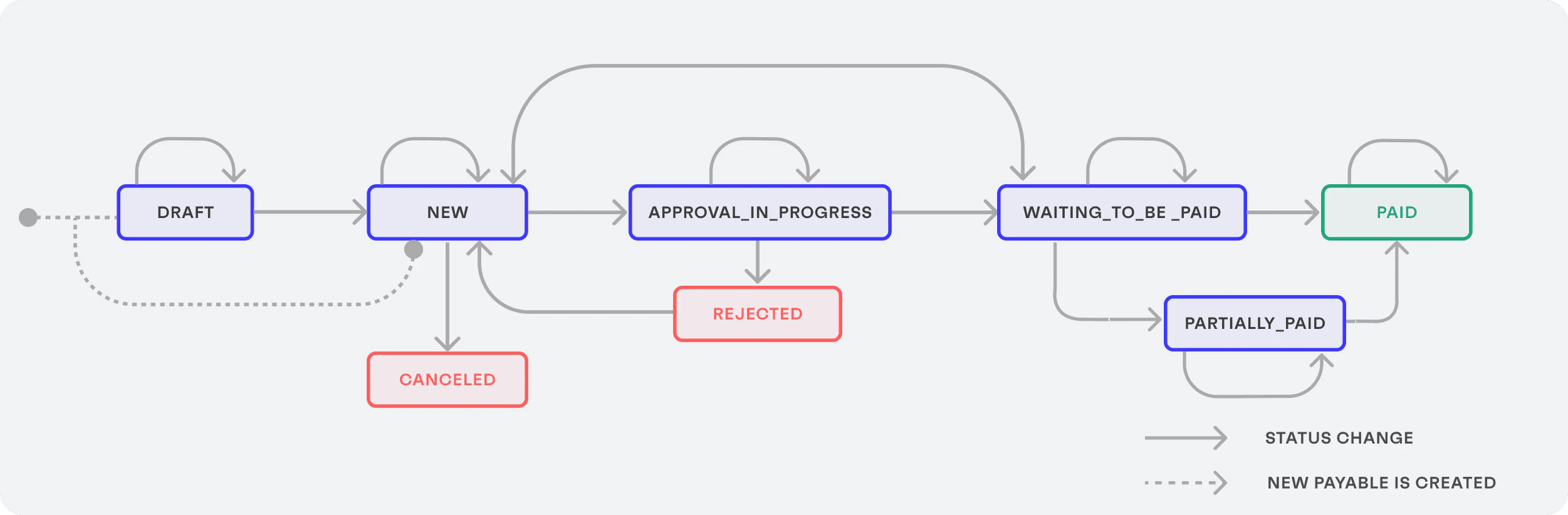 When a payable is linked to a settled payment intent that transitions to either `disputed` or `payout_failed`, the corresponding payable status is changed according to this logic:
* If `amount_paid = 0` - the payable status changes to `waiting_to_be_paid`.
* If `amount_paid > 0` - the payable status changes to `partially_paid`. The `amount_paid` field will reflect the remaining valid payments.
## Payable statuses
Check out below a detailed explanation of the payable statuses and the payable approval process:
### `draft`
This is the initial status for all [uploaded payables](/finops/guides/accounts-payable/payables/collect) that have any of the required fields set as `null` during their creation. The required fields are:
* `amount`
* `currency`
* `document_id`
* `due_date`
* `issued_at`
Apart from the required fields, the following requirements are also mandatory:
* The payable must have at least one [line item](/finops/guides/accounts-payable/payables/line-items).
* The value of `line_items[].tax`, if set, must complement the `line_items[].subtotal` and match with the `line_items[].total`.
* The sum of all `line_items[].subtotal` must be equal to the payable’s `subtotal`.
It is possible to upload payables with any set of fields or even with all fields empty, but only after the [payable is filled](/finops/guides/accounts-payable/payables/manage#update-a-payable) with all required fields, its status is automatically changed to `new`.
By [connecting to an external accounting system](/finops/guides/accounting/integration/index), additional requirements will become mandatory when [creating a payable](/finops/guides/accounts-payable/payables/collect), in addition to the standard mandatory fields. The additional requirements are:
* All [line items](/finops/guides/accounts-payable/payables/line-items) in the payable must be linked to the [ledger accounts](/finops/guides/accounting/integration/ledger-accounts), i.e. each line item must have the `ledger_account_id` field specified. The ledger account ID can be obtained by making a `GET` request to the `/ledger-accounts` endpoint after the accounting integration has been set up.
* Make sure that the accounting system has the same tax rate value (e.g. 18%) as described on each one of the tax values in all line items of the payable.
#### Customize the list of required fields
You can change and customize the list of required fields that are necessary to move a payable to the `new` state by sending a `PUT` request to the `/payables/validations` endpoint passing the new list of required fields as an array of strings:
```sh lines theme={null}
curl -X PUT 'https://api.sandbox.tesouro.com/v1/payables/validations' \
-H 'X-Finops-Version: 2025-06-23' \
-H 'X-Organization-Id: ORGANIZATION_ID' \
-H 'Authorization: Bearer ACCESS_TOKEN' \
-d '{
"required_fields": [
"description",
"sender",
"tax"
]
}'
```
The successful response returns the new list of required fields:
```json lines theme={null}
{
"required_fields": ["description", "sender", "tax"]
}
```
* A successful request overwrites the existing list of required fields and replaces them with the newly defined array of required fields.
* If the `file_id` field is specified as required, including a file for the payable becomes mandatory.
* If a composed field is specified, e.g. `line_items`, a minimum of one item will be required.
* It is possible to specify fields of different levels, e.g. `line_items.subtotal`.
* If the custom required fields list is not specified, the default validation is applied.
* To list the current required fields, send a `GET` request to the `/payables/validations` endpoint.
* To remove the custom required fields and return the validation to the default one, send a `POST` request to the `/payables/validations/reset` endpoint. The default behavior will be applied to the future payables created.
* Payables that have already passed the `new` status will not be affected by newly updated required fields.
#### Validate mandatory fields
To understand what information is missing to move a payable from `draft` to the `new` state, send a `POST` request to the `/payables/{payable_id}/validate` endpoint:
```sh lines theme={null}
curl -X POST 'https://api.sandbox.tesouro.com/v1/payables/{payable_id}/validate' \
-H 'X-Finops-Version: 2025-06-23' \
-H 'X-Organization-Id: ORGANIZATION_ID' \
-H 'Authorization: Bearer ACCESS_TOKEN' \
-d ''
```
The successful response returns the fields that need to be filled for the transition:
```json expandable lines theme={null}
{
"id": "d1d5da69-9c1b-42fc-a1d2-9dcc4c3c691f",
"validation_errors": [
{
"loc": ["tax_amount"],
"msg": "none is not an allowed value",
"type": "type_error.none.not_allowed"
},
{
"loc": ["line_items"],
"msg": "ensure this value has at least 1 items",
"type": "value_error.list.min_items",
"ctx": {
"limit_value": 1
}
}
]
}
```
***
### `new`
If the [uploaded payable](/finops/guides/accounts-payable/payables/collect) already contains all essential fields, its initial status is directly set to `new`. Only payables in the `new` status can be sent for approval.
Once an organization user [validates the payable](/finops/guides/accounts-payable/approvals/manual-transition#start-approval), the payable's status changes to `approve_in_progress`.
The organization users can also directly [confirm the payable for payment](/finops/guides/accounts-payable/approvals/manual-transition#confirm-for-payment) from the `new` status.
***
### `canceled`
The `canceled` payables are the ones that were not validated during the organization user review.
For example, if the organization user uploads the wrong file or the document is not compliant with regulations, this payable can be canceled before being sent for approval.
There is no possible status change when a payable is canceled.
***
### `approve_in_progress`
After the initial validation, the payable follows the approval policy defined for the organization. The following approval paths are enabled by default:
* **Paid documents**: Under `paid` status, the payable no longer requires approval.
* **Immediate approval**: Organization users with a specific role are enabled to select any payable and approve it immediately. The payable status changes to `waiting_to_be_paid`.
* **Approval flows**: All payables that are neither `paid` nor `approved` follow the approval workflow:
* On refusal, the payable status changes to `rejected`.
* On approval, the payable status changes to `waiting_to_be_paid`.
In case the workflow started for the payable requires the approval of specific organization users, reminder notifications are sent by email containing information about the payable and the link to perform the approval.
***
### `rejected`
The payables that are refused during the `approve_in_progress` status. By adding a reason for the refusal, the organization user who uploaded the invoice knows what went wrong.
There is no possible status change when a payable is refused.
***
### `waiting_to_be_paid`
Once the approval process is finished, the invoice is ready to be paid. At this point, the user who uploaded the invoice is notified by an email containing information about the invoice to be paid and a link to the payment provider.
Organization users can pay invoices through Tesouro or external payment channels. If paying through Tesouro, the invoice is moved to the `paid` status automatically. If an external payment channel is used, organization users must [manually convert the invoice to the `paid` status](/finops/guides/accounts-payable/approvals/manual-transition#mark-as-paid).
***
### `partially_paid`
Payables can be [marked as partially paid](/finops/guides/accounts-payable/approvals/manual-transition#mark-as-partially-paid) by setting the remaining `amount_paid` with the partial payment value, in minor units.
***
### `paid`
Organization users can access all paid documents to view any details and export these documents for accounting reasons.
## Approval processes
Before a payable is ready to be paid, somebody may be required to approve the operation. The approval processes empower you to seamlessly integrate approval workflows for your payables, ensuring smooth operations and compliance with your organization's policies. See [Approval processes](/finops/guides/accounts-payable/approvals/index) for details.
## Skip the approval flow
To allow payables to bypass the approval flow, set the `payables_skip_approval_flow` [organization setting](/finops/reference/openapi/identity/patch-organizations-id-settings) as `true` (it defaults to `false`). Once enabled, any newly created payable in the `new` status will automatically transition to the `approved` status, skipping the approval flow.
This feature is useful for organizations that do not require manual approval steps and want to streamline invoice processing for faster payment execution.
When a payable is linked to a settled payment intent that transitions to either `disputed` or `payout_failed`, the corresponding payable status is changed according to this logic:
* If `amount_paid = 0` - the payable status changes to `waiting_to_be_paid`.
* If `amount_paid > 0` - the payable status changes to `partially_paid`. The `amount_paid` field will reflect the remaining valid payments.
## Payable statuses
Check out below a detailed explanation of the payable statuses and the payable approval process:
### `draft`
This is the initial status for all [uploaded payables](/finops/guides/accounts-payable/payables/collect) that have any of the required fields set as `null` during their creation. The required fields are:
* `amount`
* `currency`
* `document_id`
* `due_date`
* `issued_at`
Apart from the required fields, the following requirements are also mandatory:
* The payable must have at least one [line item](/finops/guides/accounts-payable/payables/line-items).
* The value of `line_items[].tax`, if set, must complement the `line_items[].subtotal` and match with the `line_items[].total`.
* The sum of all `line_items[].subtotal` must be equal to the payable’s `subtotal`.
It is possible to upload payables with any set of fields or even with all fields empty, but only after the [payable is filled](/finops/guides/accounts-payable/payables/manage#update-a-payable) with all required fields, its status is automatically changed to `new`.
By [connecting to an external accounting system](/finops/guides/accounting/integration/index), additional requirements will become mandatory when [creating a payable](/finops/guides/accounts-payable/payables/collect), in addition to the standard mandatory fields. The additional requirements are:
* All [line items](/finops/guides/accounts-payable/payables/line-items) in the payable must be linked to the [ledger accounts](/finops/guides/accounting/integration/ledger-accounts), i.e. each line item must have the `ledger_account_id` field specified. The ledger account ID can be obtained by making a `GET` request to the `/ledger-accounts` endpoint after the accounting integration has been set up.
* Make sure that the accounting system has the same tax rate value (e.g. 18%) as described on each one of the tax values in all line items of the payable.
#### Customize the list of required fields
You can change and customize the list of required fields that are necessary to move a payable to the `new` state by sending a `PUT` request to the `/payables/validations` endpoint passing the new list of required fields as an array of strings:
```sh lines theme={null}
curl -X PUT 'https://api.sandbox.tesouro.com/v1/payables/validations' \
-H 'X-Finops-Version: 2025-06-23' \
-H 'X-Organization-Id: ORGANIZATION_ID' \
-H 'Authorization: Bearer ACCESS_TOKEN' \
-d '{
"required_fields": [
"description",
"sender",
"tax"
]
}'
```
The successful response returns the new list of required fields:
```json lines theme={null}
{
"required_fields": ["description", "sender", "tax"]
}
```
* A successful request overwrites the existing list of required fields and replaces them with the newly defined array of required fields.
* If the `file_id` field is specified as required, including a file for the payable becomes mandatory.
* If a composed field is specified, e.g. `line_items`, a minimum of one item will be required.
* It is possible to specify fields of different levels, e.g. `line_items.subtotal`.
* If the custom required fields list is not specified, the default validation is applied.
* To list the current required fields, send a `GET` request to the `/payables/validations` endpoint.
* To remove the custom required fields and return the validation to the default one, send a `POST` request to the `/payables/validations/reset` endpoint. The default behavior will be applied to the future payables created.
* Payables that have already passed the `new` status will not be affected by newly updated required fields.
#### Validate mandatory fields
To understand what information is missing to move a payable from `draft` to the `new` state, send a `POST` request to the `/payables/{payable_id}/validate` endpoint:
```sh lines theme={null}
curl -X POST 'https://api.sandbox.tesouro.com/v1/payables/{payable_id}/validate' \
-H 'X-Finops-Version: 2025-06-23' \
-H 'X-Organization-Id: ORGANIZATION_ID' \
-H 'Authorization: Bearer ACCESS_TOKEN' \
-d ''
```
The successful response returns the fields that need to be filled for the transition:
```json expandable lines theme={null}
{
"id": "d1d5da69-9c1b-42fc-a1d2-9dcc4c3c691f",
"validation_errors": [
{
"loc": ["tax_amount"],
"msg": "none is not an allowed value",
"type": "type_error.none.not_allowed"
},
{
"loc": ["line_items"],
"msg": "ensure this value has at least 1 items",
"type": "value_error.list.min_items",
"ctx": {
"limit_value": 1
}
}
]
}
```
***
### `new`
If the [uploaded payable](/finops/guides/accounts-payable/payables/collect) already contains all essential fields, its initial status is directly set to `new`. Only payables in the `new` status can be sent for approval.
Once an organization user [validates the payable](/finops/guides/accounts-payable/approvals/manual-transition#start-approval), the payable's status changes to `approve_in_progress`.
The organization users can also directly [confirm the payable for payment](/finops/guides/accounts-payable/approvals/manual-transition#confirm-for-payment) from the `new` status.
***
### `canceled`
The `canceled` payables are the ones that were not validated during the organization user review.
For example, if the organization user uploads the wrong file or the document is not compliant with regulations, this payable can be canceled before being sent for approval.
There is no possible status change when a payable is canceled.
***
### `approve_in_progress`
After the initial validation, the payable follows the approval policy defined for the organization. The following approval paths are enabled by default:
* **Paid documents**: Under `paid` status, the payable no longer requires approval.
* **Immediate approval**: Organization users with a specific role are enabled to select any payable and approve it immediately. The payable status changes to `waiting_to_be_paid`.
* **Approval flows**: All payables that are neither `paid` nor `approved` follow the approval workflow:
* On refusal, the payable status changes to `rejected`.
* On approval, the payable status changes to `waiting_to_be_paid`.
In case the workflow started for the payable requires the approval of specific organization users, reminder notifications are sent by email containing information about the payable and the link to perform the approval.
***
### `rejected`
The payables that are refused during the `approve_in_progress` status. By adding a reason for the refusal, the organization user who uploaded the invoice knows what went wrong.
There is no possible status change when a payable is refused.
***
### `waiting_to_be_paid`
Once the approval process is finished, the invoice is ready to be paid. At this point, the user who uploaded the invoice is notified by an email containing information about the invoice to be paid and a link to the payment provider.
Organization users can pay invoices through Tesouro or external payment channels. If paying through Tesouro, the invoice is moved to the `paid` status automatically. If an external payment channel is used, organization users must [manually convert the invoice to the `paid` status](/finops/guides/accounts-payable/approvals/manual-transition#mark-as-paid).
***
### `partially_paid`
Payables can be [marked as partially paid](/finops/guides/accounts-payable/approvals/manual-transition#mark-as-partially-paid) by setting the remaining `amount_paid` with the partial payment value, in minor units.
***
### `paid`
Organization users can access all paid documents to view any details and export these documents for accounting reasons.
## Approval processes
Before a payable is ready to be paid, somebody may be required to approve the operation. The approval processes empower you to seamlessly integrate approval workflows for your payables, ensuring smooth operations and compliance with your organization's policies. See [Approval processes](/finops/guides/accounts-payable/approvals/index) for details.
## Skip the approval flow
To allow payables to bypass the approval flow, set the `payables_skip_approval_flow` [organization setting](/finops/reference/openapi/identity/patch-organizations-id-settings) as `true` (it defaults to `false`). Once enabled, any newly created payable in the `new` status will automatically transition to the `approved` status, skipping the approval flow.
This feature is useful for organizations that do not require manual approval steps and want to streamline invoice processing for faster payment execution.