> ## Documentation Index
> Fetch the complete documentation index at: https://docs.tesouro.com/llms.txt
> Use this file to discover all available pages before exploring further.
# Credit notes (accounts receivable)
> Amend issued invoices with credit notes, including limitations and use cases.
This guide covers credit notes in accounts receivable. Tesouro also supports [credit notes for
accounts payable](/finops/guides/accounts-payable/credit-notes/index).
## Overview
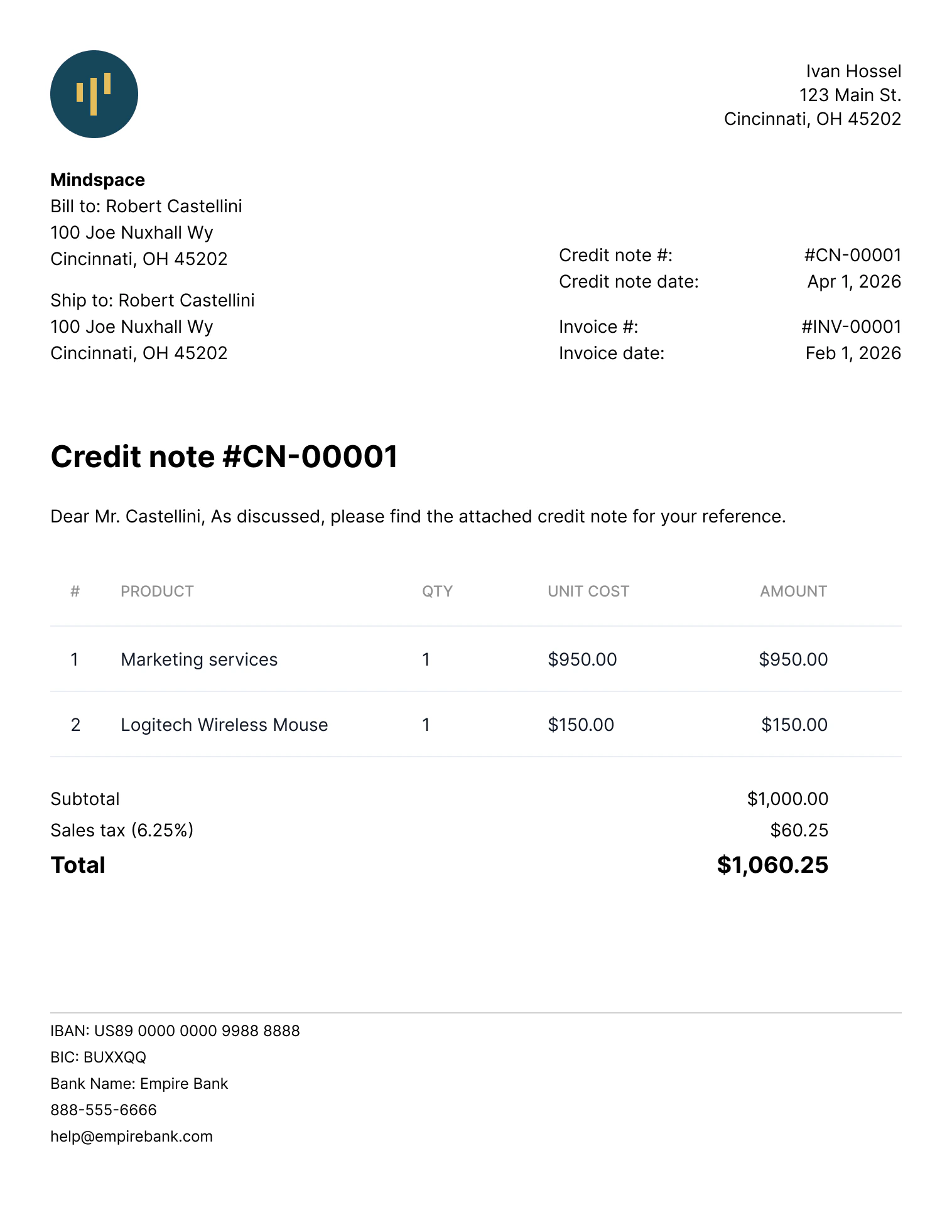
A **credit note**, also known as a **credit memo**, is a legal document used to reduce the amount owed on an invoice after it's been issued. [Organizations](/finops/guides/organizations/index) typically use credit notes in the following cases:
* An issued invoice contains a mistake (for example, wrong product or quantity).
* The order needs to change after the invoice has been issued.
* The organization or the customer ([counterpart](/finops/guides/common/counterparts/index)) canceled the order.
Credit notes can be used to partially reduce the invoice amount as well as fully cancel an invoice.
Multiple credit notes can be issued for the same invoice. However, the total amount credited can't exceed the invoice amount.
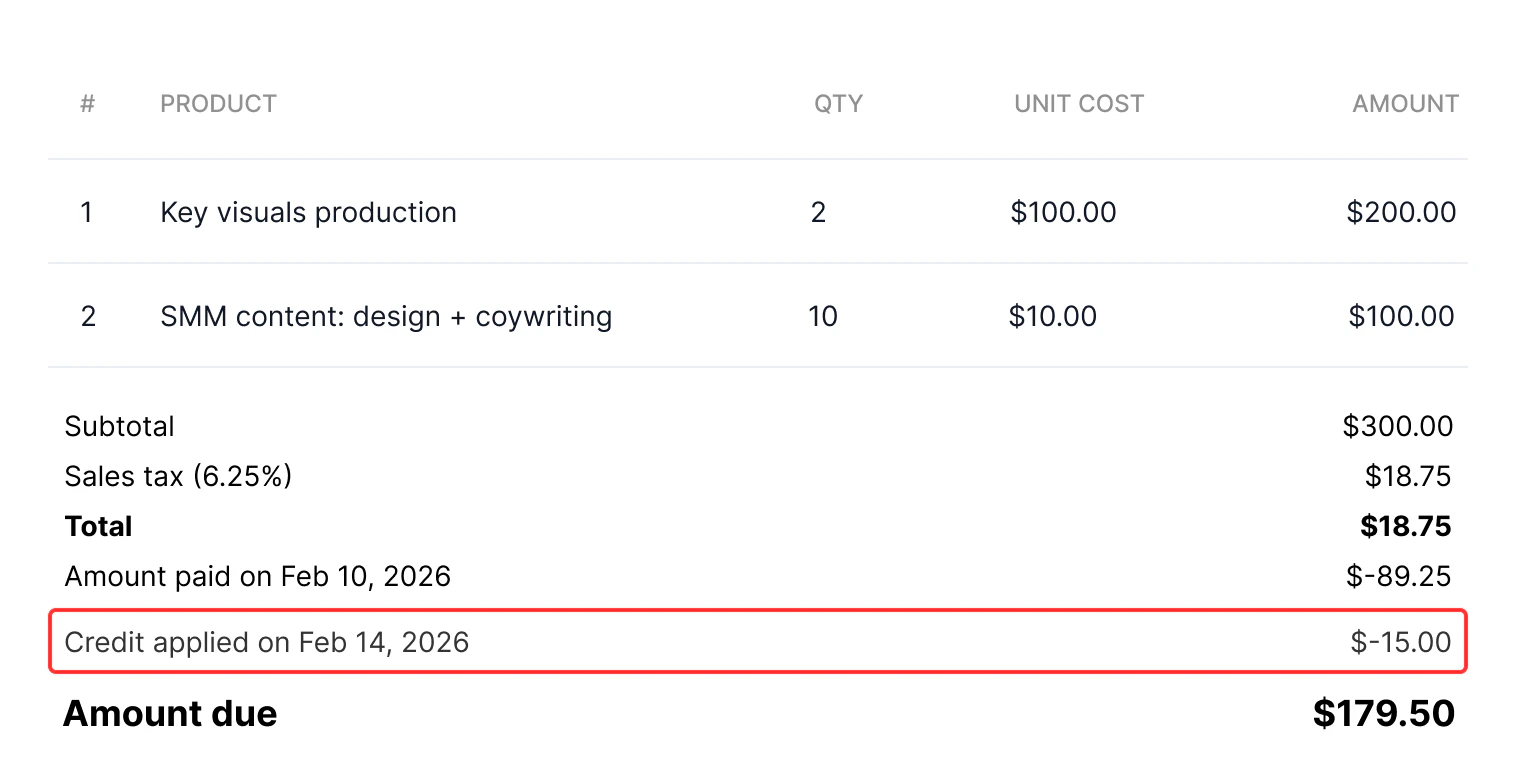
 You can also configure PDF invoices to include information about credit notes applied. To do this, enable the organization setting [`generate_paid_invoice_pdf`](/finops/reference/openapi/identity/patch-organizations-id-settings#request.body.generate_paid_invoice_pdf).
 ## Roles and permissions
To create and manage credit notes using an [organization user token](/finops/guides/organizations/users#get-organization-user-token), this organization user must have a role with the `receivables` [permission](/finops/api/concepts/permissions).
If a [partner-level token](/finops/guides/authentication/client-credentials) is used, no special permissions are needed.
## Use cases
Tesouro API supports the following use cases for credit notes:
* **Reduce quantities of line items.**\
Example: the organization issued an invoice for 10 laptops, but only eight were actually delivered. A credit note can "cancel" the remaining two laptops that weren't delivered.
* **Reduce the price of some or all units within a line item.** (Essentially applying a discount.)\
Example: The invoice mistakenly billed a product at \$210 instead of \$200. A credit note corrects the price back to \$200.
* **Credit the full remaining amount of an invoice.** This cancels an unpaid invoice, or marks a partially paid invoice as paid.
Credit notes can't *add* new line items or *increase* the unit quantity and price in line items.
Instead, the organization should issue a new invoice for the additional amount.
## Considerations and limitations
* Credit notes can only be created for invoices in the `issued`, `partially_paid`, and `overdue` [statuses](/finops/guides/accounts-receivable/invoices/index#invoice-statuses). Crediting `paid` invoices isn't supported.
* Credit notes for overdue and partially paid invoices can be used to reduce only the quantity of line items, but not the unit prices.
* If a credit note cancels the full remaining amount of an invoice:
* `issued` and unpaid `overdue` invoices are automatically moved to the `canceled` status,
* `partially_paid` and partially paid `overdue` invoices are automatically moved to the `paid` status.
* Changing line item tax rates via credit notes isn't supported.
* If the original invoice contained any form of [discounts](/finops/guides/accounts-receivable/discounts) or [special deductions](/finops/guides/accounts-receivable/special-deductions), you can only issue a credit note once. Partial adjustments of discounted invoices via credit notes aren't supported.
* If an invoice includes several line items for the same product, credit notes can't update those specific line items. However, other line items on the invoice can be updated.
* If a counterpart's address or contact information changed after an invoice was issued, you can provide the updated details via a credit note. However, the updated information only appears in the credit note — the original invoice isn't changed.
## Credit note lifecycle
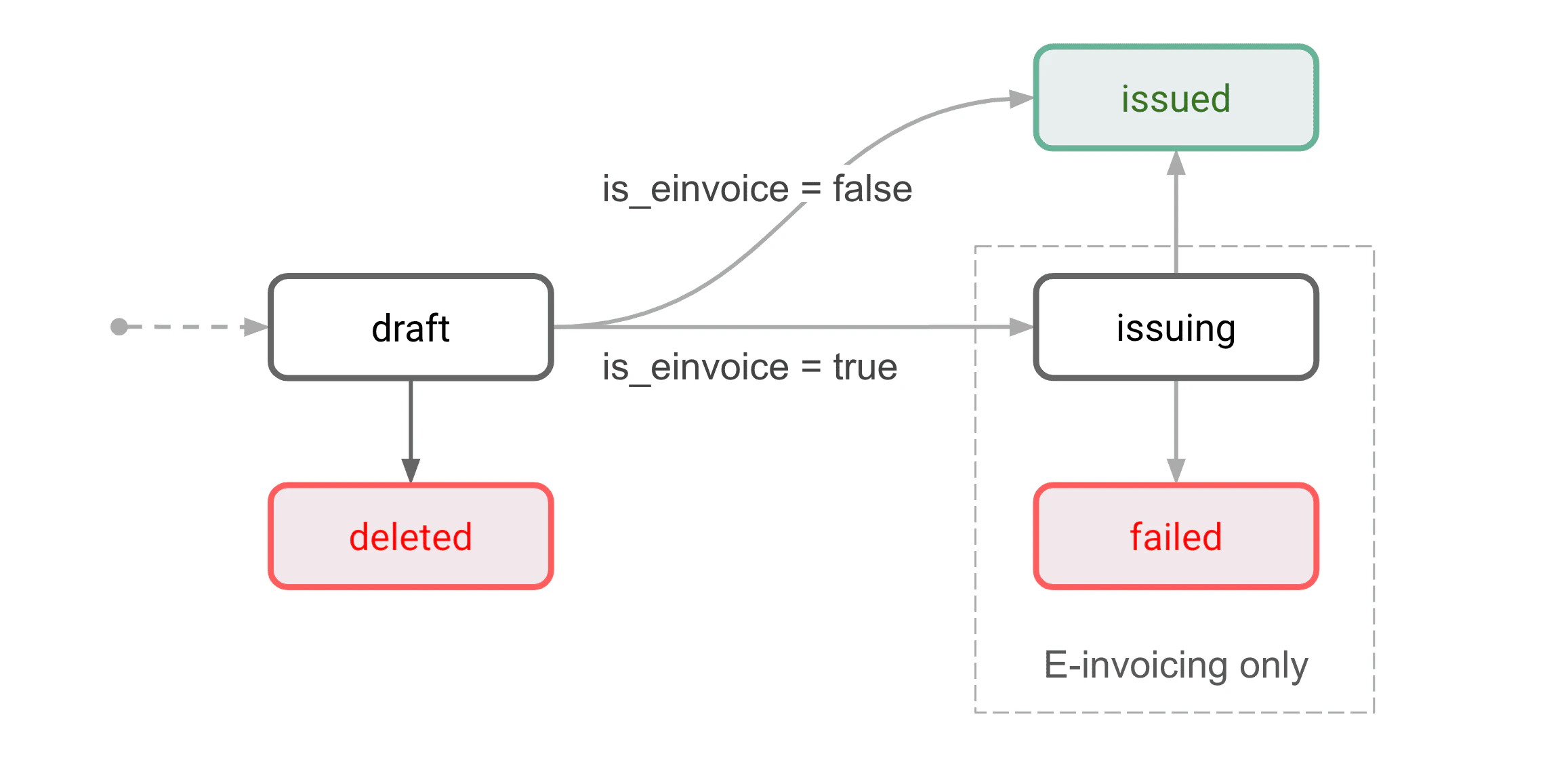
Credit notes can have one of two statuses, `draft` or `issued`.
Draft credit notes can be deleted. Deleted documents can no longer be accessed via the API.
## Roles and permissions
To create and manage credit notes using an [organization user token](/finops/guides/organizations/users#get-organization-user-token), this organization user must have a role with the `receivables` [permission](/finops/api/concepts/permissions).
If a [partner-level token](/finops/guides/authentication/client-credentials) is used, no special permissions are needed.
## Use cases
Tesouro API supports the following use cases for credit notes:
* **Reduce quantities of line items.**\
Example: the organization issued an invoice for 10 laptops, but only eight were actually delivered. A credit note can "cancel" the remaining two laptops that weren't delivered.
* **Reduce the price of some or all units within a line item.** (Essentially applying a discount.)\
Example: The invoice mistakenly billed a product at \$210 instead of \$200. A credit note corrects the price back to \$200.
* **Credit the full remaining amount of an invoice.** This cancels an unpaid invoice, or marks a partially paid invoice as paid.
Credit notes can't *add* new line items or *increase* the unit quantity and price in line items.
Instead, the organization should issue a new invoice for the additional amount.
## Considerations and limitations
* Credit notes can only be created for invoices in the `issued`, `partially_paid`, and `overdue` [statuses](/finops/guides/accounts-receivable/invoices/index#invoice-statuses). Crediting `paid` invoices isn't supported.
* Credit notes for overdue and partially paid invoices can be used to reduce only the quantity of line items, but not the unit prices.
* If a credit note cancels the full remaining amount of an invoice:
* `issued` and unpaid `overdue` invoices are automatically moved to the `canceled` status,
* `partially_paid` and partially paid `overdue` invoices are automatically moved to the `paid` status.
* Changing line item tax rates via credit notes isn't supported.
* If the original invoice contained any form of [discounts](/finops/guides/accounts-receivable/discounts) or [special deductions](/finops/guides/accounts-receivable/special-deductions), you can only issue a credit note once. Partial adjustments of discounted invoices via credit notes aren't supported.
* If an invoice includes several line items for the same product, credit notes can't update those specific line items. However, other line items on the invoice can be updated.
* If a counterpart's address or contact information changed after an invoice was issued, you can provide the updated details via a credit note. However, the updated information only appears in the credit note — the original invoice isn't changed.
## Credit note lifecycle
Credit notes can have one of two statuses, `draft` or `issued`.
Draft credit notes can be deleted. Deleted documents can no longer be accessed via the API.
 ### Draft
This is the initial status for all new credit notes. A draft credit note isn't issued yet and can still be edited.
Draft credit notes can be either issued or deleted.
Only one draft credit note can exist per invoice. Before you can create the second draft credit
note for the same invoice, you need to issue (or delete) the previous draft credit note.
### Issued
The credit note is finalized and issued to a counterpart.
## Ways to create a credit note
There are two ways to create credit notes:
* Create a credit note directly. Use this to manually adjust the credited amount (for example, to credit a partial amount).
* [Cancel an invoice](/finops/guides/accounts-receivable/invoices/manage#cancel). If the [organization setting](/finops/reference/openapi/identity/patch-organizations-id-settings) `receivable_edit_flow` is "compliant", a new credit note will be automatically created and issued for the remaining invoice amount.
Credit notes aren't automatically sent to counterparts. Use `POST /receivables/{credit_note_id}
/send` to send credit notes via email.
## Create a credit note manually
### For the full remaining invoice amount
To create a credit note, call [`POST /receivables`](/finops/reference/openapi/receivables/post-receivables) and specify the invoice ID in the `based_on` field in the request body:
```sh lines theme={null}
curl -X POST 'https://api.sandbox.tesouro.com/v1/receivables' \
-H 'X-Finops-Version: 2025-06-23' \
-H 'X-Organization-Id: ORGANIZATION_ID' \
-H 'Authorization: Bearer ACCESS_TOKEN' \
-H 'Content-Type: application/json' \
-d '{
"type": "credit_note",
"based_on": "c50265da-fddc-4d04-8318-6a449ad84726"
}'
```
This creates a draft credit note with a copy of invoice data. The response contains the `id` assigned to the credit note. The `based_on` and `based_on_document_id` properties of the credit note point to the original invoice:
```json lines theme={null}
{
"id": "ad69dcf0-6fcf-47eb-9628-e7430683bb52",
...
"based_on": "c50265da-fddc-4d04-8318-6a449ad84726",
"based_on_document_id": "INV-0004",
...
"status": "draft",
...
}
```
```json expandable lines theme={null}
{
"id": "ad69dcf0-6fcf-47eb-9628-e7430683bb52",
"created_at": "2023-04-17T12:58:51.608547+00:00",
"updated_at": "2023-04-17T12:58:51.608562+00:00",
"document_id": null,
"currency": "USD",
"subtotal": 150,
"line_items": [
{
"quantity": 1.0,
"product": {
"name": "potato",
"type": "product",
"description": "Orange potato",
"price": {
"currency": "USD",
"value": 150
},
"smallest_amount": 1.0,
"ledger_account_id": null,
"id": "26c0f554-5d53-40b7-bd46-bb88f0a8a36b",
"tax_rate": {
"id": "8d4c2c10-f7d7-4d7c-a1f5-5f3a9d56371e",
"created_at": "2023-03-24T05:32:17.923094+00:00",
"updated_at": "2023-04-06T17:45:16.773977+00:00",
"value": 0,
"country": "US",
"valid_until": null,
"valid_from": null,
"status": "active"
},
"measure_unit": {
"name": "kg",
"description": "kilogram",
"id": "8054a1d1-8bdc-4eaa-8ec4-7de290a72c97"
}
},
"discount": null,
"total_before_tax": 150
}
],
"entity_address": {
"country": "US",
"city": "New York",
"postal_code": "10001",
"state": "NY",
"line1": "5th Avenue",
"line2": null
},
"entity": {
"phone": null,
"logo": null,
"email": "Ara_Botsford@gmail.com",
"name": "NailIt Renovations",
"tax_id": "000000000",
"type": "organization"
},
"entity_user_id": null,
"counterpart_id": "155f6af7-ce95-441c-8032-a66145044833",
"counterpart_tax_id": "123456789",
"counterpart_type": "organization",
"counterpart_address": {
"country": "US",
"city": "New York",
"postal_code": "10001",
"state": "NY",
"line1": "6th Avenue",
"line2": ""
},
"counterpart_contact": {
"first_name": "Frank",
"last_name": "Jones",
"email": "frank_jones@gmail.com",
"phone": "1234567890",
"title": null,
"address": {
"country": "US",
"city": "New York",
"postal_code": "10001",
"state": "",
"line1": "6th Avenue",
"line2": ""
}
},
"counterpart_name": "Frank Jones",
"file_url": "https://example.com/bb0259fd-71ad-4c71-b2d8-9df80c12298a/18e41e5b-81f0-44e6-b52a-fbd2679e4e95.pdf",
"commercial_condition_description": "",
"total_amount": 150,
"total_tax_amount": 0,
"entity_bank_account": {
"account_number": "2571714302",
"routing_number": "061000227",
"bank_name": "Zenith Bank",
"display_name": "Zenith Bank",
"is_default": false
},
"tax_exempt": false,
"tax_exemption_rationale": "",
"based_on": "7e79dba5-4769-4a9c-9596-93af4859b53e",
"based_on_document_id": "invoice-00002",
"memo": null,
"issue_date": null,
"counterpart_shipping_address": null,
"counterpart_billing_address": null,
"counterpart_business_type": null,
"discount": null,
"discounted_subtotal": 150,
"total_tax_amounts": [
{
"id": "8d4c2c10-f7d7-4d7c-a1f5-5f3a9d56371e",
"value": 0,
"amount": 0
}
],
"type": "credit_note",
"status": "draft",
"purchase_order": null
}
```
By default, a newly created credit note cancels the full remaining amount of an invoice. If this
is what you need, you can proceed to [issue the credit note](#issue-credit-note).
### For a partial amount
The first step is the same as when creating a [full amount credit note](#for-full-invoice-amount) - call [`POST /receivables`](/finops/reference/openapi/receivables/post-receivables) and specify the invoice ID in the `based_on` field in the request body:
```sh lines theme={null}
curl -X POST 'https://api.sandbox.tesouro.com/v1/receivables' \
-H 'X-Finops-Version: 2025-06-23' \
-H 'X-Organization-Id: ORGANIZATION_ID' \
-H 'Authorization: Bearer ACCESS_TOKEN' \
-H 'Content-Type: application/json' \
-d '{
"type": "credit_note",
"based_on": "c50265da-fddc-4d04-8318-6a449ad84726"
}'
```
This returns the `id` assigned to the created draft credit note:
```json lines theme={null}
{
"id": "ad69dcf0-6fcf-47eb-9628-e7430683bb52",
...
"based_on": "c50265da-fddc-4d04-8318-6a449ad84726",
"based_on_document_id": "INV-0004",
...
"status": "draft",
...
}
```
The next step is to adjust the line item quantities and prices as needed. To do this, call [`PATCH /receivables/{credit_note_id}`](/finops/reference/openapi/receivables/patch-receivables-id) and provide the updated values. The general PATCH request format for credit notes is as follows.
```sh expandable lines theme={null}
curl -X PATCH 'https://api.sandbox.tesouro.com/v1/receivables/CREDIT_NOTE_ID' \
-H 'X-Finops-Version: 2025-06-23' \
-H 'X-Organization-Id: ORGANIZATION_ID' \
-H 'Authorization: Bearer ACCESS_TOKEN' \
-H 'Content-Type: application/json' \
-d '{
"credit_note": {
"line_items": {
"PRODUCT_ID_1": {
"quantity": 5,
"price_diff": 100
},
"PRODUCT_ID_2": {
"quantity": 3,
"price_diff": 200
},
...
}
"memo": "Optional message to display on the credit note"
}
}'
```
Notes:
* The structure of the `line_items` field in credit note `PATCH` requests differs from that in invoice objects.
* The `quantity` field represents the number of products you want to remove or apply a discount via the credit note. This number must always be less than or equal to the current total on the invoice object.
* The `price_diff` field defines the discount on the product. It represents the amount to be deducted from the current price on the invoice.
* The `old_price` field defines the price of a previously discounted product. This field should only be used when applying a further discount on a product item.
#### Example 1: Reduce line item quantity
Consider an invoice line item object with product ID `9ccaf14e-c14d-48eb-8801-4217d52b6114`, the `price` is \$5 (500 in [minor units](/finops/support/currencies#minor-units)), and the `quantity` is 10.
To reduce the product quantity from 10 to 8 (in other words, to remove 2 items), update the credit note data as follows:
```sh lines theme={null}
curl -X PATCH 'https://api.sandbox.tesouro.com/v1/receivables/CREDIT_NOTE_ID' \
-H 'X-Finops-Version: 2025-06-23' \
-H 'X-Organization-Id: ORGANIZATION_ID' \
-H 'Authorization: Bearer ACCESS_TOKEN' \
-H 'Content-Type: application/json' \
-d '{
"credit_note": {
"line_items": {
"9ccaf14e-c14d-48eb-8801-4217d52b6114": {
"quantity": 2
}
}
}
}'
```
#### Example 2: Reduce the unit price of a line item
Consider an invoice line item object with product ID `9ccaf14e-c14d-48eb-8801-4217d52b6114`, the `price` is \$5 (500 in minor units), and the `quantity` is 10.
To reduce the unit price from 5 to \$4, update the credit note data as follows:
```sh lines theme={null}
curl -X PATCH 'https://api.sandbox.tesouro.com/v1/receivables/CREDIT_NOTE_ID' \
-H 'X-Finops-Version: 2025-06-23' \
-H 'X-Organization-Id: ORGANIZATION_ID' \
-H 'Authorization: Bearer ACCESS_TOKEN' \
-H 'Content-Type: application/json' \
-d '{
"credit_note": {
"line_items": {
"9ccaf14e-c14d-48eb-8801-4217d52b6114": {
"quantity": 10,
"price_diff": 100
}
}
}
}'
```
A successful request applies a discount of \$1 (100 in minor units) to all 10 products on the invoice line item.
#### Example 3: Reduce the price of some units within a line item
Consider an invoice line item object with product ID `9ccaf14e-c14d-48eb-8801-4217d52b6114`, the `price` is \$5 (500 in minor units), and the `quantity` is 10.
Suppose you want to reduce the price of 2 units from 5 to \$4. The other 8 units should keep the original price. To achieve this, update the credit note data as follows:
```sh lines theme={null}
curl -X PATCH 'https://api.sandbox.tesouro.com/v1/receivables/CREDIT_NOTE_ID' \
-H 'X-Finops-Version: 2025-06-23' \
-H 'X-Organization-Id: ORGANIZATION_ID' \
-H 'Authorization: Bearer ACCESS_TOKEN' \
-H 'Content-Type: application/json' \
-d '{
"credit_note": {
"line_items": {
"9ccaf14e-c14d-48eb-8801-4217d52b6114": {
"quantity": 2,
"price_diff": 100
}
}
}
}'
```
A successful request applies a discount of \$1 (100 in minor units) to 2 of the 10 products on the invoice line item. No change applies to the remaining 8 products on the invoice line item.
#### Example 4: Apply a further discount to an already discounted item
Consider an invoice line item object with product ID `9ccaf14e-c14d-48eb-8801-4217d52b6114`, the `price` is \$5 (500 in minor units), and the `quantity` is 10.
Suppose you had already reduced the price of 2 items from $5 to $4 (400 in minor units). Now, you want to further reduce the price of 2 units from $4 to $2. To achieve this, update the credit note data as follows:
```sh expandable lines theme={null}
curl -X PATCH 'https://api.sandbox.tesouro.com/v1/receivables/CREDIT_NOTE_ID' \
-H 'X-Finops-Version: 2025-06-23' \
-H 'X-Organization-Id: ORGANIZATION_ID' \
-H 'Authorization: Bearer ACCESS_TOKEN' \
-H 'Content-Type: application/json' \
-d '{
"credit_note": {
"line_items": {
"9ccaf14e-c14d-48eb-8801-4217d52b6114": {
"quantity": 2,
"price_diff": 200,
"old_price": 400
}
}
}
}'
```
## Issue a credit note
Once you've finalized the credit note, mark it as issued by calling [`POST /receivables/{credit_note_id}/issue`](/finops/reference/openapi/receivables/post-receivables-id-issue):
```sh lines theme={null}
curl -X POST 'https://api.sandbox.tesouro.com/v1/receivables/ad69dc...b52/issue' \
-H 'X-Finops-Version: 2025-06-23' \
-H 'X-Organization-Id: ORGANIZATION_ID' \
-H 'Authorization: Bearer ACCESS_TOKEN'
```
When a credit note is issued, the following happens:
* The credit note `status` changes to `"issued"`.
* A document number in the format `CN-` is assigned to the `document_id` field.
* The `issue_date` is set to the current date.
* The credit note becomes read-only.
Issuing a credit note also updates the reconciliation amounts on an invoice and may trigger a status change on the invoice.
If needed, additional credit notes can be created for the same invoice if it still has a remaining amount due.
Issuing a credit note doesn't automatically send it to the counterpart. See [Send a credit
note via email](#send-via-email) below.
## Download a credit note as PDF
Tesouro automatically generates the PDF version of credit notes in the counterpart language and the organization language, and returns links to these files in the `file_url` and `original_file_url` fields of credit note responses:
```json lines theme={null}
{
"type": "credit_note",
...
// Counterpart's version of a PDF credit note
"file_language": "en",
"file_url": "https://bucketname.s3.amazonaws.com//.pdf",
...
// Organization's version of a PDF credit note
"original_file_language": "en",
"original_file_url": "https://bucketname.s3.amazonaws.com//.pdf",
...
}
```
If `file_url` or `original_file_url` is `null`, repeat the request to `GET /receivables/ {credit_note_id}` after some time.
If you need just the PDF file link without the full credit note details, call `GET /receivables/{credit_note_id}/pdf-link`:
```sh lines theme={null}
curl -X GET 'https://api.sandbox.tesouro.com/v1/receivables/ad69dc...b52/pdf-link' \
-H 'X-Finops-Version: 2025-06-23' \
-H 'X-Organization-Id: ORGANIZATION_ID' \
-H 'Authorization: Bearer ACCESS_TOKEN'
```
It returns the following response:
```json lines theme={null}
{
"file_url": "https://bucketname.s3.amazonaws.com//.pdf",
"original_file_url": "https://bucketname.s3.amazonaws.com//.pdf"
}
```
The PDF file is updated automatically if the credit note data is changed.
### Customize the PDF file
Tesouro provides several built-in PDF templates for receivables. Organizations can [change their default template](/finops/guides/advanced/pdf-templates#default) or customize their chosen templates at any time. For more information, see [PDF templates](/finops/guides/advanced/pdf-templates).
## Send a credit note via email
Both `draft` and `issued` credit notes can be sent via email. Sending a `draft` credit note also automatically [issues it](#issue-credit-note).
To send a credit note to a counterpart via email, call [`POST /receivables/{credit_note_id}/send`](/finops/reference/openapi/receivables/post-receivables-id-send) and provide the email subject and body text. The language of the email template used is determined by the counterpart's `language`.
You can also specify additional recipients, CC, and BCC addresses:
```sh lines theme={null}
curl -X POST 'https://api.sandbox.tesouro.com/v1/receivables/ad69dc...b52/send' \
-H 'X-Finops-Version: 2025-06-23' \
-H 'X-Organization-Id: ORGANIZATION_ID' \
-H 'Authorization: Bearer ACCESS_TOKEN' \
-H 'Content-Type: application/json' \
-d '{
"subject_text": "Credit note {credit_note_number} from {entity_name}",
"body_text": "Dear {contact_name},\n\nThank you for your business!\nAs discussed, we are sending you the credit note {credit_note_number} to reduce the amount due on the invoice {based_on_document_id} ({based_on_amount_due}) by {amount_due}.\n For any questions or concerns, please do not hesitate to contact us at {entity_email}. We look forward to serving you again and wish you all the best!",
"recipients": {
"to": ["dana@example.com"],
"cc": ["support@example.com", "sales@example.com"],
"bcc": ["exec@example.com"]
}
}'
```
The `subject_text` and `body_text` fields are email template variables that represent the email
subject and body. For more information, see [Create and manage email
templates](/finops/guides/advanced/email-templates/manage).
The `To` email address is taken from the `Counterpart` object associated with the credit note. This address is also returned in the `counterpart_contact.email` field of the `Receivable` object that represents the credit note.
All credit note emails are sent from the `noreply@tesouro.com` email address by default. You can customize the email domain name—`@exampleCompany.com`— by [configuring a mailbox](/finops/guides/advanced/mailboxes) for the organization. You can also customize the email sender name and username by updating your Tesouro partner settings.
A `200 OK` response from `POST /receivables/{credit_note_id}/send` means the email was successfully sent from the Tesouro email server.
### Resend a credit note
To resend a credit note, you can call `POST /receivables/{credit_note_id}/send` again, optionally with different `subject_text` and `body_text` templates.
Resending a credit note does not change its `issued_date`.
## Miscellaneous
### List all credit notes
To list all credit notes, call [`GET /receivables?type=credit_note`](/finops/reference/openapi/receivables/get-receivables). You can optionally filter the returned results by the credit note `status` or other parameters.
### Find all credit notes for an invoice
To get a list of credit notes created for an invoice, call [`GET /receivables?type=credit_note&based_on=INVOICE_ID`](/finops/reference/openapi/receivables/get-receivables):
```sh lines theme={null}
curl -X GET 'https://api.sandbox.tesouro.com/v1/receivables?type=credit_note&based_on=INVOICE_ID' \
-H 'X-Finops-Version: 2025-06-23' \
-H 'X-Organization-Id: ORGANIZATION_ID' \
-H 'Authorization: Bearer ACCESS_TOKEN'
```
The results include both draft and issued credit notes (if any) created for that invoice:
```json lines theme={null}
{
"data": [
{
"type": "credit_note",
"id": "9c9f4b57-009e-43ef-a784-d0d8ceab2bf2",
...
}
],
"prev_pagination_token": null,
"next_pagination_token": null
}
```
Alternatively, if you need just the credit note IDs without other data, examine the [`related_documents.credit_note_ids`](/finops/reference/openapi/receivables/get-receivables-id#response.body.invoice.related_documents.credit_note_ids) field in an invoice:
```json GET /receivables/{receivable_id} highlight={5-8} lines theme={null}
{
"type": "invoice",
...
"related_documents": {
"credit_note_ids": [
"9c9f4b57-009e-43ef-a784-d0d8ceab2bf2",
"618e588b-3786-4c09-b251-71b4d49fab66"
],
"proforma_invoice_id": null
}
}
```
### Draft
This is the initial status for all new credit notes. A draft credit note isn't issued yet and can still be edited.
Draft credit notes can be either issued or deleted.
Only one draft credit note can exist per invoice. Before you can create the second draft credit
note for the same invoice, you need to issue (or delete) the previous draft credit note.
### Issued
The credit note is finalized and issued to a counterpart.
## Ways to create a credit note
There are two ways to create credit notes:
* Create a credit note directly. Use this to manually adjust the credited amount (for example, to credit a partial amount).
* [Cancel an invoice](/finops/guides/accounts-receivable/invoices/manage#cancel). If the [organization setting](/finops/reference/openapi/identity/patch-organizations-id-settings) `receivable_edit_flow` is "compliant", a new credit note will be automatically created and issued for the remaining invoice amount.
Credit notes aren't automatically sent to counterparts. Use `POST /receivables/{credit_note_id}
/send` to send credit notes via email.
## Create a credit note manually
### For the full remaining invoice amount
To create a credit note, call [`POST /receivables`](/finops/reference/openapi/receivables/post-receivables) and specify the invoice ID in the `based_on` field in the request body:
```sh lines theme={null}
curl -X POST 'https://api.sandbox.tesouro.com/v1/receivables' \
-H 'X-Finops-Version: 2025-06-23' \
-H 'X-Organization-Id: ORGANIZATION_ID' \
-H 'Authorization: Bearer ACCESS_TOKEN' \
-H 'Content-Type: application/json' \
-d '{
"type": "credit_note",
"based_on": "c50265da-fddc-4d04-8318-6a449ad84726"
}'
```
This creates a draft credit note with a copy of invoice data. The response contains the `id` assigned to the credit note. The `based_on` and `based_on_document_id` properties of the credit note point to the original invoice:
```json lines theme={null}
{
"id": "ad69dcf0-6fcf-47eb-9628-e7430683bb52",
...
"based_on": "c50265da-fddc-4d04-8318-6a449ad84726",
"based_on_document_id": "INV-0004",
...
"status": "draft",
...
}
```
```json expandable lines theme={null}
{
"id": "ad69dcf0-6fcf-47eb-9628-e7430683bb52",
"created_at": "2023-04-17T12:58:51.608547+00:00",
"updated_at": "2023-04-17T12:58:51.608562+00:00",
"document_id": null,
"currency": "USD",
"subtotal": 150,
"line_items": [
{
"quantity": 1.0,
"product": {
"name": "potato",
"type": "product",
"description": "Orange potato",
"price": {
"currency": "USD",
"value": 150
},
"smallest_amount": 1.0,
"ledger_account_id": null,
"id": "26c0f554-5d53-40b7-bd46-bb88f0a8a36b",
"tax_rate": {
"id": "8d4c2c10-f7d7-4d7c-a1f5-5f3a9d56371e",
"created_at": "2023-03-24T05:32:17.923094+00:00",
"updated_at": "2023-04-06T17:45:16.773977+00:00",
"value": 0,
"country": "US",
"valid_until": null,
"valid_from": null,
"status": "active"
},
"measure_unit": {
"name": "kg",
"description": "kilogram",
"id": "8054a1d1-8bdc-4eaa-8ec4-7de290a72c97"
}
},
"discount": null,
"total_before_tax": 150
}
],
"entity_address": {
"country": "US",
"city": "New York",
"postal_code": "10001",
"state": "NY",
"line1": "5th Avenue",
"line2": null
},
"entity": {
"phone": null,
"logo": null,
"email": "Ara_Botsford@gmail.com",
"name": "NailIt Renovations",
"tax_id": "000000000",
"type": "organization"
},
"entity_user_id": null,
"counterpart_id": "155f6af7-ce95-441c-8032-a66145044833",
"counterpart_tax_id": "123456789",
"counterpart_type": "organization",
"counterpart_address": {
"country": "US",
"city": "New York",
"postal_code": "10001",
"state": "NY",
"line1": "6th Avenue",
"line2": ""
},
"counterpart_contact": {
"first_name": "Frank",
"last_name": "Jones",
"email": "frank_jones@gmail.com",
"phone": "1234567890",
"title": null,
"address": {
"country": "US",
"city": "New York",
"postal_code": "10001",
"state": "",
"line1": "6th Avenue",
"line2": ""
}
},
"counterpart_name": "Frank Jones",
"file_url": "https://example.com/bb0259fd-71ad-4c71-b2d8-9df80c12298a/18e41e5b-81f0-44e6-b52a-fbd2679e4e95.pdf",
"commercial_condition_description": "",
"total_amount": 150,
"total_tax_amount": 0,
"entity_bank_account": {
"account_number": "2571714302",
"routing_number": "061000227",
"bank_name": "Zenith Bank",
"display_name": "Zenith Bank",
"is_default": false
},
"tax_exempt": false,
"tax_exemption_rationale": "",
"based_on": "7e79dba5-4769-4a9c-9596-93af4859b53e",
"based_on_document_id": "invoice-00002",
"memo": null,
"issue_date": null,
"counterpart_shipping_address": null,
"counterpart_billing_address": null,
"counterpart_business_type": null,
"discount": null,
"discounted_subtotal": 150,
"total_tax_amounts": [
{
"id": "8d4c2c10-f7d7-4d7c-a1f5-5f3a9d56371e",
"value": 0,
"amount": 0
}
],
"type": "credit_note",
"status": "draft",
"purchase_order": null
}
```
By default, a newly created credit note cancels the full remaining amount of an invoice. If this
is what you need, you can proceed to [issue the credit note](#issue-credit-note).
### For a partial amount
The first step is the same as when creating a [full amount credit note](#for-full-invoice-amount) - call [`POST /receivables`](/finops/reference/openapi/receivables/post-receivables) and specify the invoice ID in the `based_on` field in the request body:
```sh lines theme={null}
curl -X POST 'https://api.sandbox.tesouro.com/v1/receivables' \
-H 'X-Finops-Version: 2025-06-23' \
-H 'X-Organization-Id: ORGANIZATION_ID' \
-H 'Authorization: Bearer ACCESS_TOKEN' \
-H 'Content-Type: application/json' \
-d '{
"type": "credit_note",
"based_on": "c50265da-fddc-4d04-8318-6a449ad84726"
}'
```
This returns the `id` assigned to the created draft credit note:
```json lines theme={null}
{
"id": "ad69dcf0-6fcf-47eb-9628-e7430683bb52",
...
"based_on": "c50265da-fddc-4d04-8318-6a449ad84726",
"based_on_document_id": "INV-0004",
...
"status": "draft",
...
}
```
The next step is to adjust the line item quantities and prices as needed. To do this, call [`PATCH /receivables/{credit_note_id}`](/finops/reference/openapi/receivables/patch-receivables-id) and provide the updated values. The general PATCH request format for credit notes is as follows.
```sh expandable lines theme={null}
curl -X PATCH 'https://api.sandbox.tesouro.com/v1/receivables/CREDIT_NOTE_ID' \
-H 'X-Finops-Version: 2025-06-23' \
-H 'X-Organization-Id: ORGANIZATION_ID' \
-H 'Authorization: Bearer ACCESS_TOKEN' \
-H 'Content-Type: application/json' \
-d '{
"credit_note": {
"line_items": {
"PRODUCT_ID_1": {
"quantity": 5,
"price_diff": 100
},
"PRODUCT_ID_2": {
"quantity": 3,
"price_diff": 200
},
...
}
"memo": "Optional message to display on the credit note"
}
}'
```
Notes:
* The structure of the `line_items` field in credit note `PATCH` requests differs from that in invoice objects.
* The `quantity` field represents the number of products you want to remove or apply a discount via the credit note. This number must always be less than or equal to the current total on the invoice object.
* The `price_diff` field defines the discount on the product. It represents the amount to be deducted from the current price on the invoice.
* The `old_price` field defines the price of a previously discounted product. This field should only be used when applying a further discount on a product item.
#### Example 1: Reduce line item quantity
Consider an invoice line item object with product ID `9ccaf14e-c14d-48eb-8801-4217d52b6114`, the `price` is \$5 (500 in [minor units](/finops/support/currencies#minor-units)), and the `quantity` is 10.
To reduce the product quantity from 10 to 8 (in other words, to remove 2 items), update the credit note data as follows:
```sh lines theme={null}
curl -X PATCH 'https://api.sandbox.tesouro.com/v1/receivables/CREDIT_NOTE_ID' \
-H 'X-Finops-Version: 2025-06-23' \
-H 'X-Organization-Id: ORGANIZATION_ID' \
-H 'Authorization: Bearer ACCESS_TOKEN' \
-H 'Content-Type: application/json' \
-d '{
"credit_note": {
"line_items": {
"9ccaf14e-c14d-48eb-8801-4217d52b6114": {
"quantity": 2
}
}
}
}'
```
#### Example 2: Reduce the unit price of a line item
Consider an invoice line item object with product ID `9ccaf14e-c14d-48eb-8801-4217d52b6114`, the `price` is \$5 (500 in minor units), and the `quantity` is 10.
To reduce the unit price from 5 to \$4, update the credit note data as follows:
```sh lines theme={null}
curl -X PATCH 'https://api.sandbox.tesouro.com/v1/receivables/CREDIT_NOTE_ID' \
-H 'X-Finops-Version: 2025-06-23' \
-H 'X-Organization-Id: ORGANIZATION_ID' \
-H 'Authorization: Bearer ACCESS_TOKEN' \
-H 'Content-Type: application/json' \
-d '{
"credit_note": {
"line_items": {
"9ccaf14e-c14d-48eb-8801-4217d52b6114": {
"quantity": 10,
"price_diff": 100
}
}
}
}'
```
A successful request applies a discount of \$1 (100 in minor units) to all 10 products on the invoice line item.
#### Example 3: Reduce the price of some units within a line item
Consider an invoice line item object with product ID `9ccaf14e-c14d-48eb-8801-4217d52b6114`, the `price` is \$5 (500 in minor units), and the `quantity` is 10.
Suppose you want to reduce the price of 2 units from 5 to \$4. The other 8 units should keep the original price. To achieve this, update the credit note data as follows:
```sh lines theme={null}
curl -X PATCH 'https://api.sandbox.tesouro.com/v1/receivables/CREDIT_NOTE_ID' \
-H 'X-Finops-Version: 2025-06-23' \
-H 'X-Organization-Id: ORGANIZATION_ID' \
-H 'Authorization: Bearer ACCESS_TOKEN' \
-H 'Content-Type: application/json' \
-d '{
"credit_note": {
"line_items": {
"9ccaf14e-c14d-48eb-8801-4217d52b6114": {
"quantity": 2,
"price_diff": 100
}
}
}
}'
```
A successful request applies a discount of \$1 (100 in minor units) to 2 of the 10 products on the invoice line item. No change applies to the remaining 8 products on the invoice line item.
#### Example 4: Apply a further discount to an already discounted item
Consider an invoice line item object with product ID `9ccaf14e-c14d-48eb-8801-4217d52b6114`, the `price` is \$5 (500 in minor units), and the `quantity` is 10.
Suppose you had already reduced the price of 2 items from $5 to $4 (400 in minor units). Now, you want to further reduce the price of 2 units from $4 to $2. To achieve this, update the credit note data as follows:
```sh expandable lines theme={null}
curl -X PATCH 'https://api.sandbox.tesouro.com/v1/receivables/CREDIT_NOTE_ID' \
-H 'X-Finops-Version: 2025-06-23' \
-H 'X-Organization-Id: ORGANIZATION_ID' \
-H 'Authorization: Bearer ACCESS_TOKEN' \
-H 'Content-Type: application/json' \
-d '{
"credit_note": {
"line_items": {
"9ccaf14e-c14d-48eb-8801-4217d52b6114": {
"quantity": 2,
"price_diff": 200,
"old_price": 400
}
}
}
}'
```
## Issue a credit note
Once you've finalized the credit note, mark it as issued by calling [`POST /receivables/{credit_note_id}/issue`](/finops/reference/openapi/receivables/post-receivables-id-issue):
```sh lines theme={null}
curl -X POST 'https://api.sandbox.tesouro.com/v1/receivables/ad69dc...b52/issue' \
-H 'X-Finops-Version: 2025-06-23' \
-H 'X-Organization-Id: ORGANIZATION_ID' \
-H 'Authorization: Bearer ACCESS_TOKEN'
```
When a credit note is issued, the following happens:
* The credit note `status` changes to `"issued"`.
* A document number in the format `CN-` is assigned to the `document_id` field.
* The `issue_date` is set to the current date.
* The credit note becomes read-only.
Issuing a credit note also updates the reconciliation amounts on an invoice and may trigger a status change on the invoice.
If needed, additional credit notes can be created for the same invoice if it still has a remaining amount due.
Issuing a credit note doesn't automatically send it to the counterpart. See [Send a credit
note via email](#send-via-email) below.
## Download a credit note as PDF
Tesouro automatically generates the PDF version of credit notes in the counterpart language and the organization language, and returns links to these files in the `file_url` and `original_file_url` fields of credit note responses:
```json lines theme={null}
{
"type": "credit_note",
...
// Counterpart's version of a PDF credit note
"file_language": "en",
"file_url": "https://bucketname.s3.amazonaws.com//.pdf",
...
// Organization's version of a PDF credit note
"original_file_language": "en",
"original_file_url": "https://bucketname.s3.amazonaws.com//.pdf",
...
}
```
If `file_url` or `original_file_url` is `null`, repeat the request to `GET /receivables/ {credit_note_id}` after some time.
If you need just the PDF file link without the full credit note details, call `GET /receivables/{credit_note_id}/pdf-link`:
```sh lines theme={null}
curl -X GET 'https://api.sandbox.tesouro.com/v1/receivables/ad69dc...b52/pdf-link' \
-H 'X-Finops-Version: 2025-06-23' \
-H 'X-Organization-Id: ORGANIZATION_ID' \
-H 'Authorization: Bearer ACCESS_TOKEN'
```
It returns the following response:
```json lines theme={null}
{
"file_url": "https://bucketname.s3.amazonaws.com//.pdf",
"original_file_url": "https://bucketname.s3.amazonaws.com//.pdf"
}
```
The PDF file is updated automatically if the credit note data is changed.
### Customize the PDF file
Tesouro provides several built-in PDF templates for receivables. Organizations can [change their default template](/finops/guides/advanced/pdf-templates#default) or customize their chosen templates at any time. For more information, see [PDF templates](/finops/guides/advanced/pdf-templates).
## Send a credit note via email
Both `draft` and `issued` credit notes can be sent via email. Sending a `draft` credit note also automatically [issues it](#issue-credit-note).
To send a credit note to a counterpart via email, call [`POST /receivables/{credit_note_id}/send`](/finops/reference/openapi/receivables/post-receivables-id-send) and provide the email subject and body text. The language of the email template used is determined by the counterpart's `language`.
You can also specify additional recipients, CC, and BCC addresses:
```sh lines theme={null}
curl -X POST 'https://api.sandbox.tesouro.com/v1/receivables/ad69dc...b52/send' \
-H 'X-Finops-Version: 2025-06-23' \
-H 'X-Organization-Id: ORGANIZATION_ID' \
-H 'Authorization: Bearer ACCESS_TOKEN' \
-H 'Content-Type: application/json' \
-d '{
"subject_text": "Credit note {credit_note_number} from {entity_name}",
"body_text": "Dear {contact_name},\n\nThank you for your business!\nAs discussed, we are sending you the credit note {credit_note_number} to reduce the amount due on the invoice {based_on_document_id} ({based_on_amount_due}) by {amount_due}.\n For any questions or concerns, please do not hesitate to contact us at {entity_email}. We look forward to serving you again and wish you all the best!",
"recipients": {
"to": ["dana@example.com"],
"cc": ["support@example.com", "sales@example.com"],
"bcc": ["exec@example.com"]
}
}'
```
The `subject_text` and `body_text` fields are email template variables that represent the email
subject and body. For more information, see [Create and manage email
templates](/finops/guides/advanced/email-templates/manage).
The `To` email address is taken from the `Counterpart` object associated with the credit note. This address is also returned in the `counterpart_contact.email` field of the `Receivable` object that represents the credit note.
All credit note emails are sent from the `noreply@tesouro.com` email address by default. You can customize the email domain name—`@exampleCompany.com`— by [configuring a mailbox](/finops/guides/advanced/mailboxes) for the organization. You can also customize the email sender name and username by updating your Tesouro partner settings.
A `200 OK` response from `POST /receivables/{credit_note_id}/send` means the email was successfully sent from the Tesouro email server.
### Resend a credit note
To resend a credit note, you can call `POST /receivables/{credit_note_id}/send` again, optionally with different `subject_text` and `body_text` templates.
Resending a credit note does not change its `issued_date`.
## Miscellaneous
### List all credit notes
To list all credit notes, call [`GET /receivables?type=credit_note`](/finops/reference/openapi/receivables/get-receivables). You can optionally filter the returned results by the credit note `status` or other parameters.
### Find all credit notes for an invoice
To get a list of credit notes created for an invoice, call [`GET /receivables?type=credit_note&based_on=INVOICE_ID`](/finops/reference/openapi/receivables/get-receivables):
```sh lines theme={null}
curl -X GET 'https://api.sandbox.tesouro.com/v1/receivables?type=credit_note&based_on=INVOICE_ID' \
-H 'X-Finops-Version: 2025-06-23' \
-H 'X-Organization-Id: ORGANIZATION_ID' \
-H 'Authorization: Bearer ACCESS_TOKEN'
```
The results include both draft and issued credit notes (if any) created for that invoice:
```json lines theme={null}
{
"data": [
{
"type": "credit_note",
"id": "9c9f4b57-009e-43ef-a784-d0d8ceab2bf2",
...
}
],
"prev_pagination_token": null,
"next_pagination_token": null
}
```
Alternatively, if you need just the credit note IDs without other data, examine the [`related_documents.credit_note_ids`](/finops/reference/openapi/receivables/get-receivables-id#response.body.invoice.related_documents.credit_note_ids) field in an invoice:
```json GET /receivables/{receivable_id} highlight={5-8} lines theme={null}
{
"type": "invoice",
...
"related_documents": {
"credit_note_ids": [
"9c9f4b57-009e-43ef-a784-d0d8ceab2bf2",
"618e588b-3786-4c09-b251-71b4d49fab66"
],
"proforma_invoice_id": null
}
}
```