> ## Documentation Index
> Fetch the complete documentation index at: https://docs.tesouro.com/llms.txt
> Use this file to discover all available pages before exploring further.
# Delivery notes
> Create delivery notes to accompany invoices and document the shipment or delivery of goods to customers.
## Overview
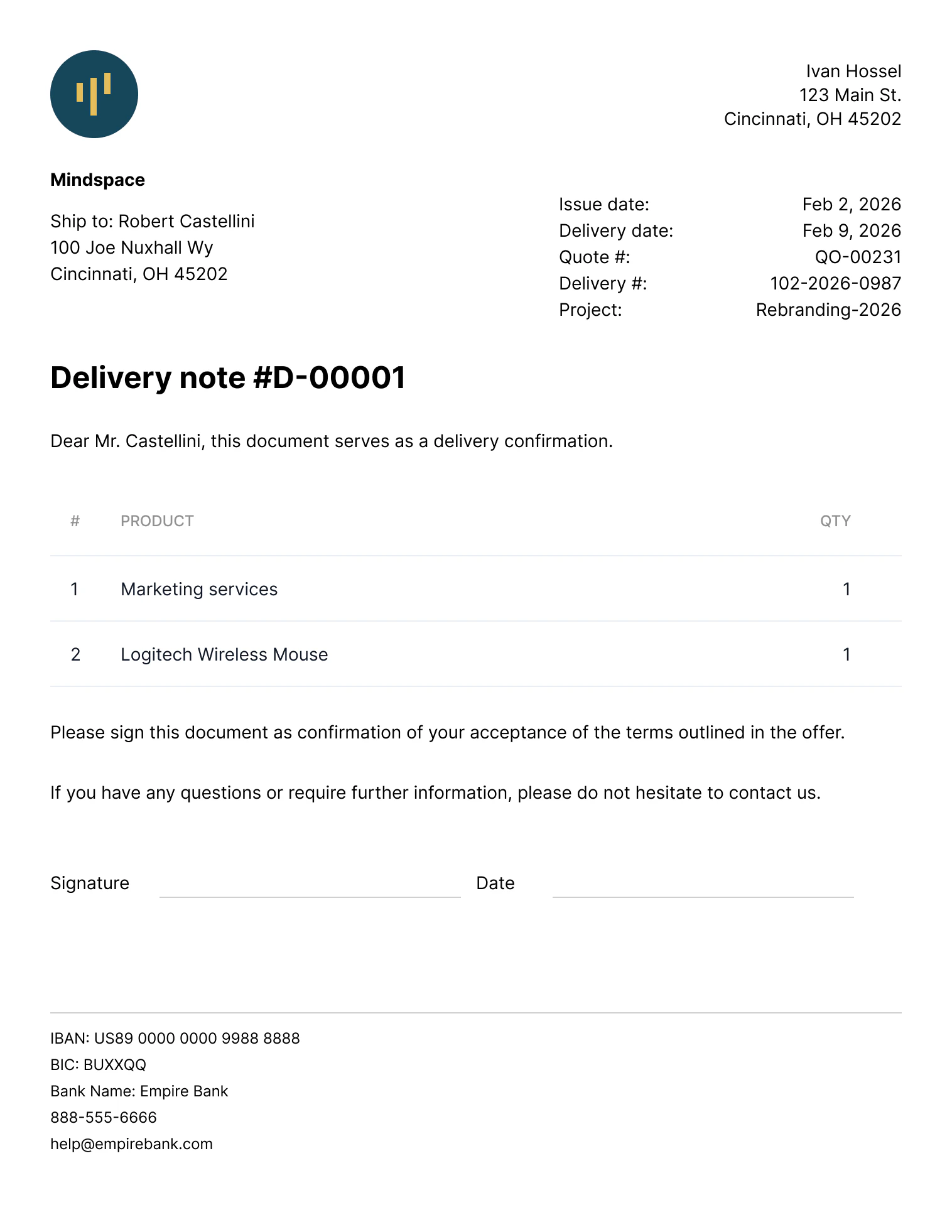
A **delivery note** (also known as a delivery slip, dispatch note, shipping note, goods delivery note, and similar names) is a document that accompanies the delivery of goods from a seller to a customer.
It contains the list of items and their quantities shipped within a delivery.
Delivery notes are often used in retail, e-commerce, construction, logistics, and supply chains to help ensure the correct items get delivered to customers and to provide customers with an overview of the shipment contents.
Upon receiving the delivery, the customer can cross-check the contents of the shipment with the delivery note to make sure they match and nothing is missing.
Unlike invoices, delivery notes do not contain financial information such as product prices and tax rates - only the product names and quantities being delivered.
 ## Roles and permissions
To use the `/delivery-notes*` endpoints with an [organization user token](/finops/guides/organizations/users#get-organization-user-token), this organization user must have a [role](/finops/guides/organizations/users#create-role) with the `delivery_note` permission.
If using a [partner-level token](/finops/guides/authentication/client-credentials), no special permissions are needed.
## Delivery note statuses
Delivery notes move through a series of statuses as they are created and processed.
The status determines the actions can be performed on a delivery note.
```mermaid expandable lines theme={null}
stateDiagram
classDef block fill: white, text-transform: lowercase
%% classDef start color: blue, stroke: blue
classDef start stroke: black
classDef success color: green, stroke: green
classDef failure color: red, stroke: red
direction LR
[*] --> created
created --> delivered
delivered --> deleted
created --> deleted
created --> canceled
canceled --> deleted
class created start
class delivered success
class canceled, deleted failure
class created, delivered, canceled, deleted block
```
Status updates of a delivery note have no effect on the status of the associated invoice or quote.
### `created`
This is the initial status of all delivery notes.
Documents in this status are considered finalized (ready to be sent to the counterparts) but can still be edited if needed.
Unlike invoices, delivery notes do not have the `issued` status.
The `created` status of delivery notes is an analog of both `draft` and `issued` statuses of invoices.
### `delivered`
Use this status to indicate that the delivery note has been handed over to the counterpart.
Delivered documents cannot be edited, but can be deleted.
### `canceled`
If the delivery is canceled, you can mark the delivery note as canceled.
Canceled delivery notes cannot be edited, but can be deleted.
### `deleted`
Delivery notes in any status can be deleted. This cannot be undone.
Deleted documents are not accessible via the API.
## Create a delivery note
There are two ways to create delivery notes:
* [create a standalone delivery note from scratch](#create-standalone)
* [create from an existing invoice or quote](#from-invoice-or-quote)
There is no way to link an existing delivery note to an invoice or quote. Only newly created
delivery notes can be associated with an invoice or quote.
### Create a standalone delivery note
Before creating a delivery note, you need to:
* Create the [counterpart](/finops/guides/common/counterparts/index) (customer).
* (Optional) Set up the [product catalog](/finops/guides/accounts-receivable/products).
To create a delivery note, call [`POST /delivery-notes`](/finops/reference/openapi/delivery-notes/post-delivery-notes) with a request body containing the counterpart details and at least one line item. Line items can either reference products from the catalog by `product_id` or specify the product `name` and other details inline.
```sh expandable lines theme={null}
curl -X POST 'https://api.sandbox.tesouro.com/v1/delivery-notes' \
-H 'X-Finops-Version: 2025-06-23' \
-H 'X-Organization-Id: ORGANIZATION_ID' \
-H 'Authorization: Bearer ACCESS_TOKEN' \
-H 'Content-Type: application/json' \
-d '{
"counterpart_id": "18a45457-377e-4b7c-b9a1-7b2e7f264d46",
"counterpart_address_id": "9a0282e1-bae7-49c9-a6f3-152dbe6fe6b8",
"delivery_date": "2025-03-10",
"delivery_number": "INV-042",
"line_items": [
{
"product": {
"name": "LG WH1000XM Monitor"
},
"quantity": 10
},
{
"product_id": "e0c21d00-6556-4536-8390-830c4d3cf4ca",
"quantity": 5
}
],
"display_signature_placeholder": true
}'
```
Other relevant (but optional) fields in delivery notes are:
* `delivery_date` - the date displayed on the PDF.
* `delivery_number`
* `display_signature_placeholder` - if `true`, the PDF delivery note will display a signature block so that the counterpart representative can sign the printed document. Default is `false`.
The document number (`document_id`) of the delivery note is generated automatically based on the organization's [document number customization](/finops/guides/advanced/document-number-customization) options.
In the [non-compliant mode](/finops/guides/accounts-receivable/regulatory-compliance/invoice-compliance), you can set the `document_id` manually.
### Create a delivery note from an invoice or quote
To create a delivery note based on an existing invoice or quote, call [`POST /delivery-notes`](/finops/reference/openapi/delivery-notes/post-delivery-notes) and specify the ID of the related invoice or quote in the `based_on` field in the request body:
```sh {7} lines theme={null}
curl -X POST 'https://api.sandbox.tesouro.com/v1/delivery-notes' \
-H 'X-Finops-Version: 2025-06-23' \
-H 'X-Organization-Id: ORGANIZATION_ID' \
-H 'Authorization: Bearer ACCESS_TOKEN' \
-H 'Content-Type: application/json' \
-d '{
"based_on": "9525e2b7-8876-48b8-aa79-5256cb811ade"
}'
```
The created delivery note contains a copy of the invoice or quote data - except unit prices, tax rates, and other values not used in delivery notes.
The ID and document number of the original invoice or quote are stored in the `based_on` and `based_on_document_id` fields of the delivery note, respectively.
The document number (`document_id`) of the delivery note is generated automatically based on the organization's [document number customization](/finops/guides/advanced/document-number-customization) options.
In the [non-compliant mode](/finops/guides/accounts-receivable/regulatory-compliance/invoice-compliance), you can update the `document_id` manually.
The next step is to edit the created delivery note to add the `delivery_date`, `delivery_number`, and other relevant details.
You can also adjust any other information - line items, counterpart address, memo, and other data - as necessary.
```sh lines theme={null}
curl -X PATCH 'https://api.sandbox.tesouro.com/v1/delivery-notes/19e0a...9cc' \
-H 'X-Finops-Version: 2025-06-23' \
-H 'X-Organization-Id: ORGANIZATION_ID' \
-H 'Authorization: Bearer ACCESS_TOKEN' \
-H 'Content-Type: application/json' \
-d '{
"delivery_date": "2025-03-10",
"delivery_number": "INT-042",
"display_signature_placeholder": true
}'
```
## Download the PDF
Tesouro automatically generates the PDF version of delivery notes in the counterpart language and the organization language, and returns links to these files in the `file_url` and `original_file_url` fields of delivery note responses:
```json lines theme={null}
{
"id": "19e0a1d5-9255-4b32-90c0-c398f7f1f9cc",
...
// Counterpart's version of a PDF delivery note
"file_language": "en",
"file_url": "https://.s3.amazonaws.com//.pdf",
...
// Organization's version of a PDF delivery note
"original_file_language": "en",
"original_file_url": "https://.s3.amazonaws.com//.pdf",
...
}
```
If `file_url` or `original_file_url` is `null`, repeat the request to [`GET /delivery-notes/ {delivery_note_id}`](/finops/reference/openapi/delivery-notes/get-delivery-notes-id) after some time.
The PDF file is updated automatically if the delivery note is updated (for example, if new line items are added or the counterpart address is changed).
Organization users can download the PDF document and print it to be shipped along with the delivered goods.
### PDF customization
PDF delivery notes are branded with the [organization logo](/finops/guides/organizations/index#logo) (if available).
If the `display_signature_placeholder` field of a delivery note is true, the PDF file includes a block where the counterpart can add their signature in the printed document upon receiving the delivery.
Tesouro also provides several built-in PDF templates for accounts receivable documents.
Organizations can [change their default template](/finops/guides/advanced/pdf-templates#default) at any time.
For more information, see [PDF templates](/finops/guides/advanced/pdf-templates).
## Update a delivery note
While a delivery note is in the `created` status, you can edit it - change the counterpart, delivery adddress, stated delivery date, and other details.
To do this, call [`PATCH /delivery-notes/{delivery_note_id}`](/finops/reference/openapi/delivery-notes/patch-delivery-notes-id) with a request body containing the fields and values you want to update.
```sh lines theme={null}
curl -X PATCH 'https://api.sandbox.tesouro.com/v1/delivery-notes/24d9a...589' \
-H 'X-Finops-Version: 2025-06-23' \
-H 'X-Organization-Id: ORGANIZATION_ID' \
-H 'Authorization: Bearer ACCESS_TOKEN' \
-H 'Content-Type: application/json' \
-d '{
"delivery_date": "2025-03-17"
}'
```
**Updating line items**
To add, delete, update, or reorder the line items of a delivery note, provide the `line_items` array containing the final list of line items.
In other words, the `line_items` array in PATCH requests *replaces* the previous line items.
For example, consider a delivery note with 3 line items.
To remove the second item, send the `line_items` array containing just the remaining line items.
## Mark a delivery note as delivered
After a delivery note has been handed over to the counterpart, you can change its status to `delivered`.
To do this, call [`POST /delivery-notes/{delivery_note_id}/mark-as-delivered`](/finops/reference/openapi/delivery-notes/post-delivery-notes-id-mark-as-delivered):
```sh lines theme={null}
curl -X POST 'https://api.sandbox.tesouro.com/v1/delivery-notes/24d9a...589/mark-as-delivered' \
-H 'X-Finops-Version: 2025-06-23' \
-H 'X-Organization-Id: ORGANIZATION_ID' \
-H 'Authorization: Bearer ACCESS_TOKEN'
```
This only changes the `status` of the delivery note, but not its `delivery_date`. The delivery
date is defined by the user when the delivery note is created or updated.
## Cancel a delivery note
If a delivery has been canceled, you can mark the corresponding delivery note as canceled.
To do this, call [`POST /delivery-notes/{delivery_note_id}/cancel`](/finops/reference/openapi/delivery-notes/post-delivery-notes-id-cancel):
```sh lines theme={null}
curl -X POST 'https://api.sandbox.tesouro.com/v1/delivery-notes/24d9a...589/cancel' \
-H 'X-Finops-Version: 2025-06-23' \
-H 'X-Organization-Id: ORGANIZATION_ID' \
-H 'Authorization: Bearer ACCESS_TOKEN'
```
Only delivery notes in the `created` status can be canceled.
Canceling a delivery note does not affect the status of the associated invoice or quote.
## Find and filter delivery notes
The [`GET /delivery-notes`](/finops/reference/openapi/delivery-notes/get-delivery-notes) endpoint supports a variety of query parameters to refine the search results.
Examples:
* Bulk fetch multiple delivery notes by their IDs (spaces added for readability):
```lines theme={null}
GET /delivery-notes? id__in=ID_1 & id__in=ID_2 & id__in=ID_3
```
* Find a delivery note created from a specific invoice or quote:
```lines theme={null}
GET /delivery-notes?based_on=INVOICE_OR_QUOTE_ID
```
* Find a delivery note by the document number of the associated invoice or quote (exact match, case-sensitive):
```lines theme={null}
GET /delivery-notes?based_on_document_id=INV-00042
```
Alternatively, use the `based_on_document_id__icontains` parameter for a partial document number match (case-insensitive).
## Delete a delivery note
Delivery notes in any status can be deleted.
To do this, call [`DELETE /delivery-notes/{delivery_note_id}`](/finops/reference/openapi/delivery-notes/delete-delivery-notes-id):
```sh lines theme={null}
curl -X DELETE 'https://api.sandbox.tesouro.com/v1/delivery-notes/24d9a...589' \
-H 'X-Finops-Version: 2025-06-23' \
-H 'X-Organization-Id: ORGANIZATION_ID' \
-H 'Authorization: Bearer ACCESS_TOKEN'
```
Deleting a document cannot be undone.
## Roles and permissions
To use the `/delivery-notes*` endpoints with an [organization user token](/finops/guides/organizations/users#get-organization-user-token), this organization user must have a [role](/finops/guides/organizations/users#create-role) with the `delivery_note` permission.
If using a [partner-level token](/finops/guides/authentication/client-credentials), no special permissions are needed.
## Delivery note statuses
Delivery notes move through a series of statuses as they are created and processed.
The status determines the actions can be performed on a delivery note.
```mermaid expandable lines theme={null}
stateDiagram
classDef block fill: white, text-transform: lowercase
%% classDef start color: blue, stroke: blue
classDef start stroke: black
classDef success color: green, stroke: green
classDef failure color: red, stroke: red
direction LR
[*] --> created
created --> delivered
delivered --> deleted
created --> deleted
created --> canceled
canceled --> deleted
class created start
class delivered success
class canceled, deleted failure
class created, delivered, canceled, deleted block
```
Status updates of a delivery note have no effect on the status of the associated invoice or quote.
### `created`
This is the initial status of all delivery notes.
Documents in this status are considered finalized (ready to be sent to the counterparts) but can still be edited if needed.
Unlike invoices, delivery notes do not have the `issued` status.
The `created` status of delivery notes is an analog of both `draft` and `issued` statuses of invoices.
### `delivered`
Use this status to indicate that the delivery note has been handed over to the counterpart.
Delivered documents cannot be edited, but can be deleted.
### `canceled`
If the delivery is canceled, you can mark the delivery note as canceled.
Canceled delivery notes cannot be edited, but can be deleted.
### `deleted`
Delivery notes in any status can be deleted. This cannot be undone.
Deleted documents are not accessible via the API.
## Create a delivery note
There are two ways to create delivery notes:
* [create a standalone delivery note from scratch](#create-standalone)
* [create from an existing invoice or quote](#from-invoice-or-quote)
There is no way to link an existing delivery note to an invoice or quote. Only newly created
delivery notes can be associated with an invoice or quote.
### Create a standalone delivery note
Before creating a delivery note, you need to:
* Create the [counterpart](/finops/guides/common/counterparts/index) (customer).
* (Optional) Set up the [product catalog](/finops/guides/accounts-receivable/products).
To create a delivery note, call [`POST /delivery-notes`](/finops/reference/openapi/delivery-notes/post-delivery-notes) with a request body containing the counterpart details and at least one line item. Line items can either reference products from the catalog by `product_id` or specify the product `name` and other details inline.
```sh expandable lines theme={null}
curl -X POST 'https://api.sandbox.tesouro.com/v1/delivery-notes' \
-H 'X-Finops-Version: 2025-06-23' \
-H 'X-Organization-Id: ORGANIZATION_ID' \
-H 'Authorization: Bearer ACCESS_TOKEN' \
-H 'Content-Type: application/json' \
-d '{
"counterpart_id": "18a45457-377e-4b7c-b9a1-7b2e7f264d46",
"counterpart_address_id": "9a0282e1-bae7-49c9-a6f3-152dbe6fe6b8",
"delivery_date": "2025-03-10",
"delivery_number": "INV-042",
"line_items": [
{
"product": {
"name": "LG WH1000XM Monitor"
},
"quantity": 10
},
{
"product_id": "e0c21d00-6556-4536-8390-830c4d3cf4ca",
"quantity": 5
}
],
"display_signature_placeholder": true
}'
```
Other relevant (but optional) fields in delivery notes are:
* `delivery_date` - the date displayed on the PDF.
* `delivery_number`
* `display_signature_placeholder` - if `true`, the PDF delivery note will display a signature block so that the counterpart representative can sign the printed document. Default is `false`.
The document number (`document_id`) of the delivery note is generated automatically based on the organization's [document number customization](/finops/guides/advanced/document-number-customization) options.
In the [non-compliant mode](/finops/guides/accounts-receivable/regulatory-compliance/invoice-compliance), you can set the `document_id` manually.
### Create a delivery note from an invoice or quote
To create a delivery note based on an existing invoice or quote, call [`POST /delivery-notes`](/finops/reference/openapi/delivery-notes/post-delivery-notes) and specify the ID of the related invoice or quote in the `based_on` field in the request body:
```sh {7} lines theme={null}
curl -X POST 'https://api.sandbox.tesouro.com/v1/delivery-notes' \
-H 'X-Finops-Version: 2025-06-23' \
-H 'X-Organization-Id: ORGANIZATION_ID' \
-H 'Authorization: Bearer ACCESS_TOKEN' \
-H 'Content-Type: application/json' \
-d '{
"based_on": "9525e2b7-8876-48b8-aa79-5256cb811ade"
}'
```
The created delivery note contains a copy of the invoice or quote data - except unit prices, tax rates, and other values not used in delivery notes.
The ID and document number of the original invoice or quote are stored in the `based_on` and `based_on_document_id` fields of the delivery note, respectively.
The document number (`document_id`) of the delivery note is generated automatically based on the organization's [document number customization](/finops/guides/advanced/document-number-customization) options.
In the [non-compliant mode](/finops/guides/accounts-receivable/regulatory-compliance/invoice-compliance), you can update the `document_id` manually.
The next step is to edit the created delivery note to add the `delivery_date`, `delivery_number`, and other relevant details.
You can also adjust any other information - line items, counterpart address, memo, and other data - as necessary.
```sh lines theme={null}
curl -X PATCH 'https://api.sandbox.tesouro.com/v1/delivery-notes/19e0a...9cc' \
-H 'X-Finops-Version: 2025-06-23' \
-H 'X-Organization-Id: ORGANIZATION_ID' \
-H 'Authorization: Bearer ACCESS_TOKEN' \
-H 'Content-Type: application/json' \
-d '{
"delivery_date": "2025-03-10",
"delivery_number": "INT-042",
"display_signature_placeholder": true
}'
```
## Download the PDF
Tesouro automatically generates the PDF version of delivery notes in the counterpart language and the organization language, and returns links to these files in the `file_url` and `original_file_url` fields of delivery note responses:
```json lines theme={null}
{
"id": "19e0a1d5-9255-4b32-90c0-c398f7f1f9cc",
...
// Counterpart's version of a PDF delivery note
"file_language": "en",
"file_url": "https://.s3.amazonaws.com//.pdf",
...
// Organization's version of a PDF delivery note
"original_file_language": "en",
"original_file_url": "https://.s3.amazonaws.com//.pdf",
...
}
```
If `file_url` or `original_file_url` is `null`, repeat the request to [`GET /delivery-notes/ {delivery_note_id}`](/finops/reference/openapi/delivery-notes/get-delivery-notes-id) after some time.
The PDF file is updated automatically if the delivery note is updated (for example, if new line items are added or the counterpart address is changed).
Organization users can download the PDF document and print it to be shipped along with the delivered goods.
### PDF customization
PDF delivery notes are branded with the [organization logo](/finops/guides/organizations/index#logo) (if available).
If the `display_signature_placeholder` field of a delivery note is true, the PDF file includes a block where the counterpart can add their signature in the printed document upon receiving the delivery.
Tesouro also provides several built-in PDF templates for accounts receivable documents.
Organizations can [change their default template](/finops/guides/advanced/pdf-templates#default) at any time.
For more information, see [PDF templates](/finops/guides/advanced/pdf-templates).
## Update a delivery note
While a delivery note is in the `created` status, you can edit it - change the counterpart, delivery adddress, stated delivery date, and other details.
To do this, call [`PATCH /delivery-notes/{delivery_note_id}`](/finops/reference/openapi/delivery-notes/patch-delivery-notes-id) with a request body containing the fields and values you want to update.
```sh lines theme={null}
curl -X PATCH 'https://api.sandbox.tesouro.com/v1/delivery-notes/24d9a...589' \
-H 'X-Finops-Version: 2025-06-23' \
-H 'X-Organization-Id: ORGANIZATION_ID' \
-H 'Authorization: Bearer ACCESS_TOKEN' \
-H 'Content-Type: application/json' \
-d '{
"delivery_date": "2025-03-17"
}'
```
**Updating line items**
To add, delete, update, or reorder the line items of a delivery note, provide the `line_items` array containing the final list of line items.
In other words, the `line_items` array in PATCH requests *replaces* the previous line items.
For example, consider a delivery note with 3 line items.
To remove the second item, send the `line_items` array containing just the remaining line items.
## Mark a delivery note as delivered
After a delivery note has been handed over to the counterpart, you can change its status to `delivered`.
To do this, call [`POST /delivery-notes/{delivery_note_id}/mark-as-delivered`](/finops/reference/openapi/delivery-notes/post-delivery-notes-id-mark-as-delivered):
```sh lines theme={null}
curl -X POST 'https://api.sandbox.tesouro.com/v1/delivery-notes/24d9a...589/mark-as-delivered' \
-H 'X-Finops-Version: 2025-06-23' \
-H 'X-Organization-Id: ORGANIZATION_ID' \
-H 'Authorization: Bearer ACCESS_TOKEN'
```
This only changes the `status` of the delivery note, but not its `delivery_date`. The delivery
date is defined by the user when the delivery note is created or updated.
## Cancel a delivery note
If a delivery has been canceled, you can mark the corresponding delivery note as canceled.
To do this, call [`POST /delivery-notes/{delivery_note_id}/cancel`](/finops/reference/openapi/delivery-notes/post-delivery-notes-id-cancel):
```sh lines theme={null}
curl -X POST 'https://api.sandbox.tesouro.com/v1/delivery-notes/24d9a...589/cancel' \
-H 'X-Finops-Version: 2025-06-23' \
-H 'X-Organization-Id: ORGANIZATION_ID' \
-H 'Authorization: Bearer ACCESS_TOKEN'
```
Only delivery notes in the `created` status can be canceled.
Canceling a delivery note does not affect the status of the associated invoice or quote.
## Find and filter delivery notes
The [`GET /delivery-notes`](/finops/reference/openapi/delivery-notes/get-delivery-notes) endpoint supports a variety of query parameters to refine the search results.
Examples:
* Bulk fetch multiple delivery notes by their IDs (spaces added for readability):
```lines theme={null}
GET /delivery-notes? id__in=ID_1 & id__in=ID_2 & id__in=ID_3
```
* Find a delivery note created from a specific invoice or quote:
```lines theme={null}
GET /delivery-notes?based_on=INVOICE_OR_QUOTE_ID
```
* Find a delivery note by the document number of the associated invoice or quote (exact match, case-sensitive):
```lines theme={null}
GET /delivery-notes?based_on_document_id=INV-00042
```
Alternatively, use the `based_on_document_id__icontains` parameter for a partial document number match (case-insensitive).
## Delete a delivery note
Delivery notes in any status can be deleted.
To do this, call [`DELETE /delivery-notes/{delivery_note_id}`](/finops/reference/openapi/delivery-notes/delete-delivery-notes-id):
```sh lines theme={null}
curl -X DELETE 'https://api.sandbox.tesouro.com/v1/delivery-notes/24d9a...589' \
-H 'X-Finops-Version: 2025-06-23' \
-H 'X-Organization-Id: ORGANIZATION_ID' \
-H 'Authorization: Bearer ACCESS_TOKEN'
```
Deleting a document cannot be undone.