> ## Documentation Index
> Fetch the complete documentation index at: https://docs.tesouro.com/llms.txt
> Use this file to discover all available pages before exploring further.
# Invoice financing
> Embed invoice financing directly into your platform, giving US business customers on-demand access to working capital tied to their outstanding invoices.
This feature is currently in BETA
## Overview
**Invoice financing** refers to a form of short-term borrowing in which a business borrows money against the amount due on invoices it issued to its customers. Invoice financing helps businesses improve cash flow, pay employees and suppliers, and reinvest in operations and growth earlier than they could if they had to wait until their customers paid their balances in full.
Tesouro offers embedded invoice financing as part of Tesouro API and [React SDK](/finops/guides/sdks/react/index). This integration, in turn, enables our partners to provide invoice financing functionality to their US customers.
**Contact us**
Contact your Tesouro account manager to learn more about invoice financing integration.
## Requirements
* Only US organizations can enroll into invoice financing.
* Only invoices in the `issued` and `partially_paid` [statuses](/finops/guides/accounts-receivable/invoices/index) can be financed.
* Invoice due date must be at least 7 days from the current date.
## Integration options
### SDK components
[Tesouro React SDK](/finops/guides/sdks/react/index) includes the following components that you can use to embed invoice financing functionality into your applications:
* `FinanceBanner` - A banner displayed at the top of the `Receivables` and `ReceivablesTable` components that allows users to apply for invoice financing.
* `FinanceInvoice` - A banner that provides an entry point for financing an invoice and handles the financing flow.
* `FinanceTab` - Contains the finance widget and the financed invoices table. This component is also embedded as a built-in tab labelled "My Financing" inside the `Receivables` and `ReceivablesTable` components.
* `FinanceWidget` - Combines the `FinanceLimits` and `FinanceOffers` components.
* `FinanceLimits` - A card that displays the organization's financing limit.
* `FinanceOffers` - A card that displays available invoice financing offers.
* `FinancedInvoicesTable` - a table that displays the list of financed invoices, the amount requested for financing, and the financing status of each invoice.
* `Integrations` - a page that displays available integrations. Currently displays only the `FinanceApplicationCard` component.
* `FinanceApplicationCard` - Apply for invoice financing from the **Integrations** page.
### API endpoints
While the onboarding flow for financing is currently available only in Tesouro React SDK, the rest of invoice financing functionality can also be implemented by using Tesouro API directly. The relevant endpoints are:
* [`GET /financing-offers`](/finops/reference/openapi/financing/get-financing-offers) - Get the onboarding status and available financing offers for an organization.
* [`POST /financing-invoices`](/finops/reference/openapi/financing/post-financing-invoices) - Request financing for one or more invoices.
* [`GET /financing-invoices`](/finops/reference/openapi/financing/get-financing-invoices) - Get a list of financed invoices and the financing details for each invoice.
## Organization onboarding
Before invoices can be financed, the organization must enroll into financing, receive an offer, and accept it. This onboarding process is currently available only in [Tesouro React SDK](/finops/guides/sdks/react/index).
The SDK provides several entry points to onboarding:
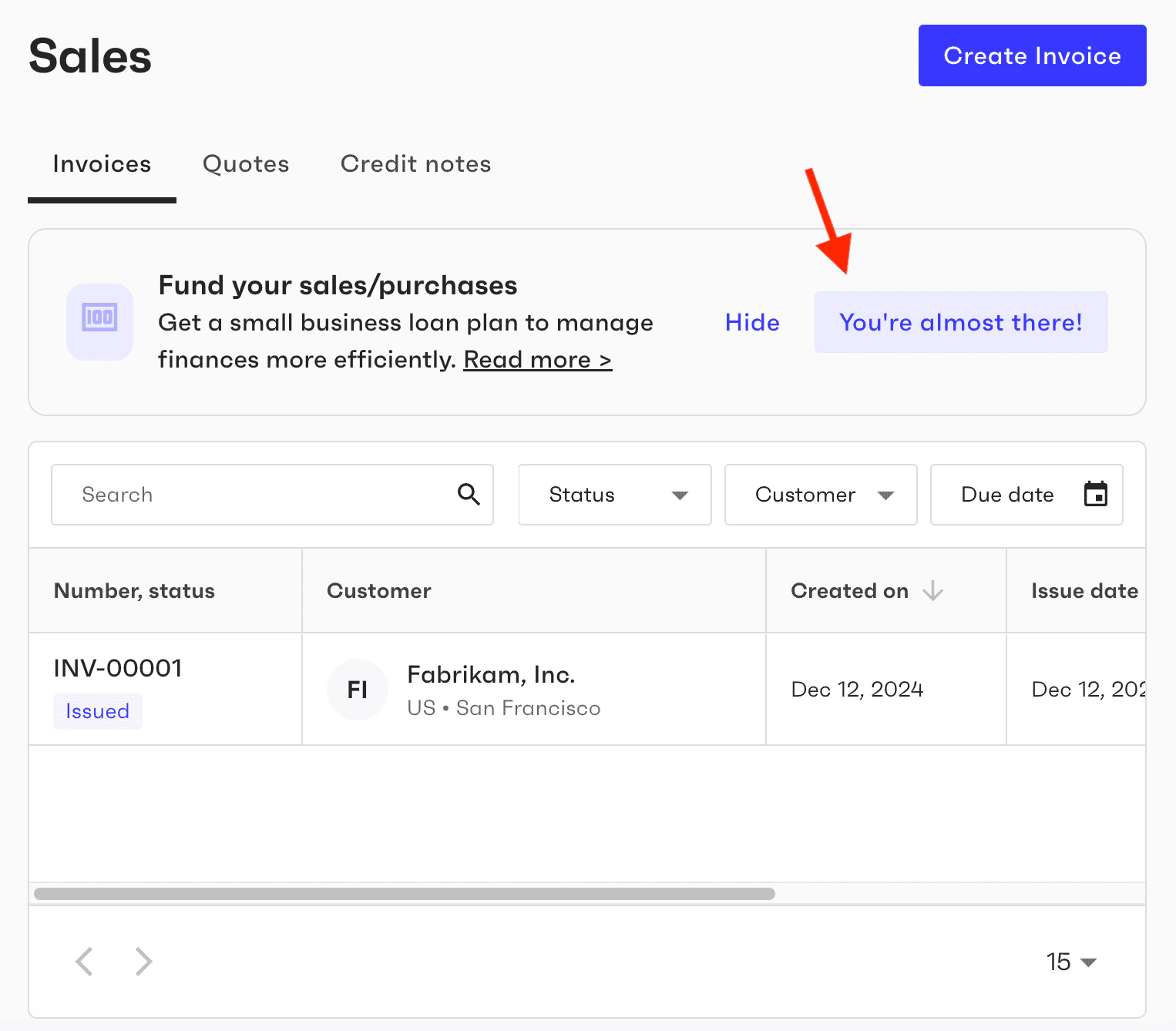
* standalone banner component `FinanceBanner` that you can place anywhere in your app,
* the banner at the top of the [`Receivables`](/finops/guides/sdks/react/components/receivables) component,
* the "Invoice financing" card displayed by the `Integrations` component.
Financing banners are rendered only if the current organization is from the US.
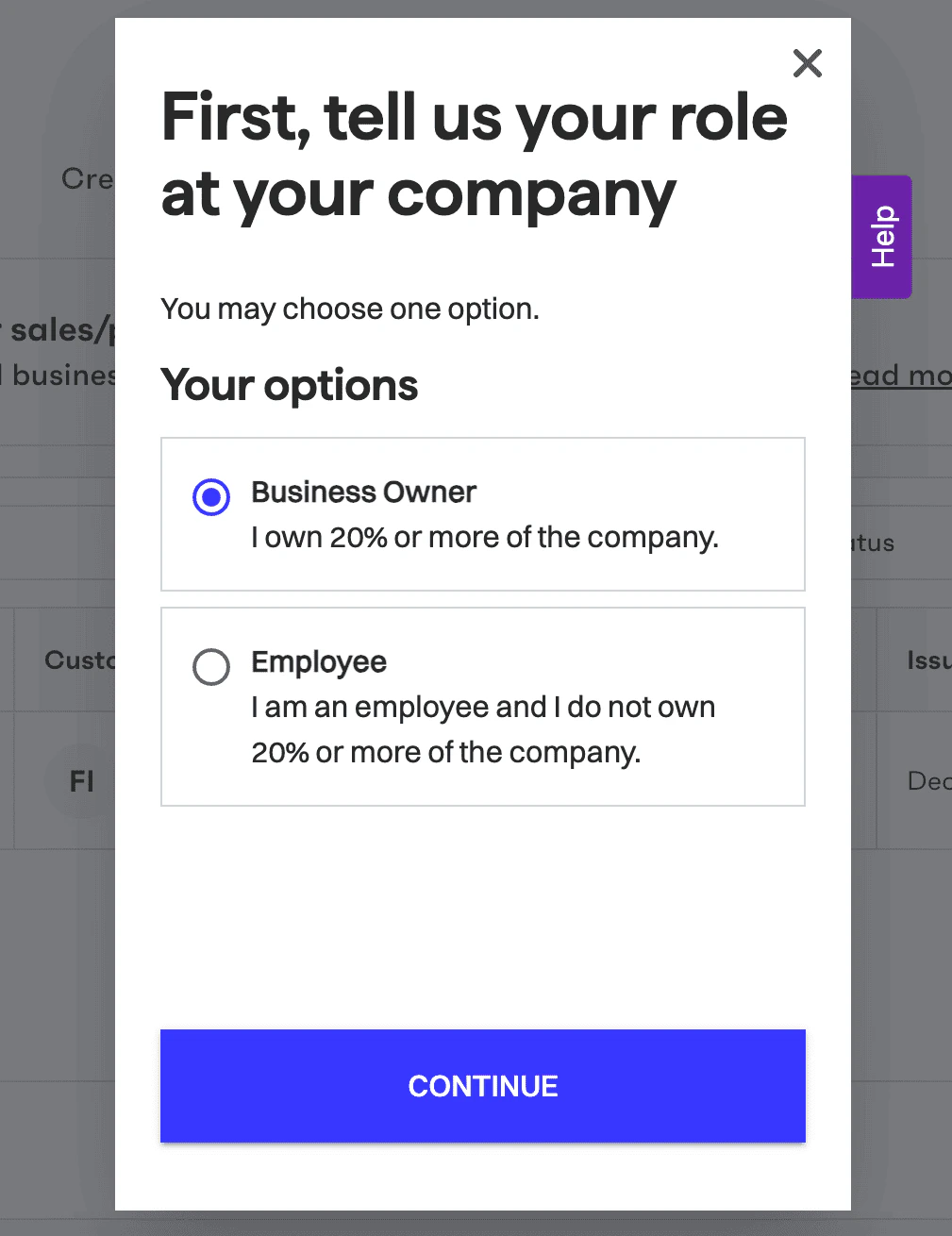
 The organization user who onboards to financing is assumed to be an authorized business representative with signing authority.
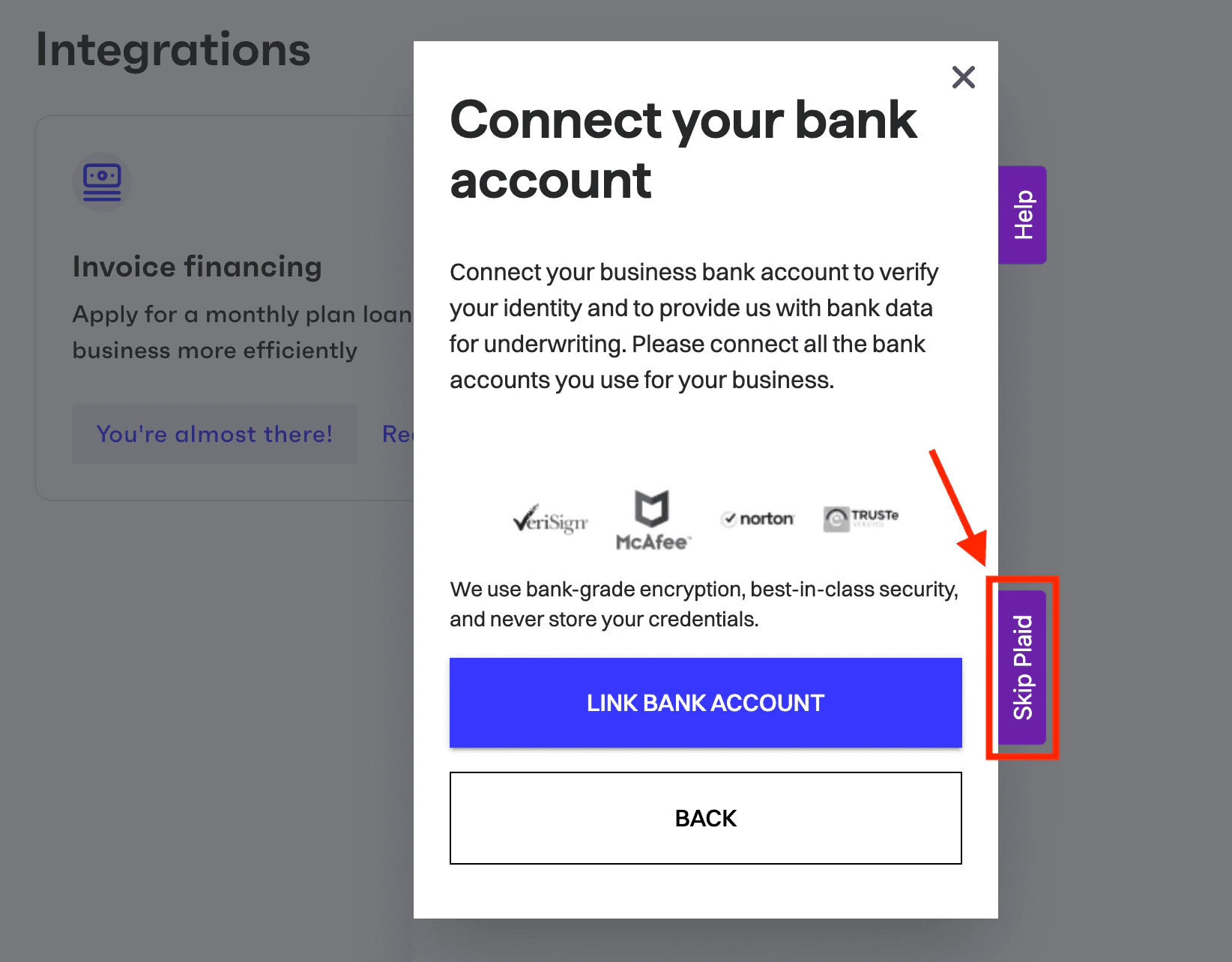
During the onboarding process, the user is prompted to provide business information about the organization, a list of business owners, and to connect a bank account where the loan funds will be deposited. [Plaid Link](https://plaid.com/en-eu/plaid-link/) is used to verify the bank account. The onboarding screens are pre-populated with existing organization data already stored in Tesouro.
At the end of onboarding, the user is presented with the available financing offers, including credit limits, loan terms and fees. To accept an offer, the user then signs the loan agreement.
## Financing an invoice
You can use the `FinanceInvoice` component to provide users with an entry point for financing an individual invoice. If the specified `invoice` object meets [financing requirements](#requirements), the `FinanceInvoice` component displays a banner indicating that financing is available for this invoice.
```js expandable lines theme={null}
import { FinanceInvoice } from "@tesouro/sdk-react";
...
// This component must be rendered within the TesouroProvider wrapper
const InvoiceFinancingPage = () => {
// Object returned in the response from `GET /receivables/{receivable_id}`
const invoice = {
id: "7721bd70-f33f-4984-82ef-4ad27efb3b20",
...
}
return (
);
};
```
If you use the [`InvoiceDetails`](/finops/guides/sdks/react/components/invoicedetails) component to display invoice details, it already has the `FinanceInvoice` banner embedded.
The organization user who onboards to financing is assumed to be an authorized business representative with signing authority.
During the onboarding process, the user is prompted to provide business information about the organization, a list of business owners, and to connect a bank account where the loan funds will be deposited. [Plaid Link](https://plaid.com/en-eu/plaid-link/) is used to verify the bank account. The onboarding screens are pre-populated with existing organization data already stored in Tesouro.
At the end of onboarding, the user is presented with the available financing offers, including credit limits, loan terms and fees. To accept an offer, the user then signs the loan agreement.
## Financing an invoice
You can use the `FinanceInvoice` component to provide users with an entry point for financing an individual invoice. If the specified `invoice` object meets [financing requirements](#requirements), the `FinanceInvoice` component displays a banner indicating that financing is available for this invoice.
```js expandable lines theme={null}
import { FinanceInvoice } from "@tesouro/sdk-react";
...
// This component must be rendered within the TesouroProvider wrapper
const InvoiceFinancingPage = () => {
// Object returned in the response from `GET /receivables/{receivable_id}`
const invoice = {
id: "7721bd70-f33f-4984-82ef-4ad27efb3b20",
...
}
return (
);
};
```
If you use the [`InvoiceDetails`](/finops/guides/sdks/react/components/invoicedetails) component to display invoice details, it already has the `FinanceInvoice` banner embedded.
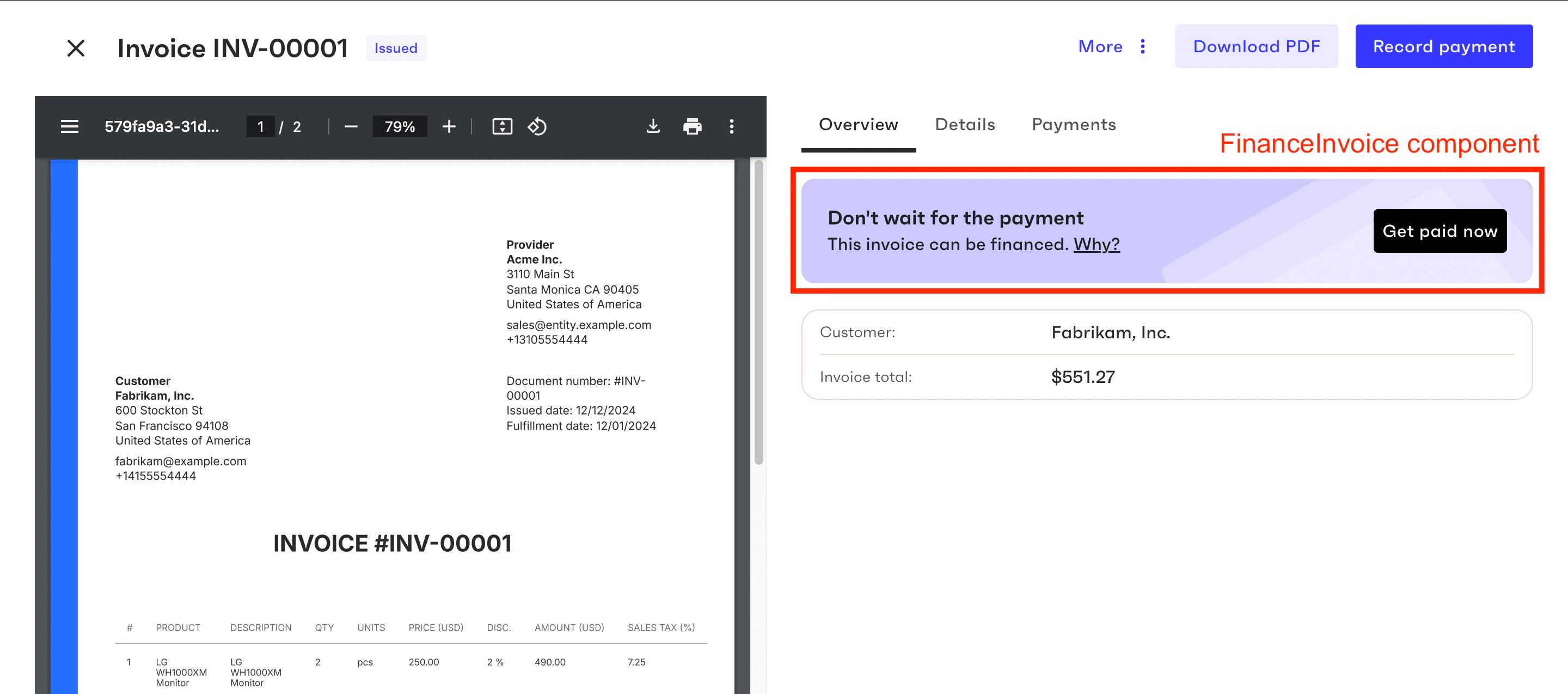 Clicking **Get paid now** in the banner opens a popup window where the user can request financing for the full or partial invoice amount and select the repayment plan that best fits their cash flow requirements.
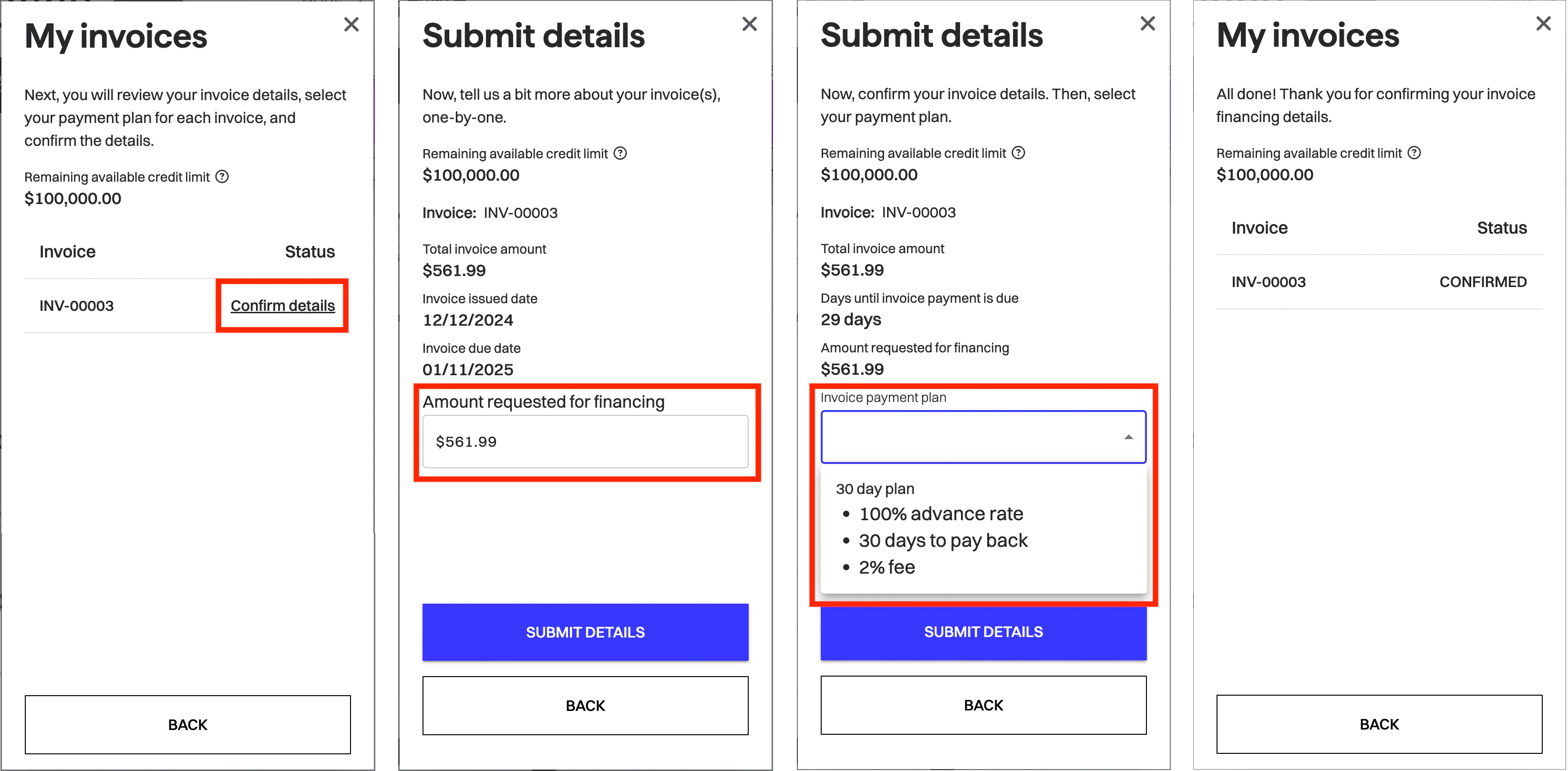 If the organization's available credit limit has been reached, the component informs the user about this and the user will not be able to submit any invoices for financing.
Invoice [status](/finops/guides/accounts-receivable/invoices/index) in Tesouro is not changed after financing because this status is supposed to reflect the actual payment received from the counterpart.
The financing status of an invoice is a separate status displayed by the `FinancedTab`, `InvoiceDetails`, and other financing-related components.
## Viewing financed invoices
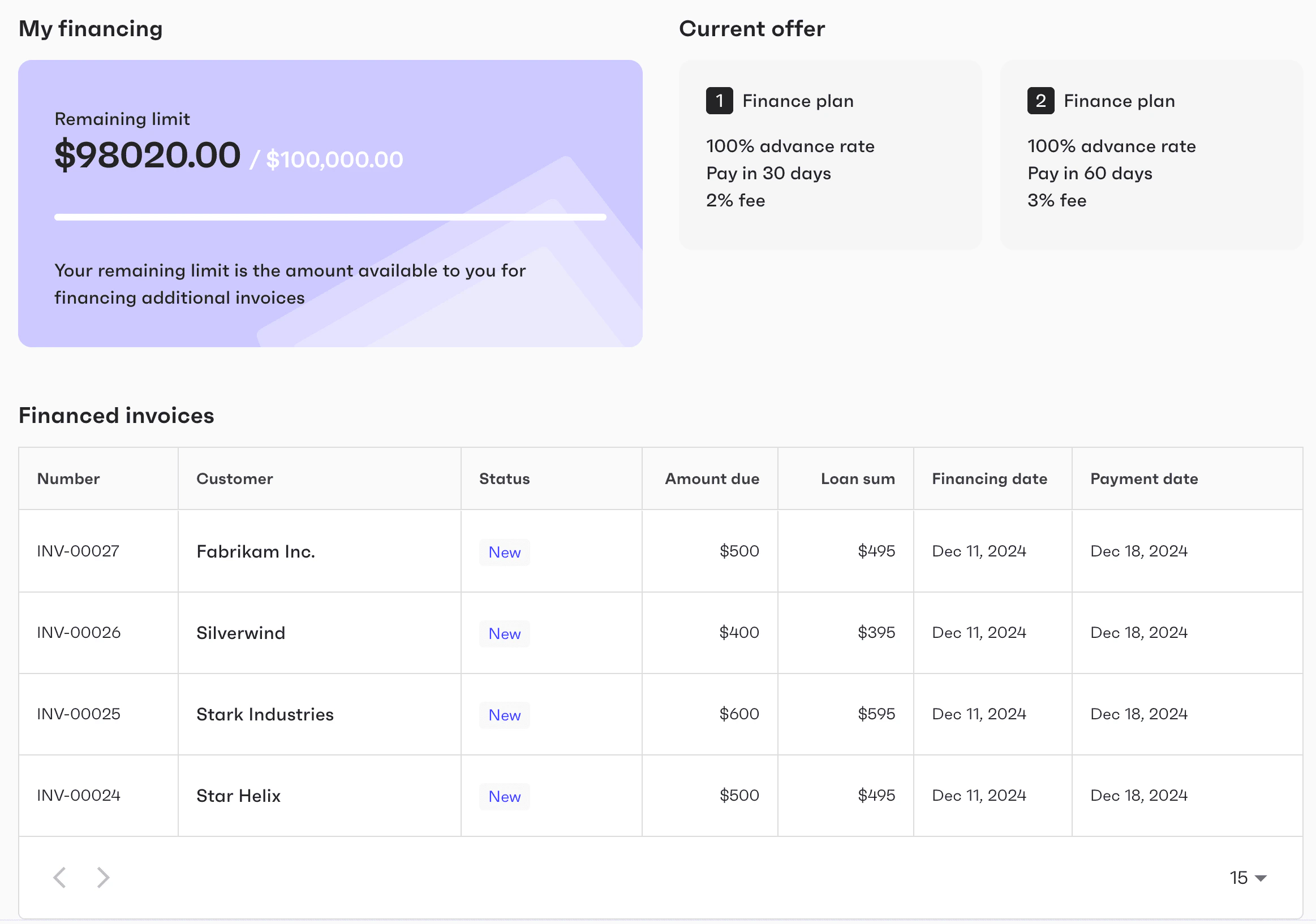
The `FinancedTab` component displays a summary table of all financed invoices, including the amount requested for financing and the financing status. This component is also integrated as a built-in tab inside the [`ReceivablesTable`](/finops/guides/sdks/react/components/receivablestable) and [`Receivables`](/finops/guides/sdks/react/components/receivables) components.
If the organization's available credit limit has been reached, the component informs the user about this and the user will not be able to submit any invoices for financing.
Invoice [status](/finops/guides/accounts-receivable/invoices/index) in Tesouro is not changed after financing because this status is supposed to reflect the actual payment received from the counterpart.
The financing status of an invoice is a separate status displayed by the `FinancedTab`, `InvoiceDetails`, and other financing-related components.
## Viewing financed invoices
The `FinancedTab` component displays a summary table of all financed invoices, including the amount requested for financing and the financing status. This component is also integrated as a built-in tab inside the [`ReceivablesTable`](/finops/guides/sdks/react/components/receivablestable) and [`Receivables`](/finops/guides/sdks/react/components/receivables) components.
 ## Testing tips
In the [sandbox](/finops/api/concepts/environments) environment, the onboarding popup has **Skip** buttons that let you skip certain parts of the onboarding flow and quickly get your test organizations onboarded.
## Testing tips
In the [sandbox](/finops/api/concepts/environments) environment, the onboarding popup has **Skip** buttons that let you skip certain parts of the onboarding flow and quickly get your test organizations onboarded.