> ## Documentation Index
> Fetch the complete documentation index at: https://docs.tesouro.com/llms.txt
> Use this file to discover all available pages before exploring further.
# Create and send invoices
> Learn how to create an invoice to collect payment.
This page is about outgoing invoices sent by an organization to its clients. For the accounts payable invoices
received by an organization from its vendors, see
[Payables](/finops/guides/accounts-payable/payables/collect).
An invoice is a document given to the buyer by the seller to collect payment. It includes the cost of the products purchased or services rendered to the buyer.
Invoices serve as legal records if they contain the names of the seller and client, the description and price of goods or services, and the payment terms.
### Bank account
Before creating an invoice - you need to specify the organization bank account to which the payment should be made. This bank account must accept the invoice's currency.
To learn how to add organization bank accounts, see [Manage bank accounts](/finops/guides/organizations/bank-accounts). Provide the bank account ID in the `entity_bank_account_id` field when creating an invoice.
## Create an invoice
To create an outgoing invoice, complete the following steps:
1. Create a [counterpart](/finops/guides/common/counterparts/index) that represents the customer.
2. Create one or more products to be listed in the invoice.
3. Create payment terms for the invoice.
4. Configure payment reminders and overdue reminders for the invoice. (Optional)
5. Create the invoice.
**Create an invoice based on a quote**
You can also create an invoice based on an issued quote. For more information, see [Create an invoice based on a quote](/finops/guides/accounts-receivable/quotes/manage#create-invoice-from-quote).
### 1. Create a counterpart
The counterpart represents the customer purchasing your product or service. It is required for creating an invoice.
Learn how to [create counterparts](/finops/guides/common/counterparts/index#create).
### 2. Create a product
The products or services to be listed in the invoice also must be created in advance. Depending on the organization's country, measure units may be required for products before the invoice can be issued.
Learn how to [create products and measure units](/finops/guides/accounts-receivable/products#create-a-product).
**Product currencies on invoices**
Currencies of products added as line items on an invoice must always match the invoice's base currency. You can create products in multiple currencies to match the invoice's base currency. For more information, see [Create a product](/finops/guides/accounts-receivable/products#create-a-product).
### 3. Create payment terms
Payment terms define when the invoice is due to be paid. A common payment term is Net 30, which means the full payment is expected within 30 days. Payment terms can also include early payment discounts to encourage customers to pay upfront.
Learn how to [create payment terms](/finops/guides/common/payment-terms).
### 4. Create the invoice
Once the required counterpart, products, and payment terms are created, you can create the invoice for a given counterpart by calling [`POST /receivables`](/finops/reference/openapi/receivables/post-receivables) endpoint with the `type` field in the payload set to `invoice`.
An invoice must specify the applicable tax rate for its line items - this can be set leveraging the `tax_rate_value` field in the invoice line item object.
```sh expandable lines theme={null}
curl -X POST 'https://api.sandbox.tesouro.com/v1/receivables' \
-H 'X-Finops-Version: 2025-06-23' \
-H 'X-Organization-Id: ORGANIZATION_ID' \
-H 'Authorization: Bearer ACCESS_TOKEN' \
-H 'Content-Type: application/json' \
-d '{
"type": "invoice",
"currency": "USD",
"counterpart_id": "0414f84c-b039-4203-b09b-e42b49245435",
"line_items": [
{
"quantity": 1,
"product_id": "8755c86a-d630-4920-b6fd-fd2917d87dfb",
"tax_rate_value": 10
}
],
"payment_terms_id": "e2cbbb5f-15e6-4b22-a942-8f51b7a81118",
"tax_exempt": false,
"counterpart_billing_address_id": "7482ea513-4689-d630-782b6f0fs3",
"entity_bank_account_id": "5624cca65c3e-8f18-4021-bdd1-3f548c1b"
}'
```
The request above is a minimal example. The request body can also include many other details about the invoice, such as a custom `memo` note, `fulfillment_date` (if different from the invoice date), `discount`, and [other fields](/finops/reference/openapi/receivables/post-receivables).
**Notes**
* If the organization has [invoice payment reminders](/finops/guides/accounts-receivable/invoices/payment-reminders) enabled (that is, [organization setting](/finops/reference/openapi/identity/get-organizations-id-settings) `reminder.enabled` is `true`), the invoice payload MUST include `payment_reminder_id`.
The response contains the `id` assigned to the created invoice, along with the calculated total (`total_amount`), subtotal (`subtotal`), tax (`total_tax_amount`), and other information. The invoice's due date is automatically calculated based on the creation date and payment terms, and is returned in the `due_date` field on the invoice response object.
```json expandable lines theme={null}
{
"type": "invoice",
"id": "411dcb25-ec2c-49fc-bb2d-a72adac289b3",
"created_at": "2022-09-08T11:45:39.048015+00:00",
"updated_at": "2022-09-08T11:45:39.066711+00:00",
"document_id": null,
"currency": "USD",
"subtotal": 5000,
"line_items": [
{
"quantity": 5,
"product": {
...
},
"total_before_tax": 5000
}
],
"total_amount": 5950,
"total_tax_amount": 950,
...
"memo": null,
"issue_date": null,
"total_tax_amounts": [
{
"id": "479155c3-0995-4689-a3cf-7482ea5132a9",
"value": 1900.0,
"amount": 950
}
],
"due_date": "2024-06-03",
"total_amount_with_credit_notes": 5950,
"amount_due": 5950,
"amount_paid": 0,
"payment_terms": {
...
},
"status": "draft",
...
}
```
For a complete list of request and response fields, refer to the description of the `POST /receivables` [endpoint](/finops/reference/openapi/receivables/post-receivables).
#### Auto-calculated amounts
Tesouro automatically calculates the subtotal, total, and tax amounts for the entire invoice and individual line items. These amounts are included in responses from the `/receivables*` endpoints. You can display these amounts in your application and use them in your business logic.
* `line_items[i].total_before_tax` - line item amount including the discount but excluding sales tax.
* `line_items[i].total_after_tax` - line item amount including the discount and sales tax.
* `subtotal` - invoice subtotal as a sum of line item subtotals. Tax and invoice-level discount are not included, but line item discounts are included.
* `subtotal_after_tax` - a sum of `subtotal` and `total_tax_amount`. In other words, it is the invoice subtotal including tax and line item discounts, but excluding invoice-level discount.
* `discounted_subtotal` - invoice subtotal after invoice-level discount. Tax is not included.
* `total_tax_amount` - total tax amount for the entire invoice.
* `total_tax_amounts` - a list of tax rates used in the invoice, along with the calculated total tax amounts for each rate.
* `total_withholding_tax` - if `withholding_tax_rate` is provided, the total withholding tax is calculated as the specified percentage of the `discounted_subtotal`.
* `total_amount` - total invoice amount including sales tax and all discounts (except [payment term](/finops/guides/common/payment-terms) discounts). It's the sum of `discounted_subtotal` and `total_tax_amount`, minus `total_deduction_amount` and `total_withholding_tax` (if any).
* `total_amount_with_credit_notes` - this is `total_amount` minus the amounts of all credit notes issued for this invoice. The value is updated whenever a new credit note is issued for this invoice.
* `total_deduction_amount` - the sum of all deductions that are applied after tax (not to be confused with discounts).
* `amount_due` - the remaining amount to be paid for this invoice. Initially, it equals the `total_amount_with_credit_notes` value and is automatically adjusted with each payment made towards the invoice. After the invoice is fully paid, the `amount_due` becomes 0.
* `amount_paid` - the total amount paid towards an invoice. The initial value starts at 0 and can be continually updated for partially paid invoices. For more information, see [Record payments on an invoice](/finops/guides/accounts-receivable/invoices/manage#record-payment).
* `amount_to_pay` - this is `amount_due` adjusted to reflect the currently effective discount (if any) defined by the payment terms. Payment terms discounts take effect once the invoice has been issued. If you [create a payment link](/finops/guides/payments/payment-links) for the invoice, this is the amount displayed on the payment page.
All monetary amounts are specified in [minor currency
units](/finops/support/currencies#minor-units), such as cents or pence.
## Download the invoice as PDF
After creating invoices, you can download the invoice as a PDF or send it to the customer via email.
Tesouro automatically generates the PDF version of invoices in the counterpart language and the organization language, and returns links to these files in the `file_url` and `original_file_url` fields of invoice responses:
```json lines theme={null}
{
"type": "invoice",
...
// Counterpart's version of a PDF invoice
"file_language": "en",
"file_url": "https://bucketname.s3.amazonaws.com//.pdf",
...
// Organization's version of a PDF invoice
"original_file_language": "en",
"original_file_url": "https://bucketname.s3.amazonaws.com//.pdf",
...
}
```
If `file_url` or `original_file_url` is `null`, repeat the request to `GET /receivables/ {invoice_id}` after some time.
If you need just the PDF file link without the full invoice details, call `GET /receivables/{invoice_id}/pdf-link`:
```sh lines theme={null}
curl -X GET 'https://api.sandbox.tesouro.com/v1/receivables/411dc6eb...6289b3/pdf-link' \
-H 'X-Finops-Version: 2025-06-23' \
-H 'X-Organization-Id: ORGANIZATION_ID' \
-H 'Authorization: Bearer ACCESS_TOKEN'
```
It returns the following response:
```json lines theme={null}
{
"file_url": "https://bucketname.s3.amazonaws.com//.pdf",
"original_file_url": "https://bucketname.s3.amazonaws.com//.pdf"
}
```
Here's how the PDF might look:
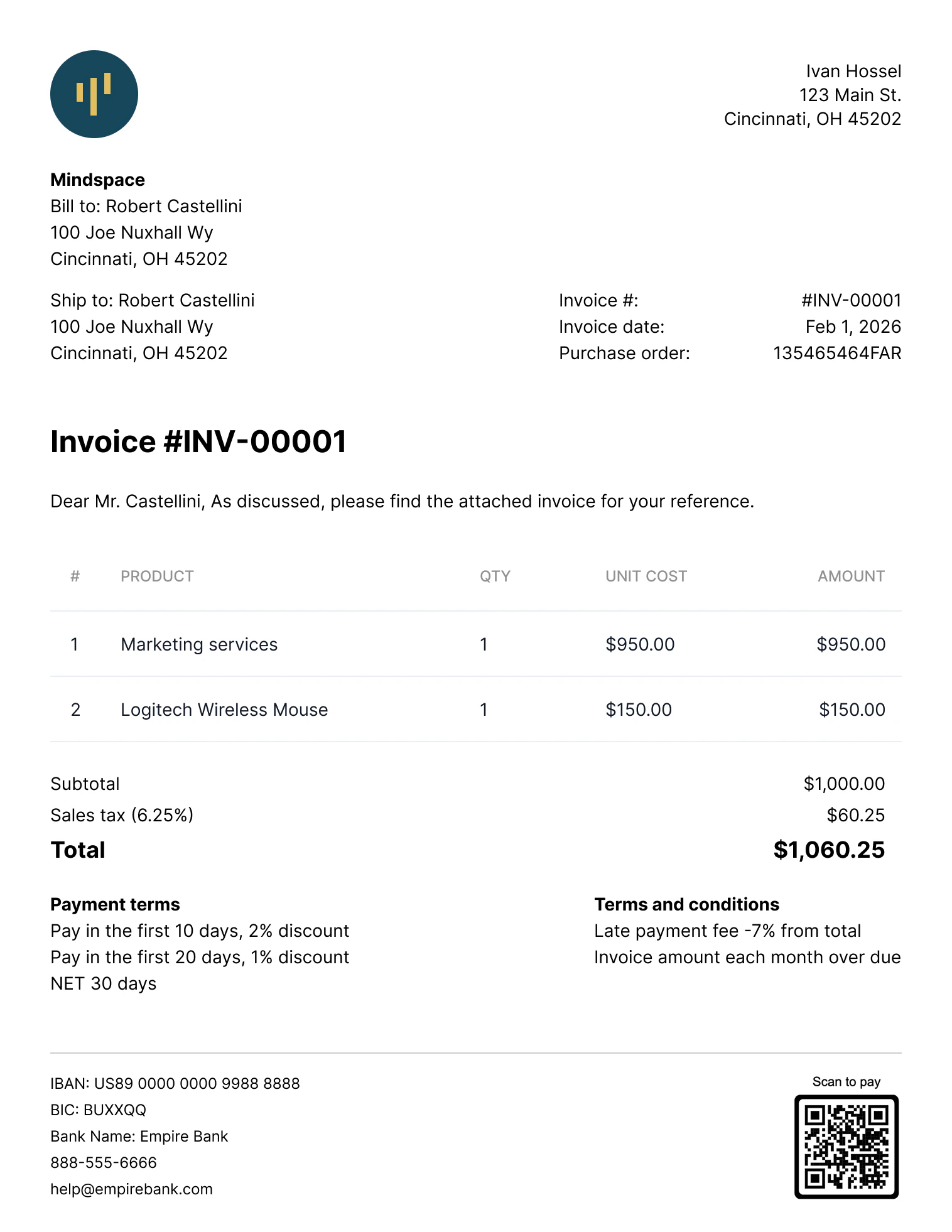 The PDF file is updated automatically if the invoice is changed (for example, if new line items are added to a draft invoice, or if the counterpart address is changed).
## Invoice customization
Tesouro allows organizations to modify organization information on an invoice. This includes providing a different organization logo, website, and contact information on the invoice object. You can only do this after creating the invoice by updating the invoice using the [`PATCH /receivables/{receivable_id}`](/finops/guides/accounts-receivable/invoices/manage#update-an-invoice) endpoint.
Modifying the organization information on the Invoice object only affects that invoice. The organization's existing or newly created invoices will
retain the original organization information.
### PDF localization
Tesouro provides several built-in PDF templates for receivables. The language on the invoice's PDF depends on the language of the invoice's counterpart. If the counterpart language is absent, Tesouro creates the invoice PDF in the organization's language. Updating the invoice's counterpart language or changing the invoice's counterpart to a counterpart with a different language will also update the invoice's PDF translation. For more information, see [PDF localization](/finops/guides/advanced/pdf-templates#localization).
Tesouro formats delimiters and decimal separators on amounts displayed on the PDFs based on the organization's country. Organizations can [change their default template](/finops/guides/advanced/pdf-templates#default) or customize their chosen templates anytime. For more information, see [PDF templates](/finops/guides/advanced/pdf-templates).
## Verify the invoice
Call `POST /receivables/{receivable_id}/verify` to check that an invoice has all required information — organization, counterpart, line items, and tax rates — before issuing it:
```sh lines theme={null}
curl -X POST 'https://api.sandbox.tesouro.com/v1/receivables/411dcb...289b3/verify' \
-H 'X-Finops-Version: 2025-06-23' \
-H 'X-Organization-Id: ORGANIZATION_ID' \
-H 'Authorization: Bearer ACCESS_TOKEN'
```
The `errors` object in the response shows all the missing information required on the invoice. If the invoice has all required information filled in, all response fields have the `null` value. The `warnings` object in the response represents possible faulty configurations on the invoice. For example, a mismatch between payment terms and payment reminders:
```json lines theme={null}
{
"errors": {
"counterpart": null,
"entity": null,
"products": null,
"receivable": null,
"tax_rates": null
},
"warnings": {
"payment_reminders": "The due date on one or more of the invoice's payment term's tier comes before the scheduled reminder date for the corresponding tier. Review the reminders configuration for the invoice."
}
}
```
If some of the required invoice fields are missing, the response contains a list of the missing fields. For example, the following response means that the organization tax ID, the counterpart tax ID, and measure unit ID on the invoice's second line item are missing. To make the invoice valid, you will need to update the corresponding organization and counterpart objects and provide their `tax_id`.
```json expandable lines theme={null}
{
"errors": {
"counterpart": ["tax_id"],
"entity": ["tax_id"],
"products": [
{
"line_item_number": 2,
"missing_fields": ["measure_unit_id"]
}
],
"receivable": null,
"tax_rates": null
},
"warnings": {
"payment_reminders": null
}
}
```
## Send the invoice via email
Once a draft invoice has been finalized, you can send it to the counterpart via email. The invoice will be attached as a PDF file to the email. You can also preview the invoice's email before sending it; for more information, see [Preview an invoice's email](/finops/guides/accounts-receivable/invoices/manage#preview-invoice-email).
To send an invoice, call [`POST /receivables/{receivable_id}/send`](/finops/reference/openapi/receivables/post-receivables-id-send) and provide the `subject_text` and `body_text`. The language of the email template used is determined by the counterpart's `language`.
Aside from the counterpart's default email address, Tesouro also allows you to provide a list of email addresses to send the invoice using the `recipients` field. If the `recipients` field isn't provided, the invoice email is sent only to the counterpart's email address.
```sh lines theme={null}
curl -X POST 'https://api.sandbox.tesouro.com/v1/receivables/411dcb...289b3/send' \
-H 'X-Finops-Version: 2025-06-23' \
-H 'X-Organization-Id: ORGANIZATION_ID' \
-H 'Authorization: Bearer ACCESS_TOKEN' \
-H 'Content-Type: application/json' \
-d '{
"subject_text": "New invoice #{invoice_number}",
"body_text": "Dear {contact_name},\n\nThank you for your business!\nPlease pay the balance of {amount_due} (invoice #{invoice_number}) by {due_date}.\n\nFor any questions or concerns, please don’t hesitate to get in touch with us at {entity_email}. We look forward to serving you again and wish you all the best!",
"recipients": {
"to": ["dana@example.com"],
"cc": ["support@example.com", "sales@example.com"],
"bcc": ["exec@example.com"]
}
}'
```
**Notes**
* The values of the `subject_text` and `body_text` fields will replace the `subject_text` and `body_template` variables if they were used when creating your custom templates. For more information, see [Create and manage email templates](/finops/guides/advanced/email-templates/manage) and [Variables list](/finops/guides/advanced/variables#list). Both the subject and body texts can include [variables](/finops/guides/advanced/variables) as placeholders for invoice-specific and counterpart-specific data.
* You can opt to attach the invoice's PDF to the email sent to the counterpart. To do this, you must update the value of the `mail.attach_documents_as_pdf` field to `true` in your Tesouro partner settings.
The `To` email address is taken from the `Counterpart` object associated with the invoice. This address is also returned in the `counterpart_contact.email` field of the `Receivable` object that represents the invoice.
All invoice emails are sent from the `noreply@tesouro.com` email address by default. You can customize the email domain name—`@exampleCompany.com`— by [configuring a mailbox](/finops/guides/advanced/mailboxes) for the organization. You can also customize the email sender name and username by updating your Tesouro partner settings. For more information, see [Update partner settings](/finops/reference/openapi/partner-settings/patch-settings).
A `200 OK` response from `POST /receivables/{receivable_id}/send` means Tesouro's email server successfully sent the email.
**Notes**
* Sending a `draft` invoice changes its [status](/finops/guides/accounts-receivable/invoices/index) to `issued`, and the `issued_date` field is automatically set to the current date and time. Issued invoices can no longer be edited.
* Invoices in the `uncollectible` status can't be sent via email. All other statuses can be sent.
#### Resend an invoice
To resend an already issued invoice, you can call `POST /receivables/{receivable_id}/send` again, optionally with different `subject_text` and `body_text` templates.
Tesouro also automatically sends [payment reminders](/finops/guides/accounts-receivable/invoices/payment-reminders) to the counterpart before the invoice due date and each payment term.
Resending an invoice does not change its `status` or `issued_date`.
The PDF file is updated automatically if the invoice is changed (for example, if new line items are added to a draft invoice, or if the counterpart address is changed).
## Invoice customization
Tesouro allows organizations to modify organization information on an invoice. This includes providing a different organization logo, website, and contact information on the invoice object. You can only do this after creating the invoice by updating the invoice using the [`PATCH /receivables/{receivable_id}`](/finops/guides/accounts-receivable/invoices/manage#update-an-invoice) endpoint.
Modifying the organization information on the Invoice object only affects that invoice. The organization's existing or newly created invoices will
retain the original organization information.
### PDF localization
Tesouro provides several built-in PDF templates for receivables. The language on the invoice's PDF depends on the language of the invoice's counterpart. If the counterpart language is absent, Tesouro creates the invoice PDF in the organization's language. Updating the invoice's counterpart language or changing the invoice's counterpart to a counterpart with a different language will also update the invoice's PDF translation. For more information, see [PDF localization](/finops/guides/advanced/pdf-templates#localization).
Tesouro formats delimiters and decimal separators on amounts displayed on the PDFs based on the organization's country. Organizations can [change their default template](/finops/guides/advanced/pdf-templates#default) or customize their chosen templates anytime. For more information, see [PDF templates](/finops/guides/advanced/pdf-templates).
## Verify the invoice
Call `POST /receivables/{receivable_id}/verify` to check that an invoice has all required information — organization, counterpart, line items, and tax rates — before issuing it:
```sh lines theme={null}
curl -X POST 'https://api.sandbox.tesouro.com/v1/receivables/411dcb...289b3/verify' \
-H 'X-Finops-Version: 2025-06-23' \
-H 'X-Organization-Id: ORGANIZATION_ID' \
-H 'Authorization: Bearer ACCESS_TOKEN'
```
The `errors` object in the response shows all the missing information required on the invoice. If the invoice has all required information filled in, all response fields have the `null` value. The `warnings` object in the response represents possible faulty configurations on the invoice. For example, a mismatch between payment terms and payment reminders:
```json lines theme={null}
{
"errors": {
"counterpart": null,
"entity": null,
"products": null,
"receivable": null,
"tax_rates": null
},
"warnings": {
"payment_reminders": "The due date on one or more of the invoice's payment term's tier comes before the scheduled reminder date for the corresponding tier. Review the reminders configuration for the invoice."
}
}
```
If some of the required invoice fields are missing, the response contains a list of the missing fields. For example, the following response means that the organization tax ID, the counterpart tax ID, and measure unit ID on the invoice's second line item are missing. To make the invoice valid, you will need to update the corresponding organization and counterpart objects and provide their `tax_id`.
```json expandable lines theme={null}
{
"errors": {
"counterpart": ["tax_id"],
"entity": ["tax_id"],
"products": [
{
"line_item_number": 2,
"missing_fields": ["measure_unit_id"]
}
],
"receivable": null,
"tax_rates": null
},
"warnings": {
"payment_reminders": null
}
}
```
## Send the invoice via email
Once a draft invoice has been finalized, you can send it to the counterpart via email. The invoice will be attached as a PDF file to the email. You can also preview the invoice's email before sending it; for more information, see [Preview an invoice's email](/finops/guides/accounts-receivable/invoices/manage#preview-invoice-email).
To send an invoice, call [`POST /receivables/{receivable_id}/send`](/finops/reference/openapi/receivables/post-receivables-id-send) and provide the `subject_text` and `body_text`. The language of the email template used is determined by the counterpart's `language`.
Aside from the counterpart's default email address, Tesouro also allows you to provide a list of email addresses to send the invoice using the `recipients` field. If the `recipients` field isn't provided, the invoice email is sent only to the counterpart's email address.
```sh lines theme={null}
curl -X POST 'https://api.sandbox.tesouro.com/v1/receivables/411dcb...289b3/send' \
-H 'X-Finops-Version: 2025-06-23' \
-H 'X-Organization-Id: ORGANIZATION_ID' \
-H 'Authorization: Bearer ACCESS_TOKEN' \
-H 'Content-Type: application/json' \
-d '{
"subject_text": "New invoice #{invoice_number}",
"body_text": "Dear {contact_name},\n\nThank you for your business!\nPlease pay the balance of {amount_due} (invoice #{invoice_number}) by {due_date}.\n\nFor any questions or concerns, please don’t hesitate to get in touch with us at {entity_email}. We look forward to serving you again and wish you all the best!",
"recipients": {
"to": ["dana@example.com"],
"cc": ["support@example.com", "sales@example.com"],
"bcc": ["exec@example.com"]
}
}'
```
**Notes**
* The values of the `subject_text` and `body_text` fields will replace the `subject_text` and `body_template` variables if they were used when creating your custom templates. For more information, see [Create and manage email templates](/finops/guides/advanced/email-templates/manage) and [Variables list](/finops/guides/advanced/variables#list). Both the subject and body texts can include [variables](/finops/guides/advanced/variables) as placeholders for invoice-specific and counterpart-specific data.
* You can opt to attach the invoice's PDF to the email sent to the counterpart. To do this, you must update the value of the `mail.attach_documents_as_pdf` field to `true` in your Tesouro partner settings.
The `To` email address is taken from the `Counterpart` object associated with the invoice. This address is also returned in the `counterpart_contact.email` field of the `Receivable` object that represents the invoice.
All invoice emails are sent from the `noreply@tesouro.com` email address by default. You can customize the email domain name—`@exampleCompany.com`— by [configuring a mailbox](/finops/guides/advanced/mailboxes) for the organization. You can also customize the email sender name and username by updating your Tesouro partner settings. For more information, see [Update partner settings](/finops/reference/openapi/partner-settings/patch-settings).
A `200 OK` response from `POST /receivables/{receivable_id}/send` means Tesouro's email server successfully sent the email.
**Notes**
* Sending a `draft` invoice changes its [status](/finops/guides/accounts-receivable/invoices/index) to `issued`, and the `issued_date` field is automatically set to the current date and time. Issued invoices can no longer be edited.
* Invoices in the `uncollectible` status can't be sent via email. All other statuses can be sent.
#### Resend an invoice
To resend an already issued invoice, you can call `POST /receivables/{receivable_id}/send` again, optionally with different `subject_text` and `body_text` templates.
Tesouro also automatically sends [payment reminders](/finops/guides/accounts-receivable/invoices/payment-reminders) to the counterpart before the invoice due date and each payment term.
Resending an invoice does not change its `status` or `issued_date`.