> ## Documentation Index
> Fetch the complete documentation index at: https://docs.tesouro.com/llms.txt
> Use this file to discover all available pages before exploring further.
# Invoice lifecycle
> Learn about the statuses that an outgoing invoice goes through inside Tesouro.
## Overview
An **invoice** is a receivable a company sends to a customer for goods or services that haven't been paid for yet — typically because the sale was on credit.
Integrate Tesouro's API into your software to automate accounts receivable for your business customers:
* Create and send invoices in fewer steps.
* Automate [payment reminders](/finops/guides/accounts-receivable/invoices/payment-reminders) and [overdue reminders](/finops/guides/accounts-receivable/invoices/overdue-reminders).
* Give your customers real-time visibility into what they owe and what's due next.
## Invoice statuses
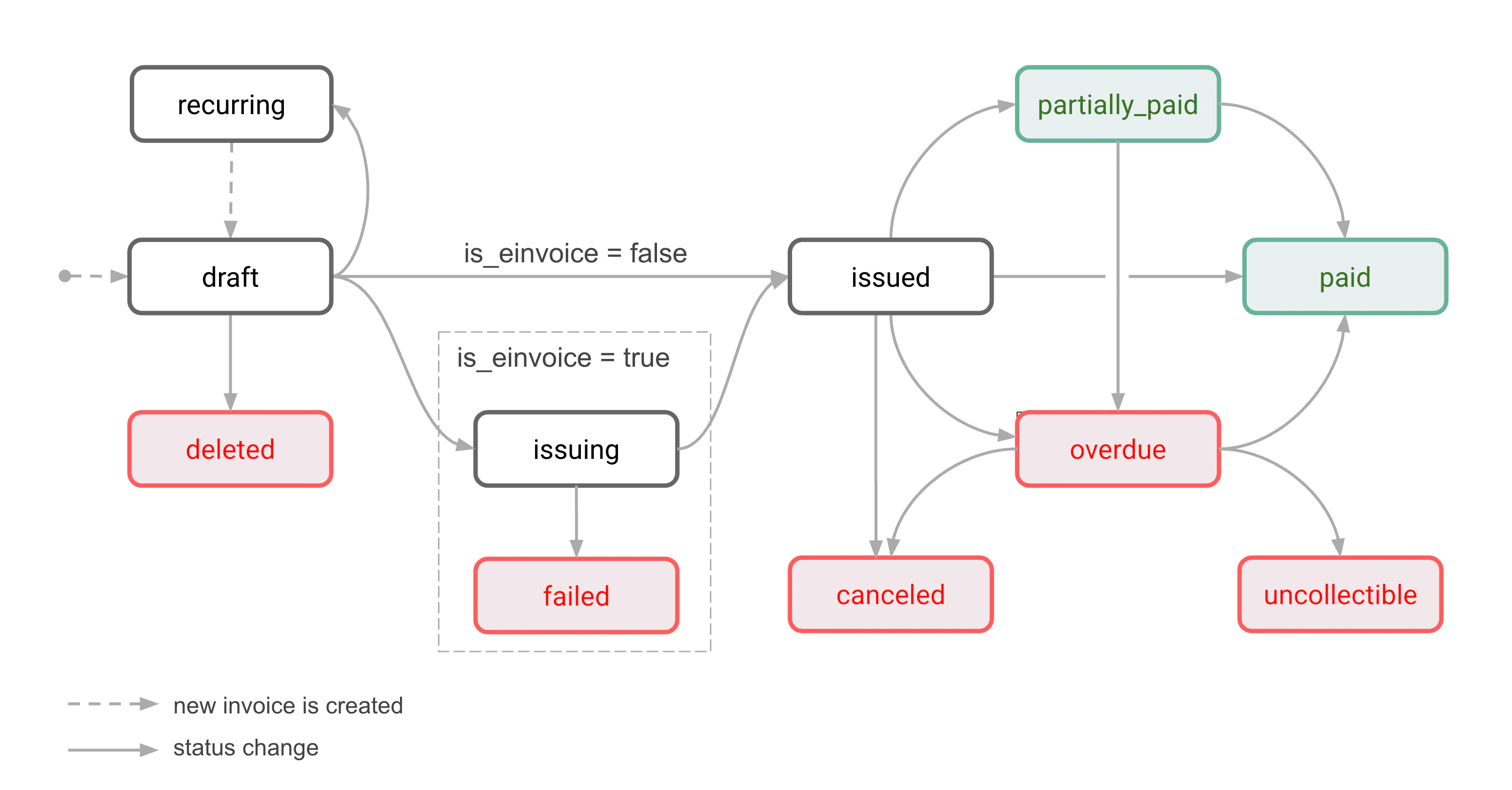
Outgoing invoices move through several statuses from creation to payment.
Each organization controls its own invoice workflow. Assign roles through the user hierarchy to scope which employees can access which invoices.
 ### Draft
All newly created invoices have the `draft` status. A `draft` invoice hasn't been finalized or issued, and can be edited at any time.
Draft invoices are the only ones that can be deleted.
### Issuing
An invoice enters this status when you submit it to an [e-invoicing](/finops/guides/e-invoicing/send) network.
If the e-invoice sends successfully, the status becomes `issued`; otherwise it becomes `failed`.
### Failed
This status indicates an error from an e-invoicing network.
E-invoices that failed to send can't be resent. This is a final status.
### Issued
The invoice has been finalized and sent to the counterpart.
If e-invoicing is enabled, this means the invoice was successfully delivered via the e-invoicing network.
Issued invoices can't be edited or deleted — only canceled.
### Recurring
When configuring [recurring invoices](/finops/guides/accounts-receivable/invoices/recurring), the `recurring` status is assigned to the base invoice from which the recurring invoices will be generated. The recurring invoices themselves go through the normal receivable lifecycle (such as `draft` → `issued` → `paid`).
Even if the recurrence ends or is canceled, the base invoice remains with the `recurring` status.
### Paid
The `paid` status indicates that the customer has fully paid the invoice and the organization has received the funds on its bank account. This is the final state of an invoice.
An invoice can reach the `paid` status in several ways:
* The customer pays the invoice via a [payment link](/finops/guides/payments/payment-links) or an [embedded payment component](/finops/guides/payments/payment-web-component). In this case, Tesouro changes the invoice status to `paid` automatically after the payment has settled.
* The organization [records an invoice payment](/finops/guides/accounts-receivable/invoices/manage#record-payment) for the remaining invoice amount.
* The organization [marks the invoice as paid](/finops/guides/accounts-receivable/invoices/manage#mark-as-paid) directly.
If the [organization setting](/finops/reference/openapi/identity/patch-organizations-id-settings) `generate_paid_invoice_pdf` is `true`, once an invoice becomes `paid` its PDF version is automatically updated to reflect the paid status:
* organization bank account details for payments are removed,
* the payment amount block displays two additional lines:
```lines theme={null}
Amount paid on :
Amount due: 0
```
### Partially paid
An invoice gets this status when a partial payment is [recorded](/finops/guides/accounts-receivable/invoices/manage#record-payment) for this invoice.
The counterpart will continue receiving [payment reminders](/finops/guides/accounts-receivable/invoices/payment-reminders) (if they are configured) until the invoice is paid in full.
If the counterpart pays the remaining amount by the due date, the invoice status is changed to `paid`. Issuing a [credit note](/finops/guides/accounts-receivable/credit-notes) for the remaining amount also marks the invoice as `paid`.
Partially paid invoices can't be canceled or deleted, but can become overdue if not fully paid by the due date.
A partially paid invoice that is overdue has the `overdue` status rather than `partially_paid`.
If the organization setting [`generate_paid_invoice_pdf`](/finops/reference/openapi/identity/patch-organizations-id-settings#request.body.generate_paid_invoice_pdf) is `true`, the totals block in the PDF invoice includes a list of all payments made and [credit notes](/finops/guides/accounts-receivable/credit-notes) applied, for example:
```lines theme={null}
Total $ 800
Amount paid on Jun 15, 2025 $-100
Credit applied Jun 23, 2025 $ -50
Amount paid on Jul 2, 2025 $-150
Amount due $ 500
```
### Overdue
The counterpart hasn't paid the invoice in full by the due date. Depending on the commercial terms, the counterpart may or may not be able to make further payments against the invoice. Send [overdue reminders](/finops/guides/accounts-receivable/invoices/overdue-reminders) if needed.
If the counterpart pays an overdue invoice in full, the invoice status becomes `paid`.
An overdue invoice can't be deleted, but you can cancel it or mark it as uncollectible to write it off.
### Canceled
An organization can cancel an invoice — for example, if it contains incorrect information or was issued by mistake. Only issued and overdue invoices that haven't been fully paid can be canceled. A partially paid invoice can be canceled if it's overdue. The counterpart can't make payments toward a canceled invoice.
Depending on the organization settings, canceling an invoice can automatically issue a [credit note](/finops/guides/accounts-receivable/credit-notes) for the remaining invoice amount.
Canceled invoices can't be deleted and remain in the system for accounting purposes. This is a final status.
For more information, see [Cancel an invoice](/finops/guides/accounts-receivable/invoices/manage#cancel).
### Deleted
Only `draft` invoices can be deleted. Once deleted, they can't be accessed.
For more information, see [Delete an invoice](/finops/guides/accounts-receivable/invoices/manage#delete).
### Uncollectible
The counterpart is unlikely to pay this invoice.
The difference from `canceled`: an `uncollectible` invoice still carries a legal claim on the counterpart. It's also the final state after a debt collection agency couldn't retrieve the funds. For bookkeeping, this is a write-off with tax implications.
For more information, see [Mark an invoice as uncollectible](/finops/guides/accounts-receivable/invoices/manage#mark-as-uncollectible).
### Draft
All newly created invoices have the `draft` status. A `draft` invoice hasn't been finalized or issued, and can be edited at any time.
Draft invoices are the only ones that can be deleted.
### Issuing
An invoice enters this status when you submit it to an [e-invoicing](/finops/guides/e-invoicing/send) network.
If the e-invoice sends successfully, the status becomes `issued`; otherwise it becomes `failed`.
### Failed
This status indicates an error from an e-invoicing network.
E-invoices that failed to send can't be resent. This is a final status.
### Issued
The invoice has been finalized and sent to the counterpart.
If e-invoicing is enabled, this means the invoice was successfully delivered via the e-invoicing network.
Issued invoices can't be edited or deleted — only canceled.
### Recurring
When configuring [recurring invoices](/finops/guides/accounts-receivable/invoices/recurring), the `recurring` status is assigned to the base invoice from which the recurring invoices will be generated. The recurring invoices themselves go through the normal receivable lifecycle (such as `draft` → `issued` → `paid`).
Even if the recurrence ends or is canceled, the base invoice remains with the `recurring` status.
### Paid
The `paid` status indicates that the customer has fully paid the invoice and the organization has received the funds on its bank account. This is the final state of an invoice.
An invoice can reach the `paid` status in several ways:
* The customer pays the invoice via a [payment link](/finops/guides/payments/payment-links) or an [embedded payment component](/finops/guides/payments/payment-web-component). In this case, Tesouro changes the invoice status to `paid` automatically after the payment has settled.
* The organization [records an invoice payment](/finops/guides/accounts-receivable/invoices/manage#record-payment) for the remaining invoice amount.
* The organization [marks the invoice as paid](/finops/guides/accounts-receivable/invoices/manage#mark-as-paid) directly.
If the [organization setting](/finops/reference/openapi/identity/patch-organizations-id-settings) `generate_paid_invoice_pdf` is `true`, once an invoice becomes `paid` its PDF version is automatically updated to reflect the paid status:
* organization bank account details for payments are removed,
* the payment amount block displays two additional lines:
```lines theme={null}
Amount paid on :
Amount due: 0
```
### Partially paid
An invoice gets this status when a partial payment is [recorded](/finops/guides/accounts-receivable/invoices/manage#record-payment) for this invoice.
The counterpart will continue receiving [payment reminders](/finops/guides/accounts-receivable/invoices/payment-reminders) (if they are configured) until the invoice is paid in full.
If the counterpart pays the remaining amount by the due date, the invoice status is changed to `paid`. Issuing a [credit note](/finops/guides/accounts-receivable/credit-notes) for the remaining amount also marks the invoice as `paid`.
Partially paid invoices can't be canceled or deleted, but can become overdue if not fully paid by the due date.
A partially paid invoice that is overdue has the `overdue` status rather than `partially_paid`.
If the organization setting [`generate_paid_invoice_pdf`](/finops/reference/openapi/identity/patch-organizations-id-settings#request.body.generate_paid_invoice_pdf) is `true`, the totals block in the PDF invoice includes a list of all payments made and [credit notes](/finops/guides/accounts-receivable/credit-notes) applied, for example:
```lines theme={null}
Total $ 800
Amount paid on Jun 15, 2025 $-100
Credit applied Jun 23, 2025 $ -50
Amount paid on Jul 2, 2025 $-150
Amount due $ 500
```
### Overdue
The counterpart hasn't paid the invoice in full by the due date. Depending on the commercial terms, the counterpart may or may not be able to make further payments against the invoice. Send [overdue reminders](/finops/guides/accounts-receivable/invoices/overdue-reminders) if needed.
If the counterpart pays an overdue invoice in full, the invoice status becomes `paid`.
An overdue invoice can't be deleted, but you can cancel it or mark it as uncollectible to write it off.
### Canceled
An organization can cancel an invoice — for example, if it contains incorrect information or was issued by mistake. Only issued and overdue invoices that haven't been fully paid can be canceled. A partially paid invoice can be canceled if it's overdue. The counterpart can't make payments toward a canceled invoice.
Depending on the organization settings, canceling an invoice can automatically issue a [credit note](/finops/guides/accounts-receivable/credit-notes) for the remaining invoice amount.
Canceled invoices can't be deleted and remain in the system for accounting purposes. This is a final status.
For more information, see [Cancel an invoice](/finops/guides/accounts-receivable/invoices/manage#cancel).
### Deleted
Only `draft` invoices can be deleted. Once deleted, they can't be accessed.
For more information, see [Delete an invoice](/finops/guides/accounts-receivable/invoices/manage#delete).
### Uncollectible
The counterpart is unlikely to pay this invoice.
The difference from `canceled`: an `uncollectible` invoice still carries a legal claim on the counterpart. It's also the final state after a debt collection agency couldn't retrieve the funds. For bookkeeping, this is a write-off with tax implications.
For more information, see [Mark an invoice as uncollectible](/finops/guides/accounts-receivable/invoices/manage#mark-as-uncollectible).