> ## Documentation Index
> Fetch the complete documentation index at: https://docs.tesouro.com/llms.txt
> Use this file to discover all available pages before exploring further.
# Create and send quotes
> Learn how to create a quote and send a formal offer.
## Overview
A quote is a formal offer that details how much a product or service will cost. Quotes are similar to invoices. The difference is that a quote is given to a potential customer *before* they decide to purchase, whereas an invoice is issued *after* the delivery of products or services to the customer.
Quotes have an expiry date by which the quote should be accepted or declined.
## Create a quote
A typical quote workflow includes the following steps:
1. Create a counterpart that represents the customer.
2. Create one or more *products* to be listed in the quote.
3. Apply the applicable `tax_rate_value` for the product in the line item
4. Create the quote.
### 1. Create a counterpart
The counterpart represents the customer (organization or individual) purchasing your products or services.
Learn how to [create counterparts](/finops/guides/common/counterparts/index#create).
### 2. Create a product
The products to be listed in the quote must also be created in advance. Depending on the organization's country, measure units may be required for products before the quote can be issued.
Learn how to [create products and measure units](/finops/guides/accounts-receivable/products#create-a-product).
As an example, here is a representation of a sample *t-shirt* product:
```json lines theme={null}
{
"id": "8755c86a-d630-4920-b6fd-fd2917d87dfb",
"name": "T-shirt",
"type": "product",
"description": "A black cotton t-shirt, medium size",
"price": {
"currency": "USD",
"value": 1000 // 10 USD
},
"measure_unit_id": "256560f1-8d09-4d21-aadf-45b33e4b0660",
"smallest_amount": 1
}
```
The associated measure unit is "pieces" (items):
```json lines theme={null}
{
"id": "256560f1-8d09-4d21-aadf-45b33e4b0660",
"name": "pcs",
"description": "pieces",
...
}
```
### 3. Create the quote
Once the counterpart and products have been created, you can create the quote for a given counterpart by calling `POST /receivables` with the `type` field in the request body set to `quote`.
The request body must contain the counterpart ID, line items (products, their quantities, and tax value), and quote expiration date, among other information. The subtotal, total, and tax amount are not specified in the request - they will be calculated automatically based on the product price, quantity, and tax rate.
The example below creates a quote for five items of a product:
```sh expandable lines theme={null}
curl -X POST 'https://api.sandbox.tesouro.com/v1/receivables' \
-H 'X-Finops-Version: 2025-06-23' \
-H 'X-Organization-Id: ORGANIZATION_ID' \
-H 'Authorization: Bearer ACCESS_TOKEN' \
-H 'Content-Type: application/json' \
-d '{
"type": "quote",
"counterpart_id": "0414f84c-b039-4203-b09b-e42b49245435",
"expiry_date": "2022-06-01",
"currency": "USD",
"line_items": [
{
"product_id": "8755c86a-d630-4920-b6fd-fd2917d87dfb",
"quantity": 5,
"tax_rate_value": "1250" // 12.5% USD
}
],
"counterpart_billing_address_id": "7482ea513-4689-d630-782b6f0fs3",
"entity_bank_account_id": "4c6d245f-0f57-4db1-8e94-eaa6311a8e7a"
}'
```
The successful `201 Created` response contains the `id` assigned to the created quote, along with the calculated total (`total_amount`), subtotal (`subtotal`), tax (`total_tax_amount`), and other information.
```json expandable lines theme={null}
{
"type": "quote",
"expiry_date": "2022-06-01",
"id": "e9a25ceb-003d-4c82-9e90-5d568ccd8c47",
"created_at": "2022-05-04T09:12:53.875094+00:00",
"updated_at": "2022-05-04T09:12:53.875103+00:00",
"currency": "USD",
"subtotal": 5000,
"line_items": [
{
"quantity": 5,
"product": {
...
}
}
],
"total_amount": 5900,
"total_tax_amount": 950,
...
}
```
For the complete list of quote data fields and their descriptions, refer to the `/receivables`
[endpoint](/finops/reference/openapi/receivables/post-receivables).
#### Auto-calculated amounts
Tesouro automatically calculates the subtotal, total, and tax amounts for the entire quote and individual line items. These amounts are included in responses from the `/receivables*` endpoints. You can display these amounts in your application and use them in your business logic.
* `line_items[i].total_before_tax` - line item amount including the discount but excluding tax.
* `line_items[i].total_after_tax` - line item amount including the discount and tax.
* `subtotal` - quote subtotal as a sum of line item subtotals. Tax and quote-level discounts are not included, but line-item discounts are included.
* `subtotal_after_tax` - a sum of `subtotal` and `total_tax_amount`. In other words, it is the quote subtotal including tax and line item discounts, but excluding quote-level discount.
* `discounted_subtotal` - quote subtotal after the quote-level discount. Tax is not included.
* `total_deduction_amount` - the sum of all deductions that are applied after tax (not to be confused with discounts).
* `total_tax_amount` - total tax amount for the entire quote.
* `total_tax_amounts` - a list of tax rates used in the document, along with the calculated total tax amounts for each rate.
* `total_withholding_tax` - if `withholding_tax_rate` is provided, the total withholding tax is calculated as the specified percentage of the `discounted_subtotal`.
* `total_amount` - total quote amount after all discounts, tax, and other taxes. It's the sum of `discounted_subtotal` and `total_tax_amount`, minus `total_deduction_amount` and `total_withholding_tax` (if any).
All monetary amounts are specified in [minor currency
units](/finops/support/currencies#minor-units), such as cents or pence.
## Download the quote as PDF
After creating a quote, you can download it as a PDF or send it to the customer via email.
Tesouro automatically generates the PDF version of quotes in the counterpart language and the organization language, and returns links to these files in the `file_url` and `original_file_url` fields of quote responses:
```json lines theme={null}
{
"type": "invoice",
...
// Counterpart's version of a PDF quote
"file_language": "en",
"file_url": "https://bucketname.s3.amazonaws.com//.pdf",
...
// Organization's version of a PDF quote
"original_file_language": "en",
"original_file_url": "https://bucketname.s3.amazonaws.com//.pdf",
...
}
```
If `file_url` or `original_file_url` is `null`, repeat the request to `GET /receivables/{quote_id}
` after some time.
If you need just the PDF file link without the full quote details, call `GET /receivables/{quote_id}/pdf-link`:
```sh lines theme={null}
curl -X GET 'https://api.sandbox.tesouro.com/v1/receivables/411dc6eb...6289b3/pdf-link' \
-H 'X-Finops-Version: 2025-06-23' \
-H 'X-Organization-Id: ORGANIZATION_ID' \
-H 'Authorization: Bearer ACCESS_TOKEN'
```
It returns the following response:
```json lines theme={null}
{
"file_url": "https://bucketname.s3.amazonaws.com//.pdf",
"original_file_url": "https://bucketname.s3.amazonaws.com//.pdf"
}
```
Here's how the PDF might look:
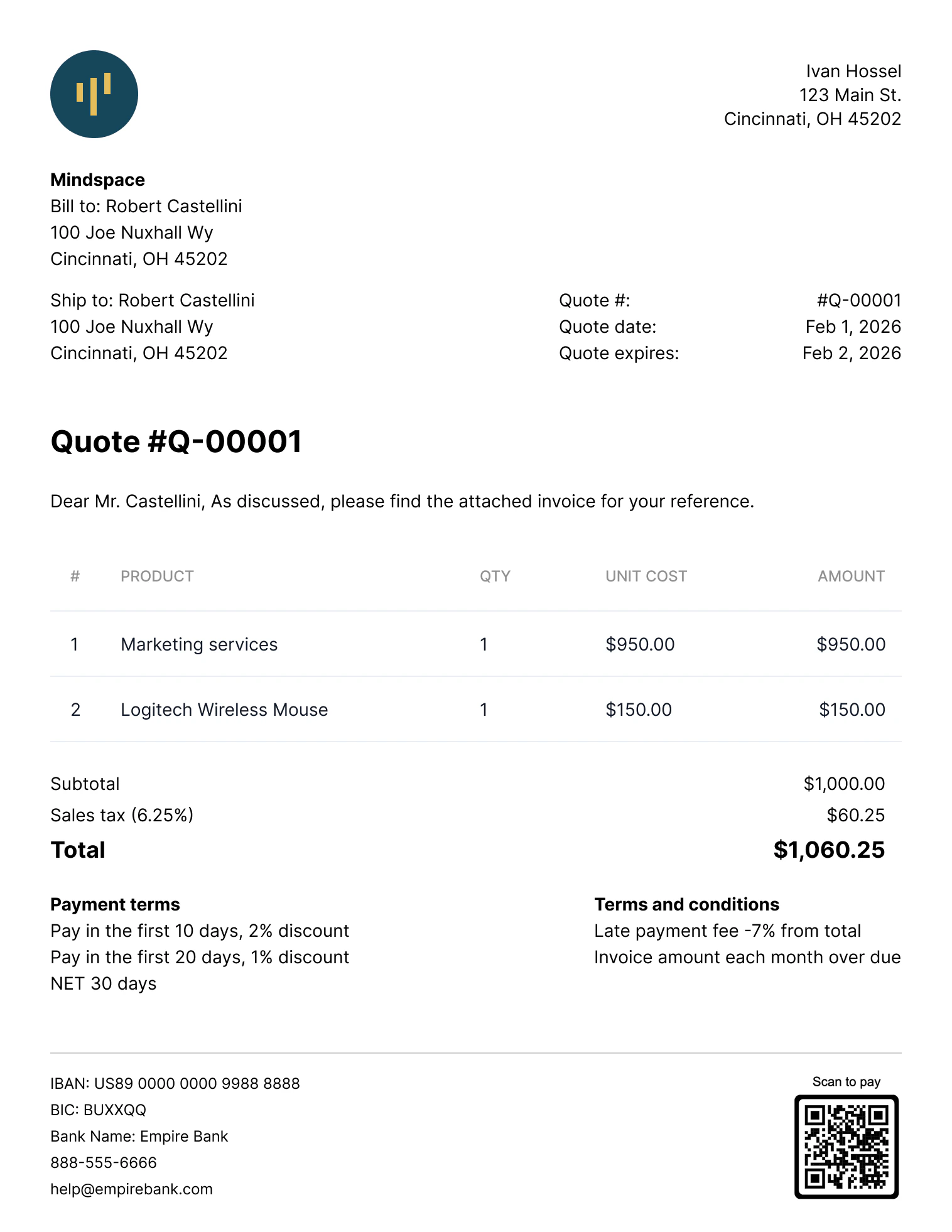 The PDF file is updated automatically if the quote is changed (for example, if new line items are
added to a draft quote, or if the counterpart address is changed).
### PDF localization
Tesouro provides several built-in PDF templates for quotes. The language on the quote's PDF depends on the language of the quote's counterpart. If the counterpart language is absent, the quote's PDF will be created in the organization's language. Updating the quote's counterpart's language or changing the quote's counterpart to a counterpart with a different language will also update the quote's PDF translation. For more information, see [PDF localization](/finops/guides/advanced/pdf-templates#localization).
Tesouro formats delimiters and decimal separators on amounts displayed on the PDFs based on the organization's country. Organizations can [change their default template](/finops/guides/advanced/pdf-templates#default) or customize their chosen templates anytime. For more information, see [PDF templates](/finops/guides/advanced/pdf-templates).
## Verify the quote
Before a newly created quote can be issued to a counterpart, certain required information must be present on the quote. This includes information about the organization, counterpart, line items, and tax rates on the quote. To trigger regulatory checks for a quote and check that a quote contains all required information, send a `POST` request to the `receivables/{receivable_id}/verify` endpoint as shown:
```sh lines theme={null}
curl -X POST 'https://api.sandbox.tesouro.com/v1/receivables/411dcb...289b3/verify' \
-H 'X-Finops-Version: 2025-06-23' \
-H 'X-Organization-Id: ORGANIZATION_ID' \
-H 'Authorization: Bearer ACCESS_TOKEN' \
```
A successful response returns an object containing the missing information required on the quote. The `errors` object in the response shows all the missing information required on the quote. If the quote has all required information filled in, all response fields have the `null` value. For example, the following example shows the response for a quote without organization tax ID and counterpart tax ID information.
```json lines theme={null}
{
"errors": {
"counterpart": ["tax_id"],
"entity": ["tax_id"],
"products": null,
"receivable": null,
"tax_rates": null
},
"warnings": {
"payment_reminders": null
}
}
```
## Send the quote via email
Once a draft quote has been finalized, you can send it to the counterpart via email. The quote will be attached as a PDF file to the email. You can also preview the quote's email before sending it; for more information, see [Preview a quote's email](/finops/guides/accounts-receivable/quotes/manage#preview-email).
To send a quote, call [`POST /receivables/{receivable_id}/send`](/finops/reference/openapi/receivables/post-receivables-id-send) and provide the `subject_text` and `body_text`. The language of the email template used is determined by the counterpart's `language`.
Aside from the counterpart's default email address, Tesouro also allows you to provide a list of email addresses to which you can send the invoice using the `recipients` field. If the `recipients` field is not provided, the quote email is sent only to the counterpart's email address.
```sh lines theme={null}
curl -X POST 'https://api.sandbox.tesouro.com/v1/receivables/e9a25c...8c47/send' \
-H 'X-Finops-Version: 2025-06-23' \
-H 'X-Organization-Id: ORGANIZATION_ID' \
-H 'Authorization: Bearer ACCESS_TOKEN' \
-H 'Content-Type: application/json' \
-d '{
"subject_text": "New quote #{quote_number}",
"body_text": "Dear {contact_name},\n\nThank you for requesting a quote for your project. We are happy to provide you with our quote #{quote_number}!\n\nIf you have any questions, please don\'t hesitate to contact us at {entity_email}.",
"recipients": {
"to": ["dana@example.com"],
"cc": ["support@example.com", "sales@example.com"],
"bcc": ["exec@example.com"]
}
}'
```
Notes:
* The values of the `subject_text` and `body_text` fields will replace the `subject_text` and `body_template` variables if they were used when creating your custom templates. For more information, see [Create and manage email templates](/finops/guides/advanced/email-templates/manage) and [Variables list](/finops/guides/advanced/variables#list). Both the subject and body texts can include [variables](/finops/guides/advanced/variables) as placeholders for quote-specific and counterpart-specific data.
* You can also opt to attach the quote's PDF to the email sent to the counterpart. To do this, you must update the value of the `mail.attach_documents_as_pdf` field to `true` in your partner settings.
The `To` email address is taken from the `Counterpart` object associated with the quote. This address is also returned in the `counterpart_contact.email` field of the `Receivable` object that represents the quote.
All quote emails are sent from the `noreply@tesouro.com` email address by default. You can customize the email domain name—`@exampleCompany.com`— by [configuring a mailbox](/finops/guides/advanced/mailboxes) for the organization. You can also customize the email sender name and username by updating your Tesouro partner settings.
A `200 OK` response from `POST /receivables/{quote_id}/send` means the email was successfully sent from the Tesouro email server.
**Notes**
* Sending a `draft` quote changes its [status](/finops/guides/accounts-receivable/quotes/index#draft) to `issued`. Issued quotes can no longer be edited.
* Only quotes in the `draft`, `issued`, and `accepted` statuses can be sent via email. Attempting to send a quote in the `deleted`, `expired`, or `declined` status will return an error.
#### Resend the quote
To resend an already issued quote, you can call `POST /receivables/{quote_id}/send` again, optionally with different `subject_text` and `body_text` templates.
Resending a quote does not change its `status`.
The PDF file is updated automatically if the quote is changed (for example, if new line items are
added to a draft quote, or if the counterpart address is changed).
### PDF localization
Tesouro provides several built-in PDF templates for quotes. The language on the quote's PDF depends on the language of the quote's counterpart. If the counterpart language is absent, the quote's PDF will be created in the organization's language. Updating the quote's counterpart's language or changing the quote's counterpart to a counterpart with a different language will also update the quote's PDF translation. For more information, see [PDF localization](/finops/guides/advanced/pdf-templates#localization).
Tesouro formats delimiters and decimal separators on amounts displayed on the PDFs based on the organization's country. Organizations can [change their default template](/finops/guides/advanced/pdf-templates#default) or customize their chosen templates anytime. For more information, see [PDF templates](/finops/guides/advanced/pdf-templates).
## Verify the quote
Before a newly created quote can be issued to a counterpart, certain required information must be present on the quote. This includes information about the organization, counterpart, line items, and tax rates on the quote. To trigger regulatory checks for a quote and check that a quote contains all required information, send a `POST` request to the `receivables/{receivable_id}/verify` endpoint as shown:
```sh lines theme={null}
curl -X POST 'https://api.sandbox.tesouro.com/v1/receivables/411dcb...289b3/verify' \
-H 'X-Finops-Version: 2025-06-23' \
-H 'X-Organization-Id: ORGANIZATION_ID' \
-H 'Authorization: Bearer ACCESS_TOKEN' \
```
A successful response returns an object containing the missing information required on the quote. The `errors` object in the response shows all the missing information required on the quote. If the quote has all required information filled in, all response fields have the `null` value. For example, the following example shows the response for a quote without organization tax ID and counterpart tax ID information.
```json lines theme={null}
{
"errors": {
"counterpart": ["tax_id"],
"entity": ["tax_id"],
"products": null,
"receivable": null,
"tax_rates": null
},
"warnings": {
"payment_reminders": null
}
}
```
## Send the quote via email
Once a draft quote has been finalized, you can send it to the counterpart via email. The quote will be attached as a PDF file to the email. You can also preview the quote's email before sending it; for more information, see [Preview a quote's email](/finops/guides/accounts-receivable/quotes/manage#preview-email).
To send a quote, call [`POST /receivables/{receivable_id}/send`](/finops/reference/openapi/receivables/post-receivables-id-send) and provide the `subject_text` and `body_text`. The language of the email template used is determined by the counterpart's `language`.
Aside from the counterpart's default email address, Tesouro also allows you to provide a list of email addresses to which you can send the invoice using the `recipients` field. If the `recipients` field is not provided, the quote email is sent only to the counterpart's email address.
```sh lines theme={null}
curl -X POST 'https://api.sandbox.tesouro.com/v1/receivables/e9a25c...8c47/send' \
-H 'X-Finops-Version: 2025-06-23' \
-H 'X-Organization-Id: ORGANIZATION_ID' \
-H 'Authorization: Bearer ACCESS_TOKEN' \
-H 'Content-Type: application/json' \
-d '{
"subject_text": "New quote #{quote_number}",
"body_text": "Dear {contact_name},\n\nThank you for requesting a quote for your project. We are happy to provide you with our quote #{quote_number}!\n\nIf you have any questions, please don\'t hesitate to contact us at {entity_email}.",
"recipients": {
"to": ["dana@example.com"],
"cc": ["support@example.com", "sales@example.com"],
"bcc": ["exec@example.com"]
}
}'
```
Notes:
* The values of the `subject_text` and `body_text` fields will replace the `subject_text` and `body_template` variables if they were used when creating your custom templates. For more information, see [Create and manage email templates](/finops/guides/advanced/email-templates/manage) and [Variables list](/finops/guides/advanced/variables#list). Both the subject and body texts can include [variables](/finops/guides/advanced/variables) as placeholders for quote-specific and counterpart-specific data.
* You can also opt to attach the quote's PDF to the email sent to the counterpart. To do this, you must update the value of the `mail.attach_documents_as_pdf` field to `true` in your partner settings.
The `To` email address is taken from the `Counterpart` object associated with the quote. This address is also returned in the `counterpart_contact.email` field of the `Receivable` object that represents the quote.
All quote emails are sent from the `noreply@tesouro.com` email address by default. You can customize the email domain name—`@exampleCompany.com`— by [configuring a mailbox](/finops/guides/advanced/mailboxes) for the organization. You can also customize the email sender name and username by updating your Tesouro partner settings.
A `200 OK` response from `POST /receivables/{quote_id}/send` means the email was successfully sent from the Tesouro email server.
**Notes**
* Sending a `draft` quote changes its [status](/finops/guides/accounts-receivable/quotes/index#draft) to `issued`. Issued quotes can no longer be edited.
* Only quotes in the `draft`, `issued`, and `accepted` statuses can be sent via email. Attempting to send a quote in the `deleted`, `expired`, or `declined` status will return an error.
#### Resend the quote
To resend an already issued quote, you can call `POST /receivables/{quote_id}/send` again, optionally with different `subject_text` and `body_text` templates.
Resending a quote does not change its `status`.