> ## Documentation Index
> Fetch the complete documentation index at: https://docs.tesouro.com/llms.txt
> Use this file to discover all available pages before exploring further.
# Manage quotes
> Learn how to manage quotes and change quotes statuses.
## Update a quote
All newly created quotes start in the `draft` status. You can edit draft quotes before issuing them to a counterpart.
To edit a draft quote, call [`PATCH /receivables/{receivable_id}`](/finops/reference/openapi/receivables/patch-receivables-id) with the updated fields in the request body. You can update counterpart data, quote memo, existing line items data, and other details.
```sh lines theme={null}
curl -X PATCH 'https://api.sandbox.tesouro.com/v1/receivables/411dc6eb...6289b3' \
-H 'X-Finops-Version: 2025-06-23' \
-H 'X-Organization-Id: ORGANIZATION_ID' \
-H 'Authorization: Bearer ACCESS_TOKEN' \
-H 'Content-Type: application/json' \
-d '{
"quote": {
"currency": "USD",
"counterpart_id": "782b6f0f-0177-475c-b1e4-98dc160a656f",
"counterpart_billing_address_id": "796d1f1d-f345-4888-849c-6cbcfbd39982",
"entity_bank_account_id": "3fa85f64-5717-4562-b3fc-2c963f66afa6"
}
}'
```
When updating a quote's counterpart, you must also provide the new counterpart's `counterpart_billing_address_id` in the request body to update the `counterpart_billing_address` object.
## Update quote line items
You can modify a quote's line items to add, remove, or update the products and product details on the quote. To update a quote's line item, send a `PUT` request to the [`/receivables/{receivable_id}/line-items`](/finops/reference/openapi/receivables/put-receivables-id-line-items) endpoint. In the request body, use the `data` field to specify an array of the quote's new line items.
```sh expandable lines theme={null}
curl -X PUT 'https://api.sandbox.tesouro.com/v1/receivables/411dc6eb...6289b3/line-items' \
-H 'X-Finops-Version: 2025-06-23' \
-H 'X-Organization-Id: ORGANIZATION_ID' \
-H 'Authorization: Bearer ACCESS_TOKEN' \
-H 'Content-Type: application/json' \
-d '{
"data": [
{
"quantity": 2,
"product_id": "fb2cc78f-3396-42e1-a69f-04b1931e4a84",
"vat_rate_id": "8d4c2c10-f7d7-4d7c-a1f5-5f3a9d56371e",
"discount": {
"type": "amount",
"amount": 0
}
},
{
"quantity": 4,
"product_id": "d1bc6df0-1571-457c-8407-7cf42aceb5dd",
"vat_rate_id":"8d4c2c10-f7d7-4d7c-a1f5-5f3a9d56371e",
"discount": {
"type":"amount",
"amount":0
}
}
]
}'
```
A successful request overwrites the quote's existing line items and replaces them with the newly defined array of line item objects.
## Preview a quote's email
After creating a quote, you can preview a quote's email before issuing it. This step can be used when troubleshooting email template layouts for a quote to ensure that the final presentation aligns with your template design.
To preview a quote's template, make a `POST` request to the [`/receivables/{receivable_id}/preview`](/finops/reference/openapi/receivables/post-receivables-id-preview) endpoint. The `language` field determines the language of the email template used to preview the quote. If a value is not provided, it defaults to `en`.
```sh lines theme={null}
curl -X POST 'https://api.sandbox.tesouro.com/v1/receivables/411dc6eb...6289b3/preview' \
-H 'X-Finops-Version: 2025-06-23' \
-H 'X-Organization-Id: ORGANIZATION_ID' \
-H 'Authorization: Bearer ACCESS_TOKEN' \
-H 'Content-Type: application/json' \
-d '{
"subject_text": "New quote #{quote_number}",
"body_text": "Dear {contact_name},\n\nThank you for requesting a quote for your project. We are happy to provide you with our quote #{quote_number}!\n\nIf you have any questions, please dont hesitate to contact us at {entity_email}.",
"language": "en"
}'
```
The values of the `subject_text` and `body_text` fields will replace the `subject_text` and `body_template` variables if they were used when creating your custom templates. For more information, see [Create and manage email templates](/finops/guides/advanced/email-templates/manage) and [Variables list](/finops/guides/advanced/variables#list).
Only quotes in the `draft` and `issued` statuses can be previewed. Attempting to preview a quote
in any other status will return a `409 Conflict` error.
## Accept a quote
If the customer accepts the quote, call [`POST /receivables/{quote_id}/accept`](/finops/reference/openapi/receivables/post-receivables-id-accept) to mark the quote as `accepted`:
```sh lines theme={null}
curl -X POST 'https://api.sandbox.tesouro.com/v1/receivables/e9a25c...8c47/accept' \
-H 'X-Finops-Version: 2025-06-23' \
-H 'X-Organization-Id: ORGANIZATION_ID' \
-H 'Authorization: Bearer ACCESS_TOKEN'
```
When a quote is accepted, Tesouro automatically creates a new invoice based on the information on the quote. To get the newly created invoice you can call `GET /receivables?based_on=QUOTE_ID`, where `QUOTE_ID` represents the ID of the accepted quote.
### Accept a quote with a digital signature
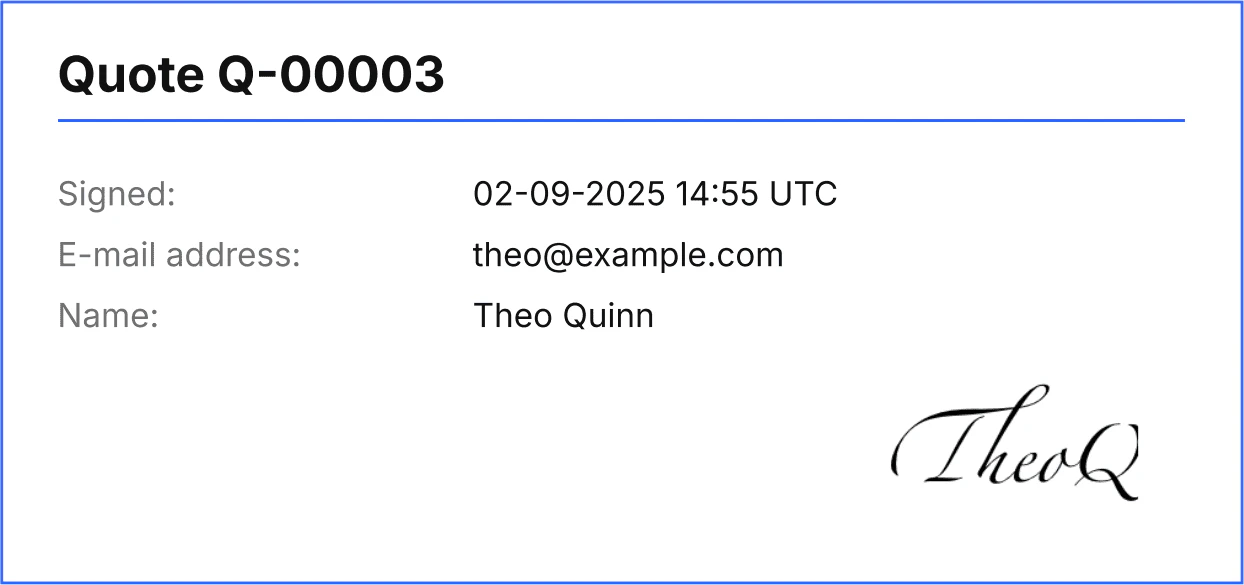
Organizations can require that their customers provide a signature when accepting quotes. To do this, the `signature_required` field in the quote object must be `true`.
Organization setting
[`quote_signature_required`](/finops/reference/openapi/identity/patch-organizations-id-settings#request.body.quote_signature_required)
defines the default value of the `signature_required` field for all newly created quotes.
When `signature_required` is `true` for a quote, a request to `POST /receivables/{receivable_id}/accept`
must include the `signature` object containing the signee's email address, name, and signature image. The `signature_image` field must be a Base64-encoded PNG image of the signee's signature.
```sh lines theme={null}
curl -X POST 'https://api.sandbox.tesouro.com/v1/receivables/e9a25c...8c47/accept' \
-H 'X-Finops-Version: 2025-06-23' \
-H 'X-Organization-Id: ORGANIZATION_ID' \
-H 'Authorization: Bearer ACCESS_TOKEN' \
-H 'Content-Type: application/json' \
-d '{
"signature": {
"email": "theo@example.com",
"full_name": "Theo Quinn",
"signature_image": "... base64-encoded PNG image ..."
}
}'
```
Additionally, if the organization setting [document\_rendering.quote.display\_signature](/finops/reference/openapi/identity/patch-organizations-id-settings#request.body.document_rendering.quote.display_signature) is `true`, the PDF quote is automatically updated to include the signature specified when the quote was accepted. This setting can be overridden for individual quotes.
 ### Accept quotes using QR codes
The field `quote_accept_page_url` defines a link to a page that can be accessed to accept the quote. When `quote_accept_page_url` is specified, the quote will include a QR code representing the provided URL. Tesouro's partners must implement and host this page on their side.
The default value of `quote_accept_page_url` is `https://tesouro.com`.
## Decline a quote
If the customer declined the quote, call [`POST /receivables/{quote_id}/decline`](/finops/reference/openapi/receivables/post-receivables-id-decline) to mark the quote as `declined`. As a best practice, customers should provide a reason why they declined the quote. This reason can be specified in the `comment` field in the request body. If no `comment` is available, you can omit the request body.
```sh lines theme={null}
curl -X POST 'https://api.sandbox.tesouro.com/v1/receivables/e9a25c...8c47/decline' \
-H 'X-Finops-Version: 2025-06-23' \
-H 'X-Organization-Id: ORGANIZATION_ID' \
-H 'Authorization: Bearer ACCESS_TOKEN' \
-H 'Content-Type: application/json' \
-d '{"comment": "Thanks for the quote, but we decided to go with another vendor."}'
```
## Customize quote numbering
Quote numbers are customized in the organization settings. Customizing a quote number will affect all quotes subsequently issued by the organization. The `document_id` on previously issued quotes will not be affected by this change. To customize quote numbering, make a `PATCH` request to the `/organizations/{organization_id}/settings` endpoint as shown:
```sh expandable lines theme={null}
curl -X PATCH 'https://api.sandbox.tesouro.com/identity/v1/organizations/5b031d0c...44df31ebf0db/settings' \
-H 'X-Finops-Version: 2025-06-23' \
-H 'Authorization: Bearer YOUR_ACCESS_TOKEN' \
-H 'Content-Type: application/json' \
-d '{
"document_ids": {
"include_date": true,
"min_digits": 3,
"document_type_prefix": {
"quote": "QU",
},
"next_number": {
"quote": "10",
}
}
}'
```
For more information on customizing quote numbering, see [Document number customization](/finops/guides/advanced/document-number-customization).
## Create an invoice based on the quote
If the customer accepts the quote, you can create an invoice based on this quote after the goods or services have been delivered.
To create an invoice from a quote, call [`POST /receivables`](/finops/reference/openapi/receivables/post-receivables) and provide the quote ID in the `based_on` field in the request body:
```sh lines theme={null}
curl -X POST 'https://api.sandbox.tesouro.com/v1/receivables' \
-H 'X-Finops-Version: 2025-06-23' \
-H 'X-Organization-Id: ORGANIZATION_ID' \
-H 'Authorization: Bearer ACCESS_TOKEN' \
-H 'Content-Type: application/json' \
-d '{
"type": "invoice",
"based_on": "e9a25ceb-003d-4c82-9e90-5d568ccd8c47"
}'
```
Invoices can be created not only from `accepted` quotes, but also from any other quote states,
even `declined`.
The request above creates a new [draft](/finops/guides/accounts-receivable/invoices/index#draft) invoice with a copy of the quote data (that is, with the same line items and counterpart). The ID and document number of the original quote are saved in the `based_on` and `based_on_document_id` properties, respectively:
```json lines theme={null}
{
"type": "invoice",
"id": "b21c80f9-18c0-40ce-be6b-89ddcc4d8ad9",
"created_at": "2022-05-19T06:04:29.499753+00:00",
"updated_at": "2022-05-19T06:04:30.976539+00:00",
"currency": "USD",
"subtotal": 5000,
"total_amount": 5900,
"line_items": [ ... ],
...
"status": "draft",
"based_on": "e9a25ceb-003d-4c82-9e90-5d568ccd8c47",
"based_on_document_id": "Q-00015",
"payment_terms": null
}
```
Next, update the created draft invoice and add other necessary information, such as:
* `payment_terms_id` - [payment terms](/finops/guides/common/payment-terms) that define the invoice due date and, optionally, early payment discounts;
* `payment_reminder_id` - [payment reminder](/finops/guides/accounts-receivable/invoices/payment-reminders) configuration for this invoice. Required if [organization setting](/finops/reference/openapi/identity/get-organizations-id-settings) `reminder.enabled` is `true`.
For a complete list of fields that can be updated in draft invoices, refer to the description of
the [`PATCH /receivables/{receivable_id}`](/finops/reference/openapi/receivables/patch-receivables-id) endpoint.
```sh lines theme={null}
curl -X PATCH 'https://api.sandbox.tesouro.com/v1/receivables/b21c80...8ad9' \
-H 'X-Finops-Version: 2025-06-23' \
-H 'X-Organization-Id: ORGANIZATION_ID' \
-H 'Authorization: Bearer ACCESS_TOKEN' \
-H 'Content-Type: application/json' \
-d '{
"invoice": {
"payment_terms_id": "411d9079-02af-476d-8723-4789882e01c3"
}
}'
```
The invoice due date is calculated automatically based on the creation date and payment terms and is returned in the `due_date` field on the invoice response object.
```json expandable lines theme={null}
{
"type": "invoice",
"id": "b21c80f9-18c0-40ce-be6b-89ddcc4d8ad9",
"created_at": "2022-05-19T06:04:29.499753+00:00",
...
"due_date": "2024-06-18",
"payment_terms": {
"id": "411d9079-02af-476d-8723-4789882e01c3",
"name": "Net 30",
"description": "The payment is due within 30 days after the invoice issue date.",
"term_final": {
"number_of_days": 30,
"end_date": "2022-06-18"
}
}
}
```
Finally, you can [download the quote as PDF](/finops/guides/accounts-receivable/quotes/create#download-pdf) and send it to the customer via email.
## Clone a quote
You can clone a quote of any status by sending a `POST` request to the [`/receivables/{receivable_id}/clone`](/finops/reference/openapi/receivables/post-receivables-id-clone) endpoint. Cloning a quote copies the updated organization and counterpart information associated with the quote.
```sh lines theme={null}
curl -X POST 'https://api.sandbox.tesouro.com/v1/receivables/411dc6eb...6289b3/clone' \
-H 'X-Finops-Version: 2025-06-23' \
-H 'X-Organization-Id: ORGANIZATION_ID' \
-H 'Authorization: Bearer ACCESS_TOKEN'
```
A successful request returns an object with the newly cloned quote details.
All newly cloned quotes will have a `draft` status regardless of the status of the original quote
they were cloned from. Therefore, all previously updated values related to issuing the original
quote will be reset.
## Quote expiration
After a quote's `expiry_date` has passed, the quote status automatically becomes `expired`. Expired quotes cannot be accepted or declined. If needed, you can create a fresh quote for the same counterpart.
## Delete a quote
Draft quotes can be deleted by calling [`DELETE /receivables/{receivable_id}`](/finops/reference/openapi/receivables/delete-receivables-id). It's important to note that this action is irreversible, and once deleted, the quotes can no longer be accessed.
```sh lines theme={null}
curl -X DELETE 'https://api.sandbox.tesouro.com/v1/receivables/411dc6eb...6289b3' \
-H 'X-Finops-Version: 2025-06-23' \
-H 'X-Organization-Id: ORGANIZATION_ID' \
-H 'Authorization: Bearer ACCESS_TOKEN'
```
Only quotes in the `draft` status can be deleted successfully. Attempting to delete a quote with
any other status will throw an error.
## List all quotes
To get a list of all quotes generated by an organization, call [`GET /receivables?type=quote`](/finops/reference/openapi/receivables/get-receivables):
```sh lines theme={null}
curl -X GET 'https://api.sandbox.tesouro.com/v1/receivables?type=quote' \
-H 'X-Finops-Version: 2025-06-23' \
-H 'X-Organization-Id: ORGANIZATION_ID' \
-H 'Authorization: Bearer ACCESS_TOKEN'
```
You can [sort and filter](/finops/api/concepts/pagination-sorting-filtering#sorting) the results by the amount, counterpart name, and other fields. For the full list of available sort and filter parameters, see the description of the [`GET /receivables`](/finops/reference/openapi/receivables/get-receivables) endpoint.
Some examples:
* `GET /receivables?type=quote&counterpart_name=Acme%20Inc.` - get all quotes issued to Acme Inc.
* `GET /receivables?type=quote&amount__gte=15000` - get all quotes where the total amount is \$150 or more.
* `GET /receivables?type=quote&status__in=draft&status__in=issued` - get all draft and issued quotes.
* `GET /receivables?type=quote&created_at__gte=2022-01-01T00%3A00%3A00` - get all quotes created on or after January 1, 2022.
## Retrieve a quote
To get information about a specific quote, call [`GET /receivables/{receivable_id}`](/finops/reference/openapi/receivables/get-receivables-id) and provide the quote ID.
## Find invoices created from a quote
To check if there are invoices created from a specific quote, call `GET /receivables?based_on=QUOTE_ID`:
```sh lines theme={null}
curl -X GET 'https://api.sandbox.tesouro.com/v1/receivables?based_on=e9a25ceb-003d-4c82-9e90-5d568ccd8c47' \
-H 'X-Finops-Version: 2025-06-23' \
-H 'X-Organization-Id: ORGANIZATION_ID' \
-H 'Authorization: Bearer ACCESS_TOKEN'
```
The `data` array in the response contains a list of related invoices, if any:
```json lines theme={null}
{
"data": [
{
"type": "invoice",
"id": "b21c80f9-18c0-40ce-be6b-89ddcc4d8ad9",
...
}
],
"prev_pagination_token": null,
"next_pagination_token": null
}
```
### Accept quotes using QR codes
The field `quote_accept_page_url` defines a link to a page that can be accessed to accept the quote. When `quote_accept_page_url` is specified, the quote will include a QR code representing the provided URL. Tesouro's partners must implement and host this page on their side.
The default value of `quote_accept_page_url` is `https://tesouro.com`.
## Decline a quote
If the customer declined the quote, call [`POST /receivables/{quote_id}/decline`](/finops/reference/openapi/receivables/post-receivables-id-decline) to mark the quote as `declined`. As a best practice, customers should provide a reason why they declined the quote. This reason can be specified in the `comment` field in the request body. If no `comment` is available, you can omit the request body.
```sh lines theme={null}
curl -X POST 'https://api.sandbox.tesouro.com/v1/receivables/e9a25c...8c47/decline' \
-H 'X-Finops-Version: 2025-06-23' \
-H 'X-Organization-Id: ORGANIZATION_ID' \
-H 'Authorization: Bearer ACCESS_TOKEN' \
-H 'Content-Type: application/json' \
-d '{"comment": "Thanks for the quote, but we decided to go with another vendor."}'
```
## Customize quote numbering
Quote numbers are customized in the organization settings. Customizing a quote number will affect all quotes subsequently issued by the organization. The `document_id` on previously issued quotes will not be affected by this change. To customize quote numbering, make a `PATCH` request to the `/organizations/{organization_id}/settings` endpoint as shown:
```sh expandable lines theme={null}
curl -X PATCH 'https://api.sandbox.tesouro.com/identity/v1/organizations/5b031d0c...44df31ebf0db/settings' \
-H 'X-Finops-Version: 2025-06-23' \
-H 'Authorization: Bearer YOUR_ACCESS_TOKEN' \
-H 'Content-Type: application/json' \
-d '{
"document_ids": {
"include_date": true,
"min_digits": 3,
"document_type_prefix": {
"quote": "QU",
},
"next_number": {
"quote": "10",
}
}
}'
```
For more information on customizing quote numbering, see [Document number customization](/finops/guides/advanced/document-number-customization).
## Create an invoice based on the quote
If the customer accepts the quote, you can create an invoice based on this quote after the goods or services have been delivered.
To create an invoice from a quote, call [`POST /receivables`](/finops/reference/openapi/receivables/post-receivables) and provide the quote ID in the `based_on` field in the request body:
```sh lines theme={null}
curl -X POST 'https://api.sandbox.tesouro.com/v1/receivables' \
-H 'X-Finops-Version: 2025-06-23' \
-H 'X-Organization-Id: ORGANIZATION_ID' \
-H 'Authorization: Bearer ACCESS_TOKEN' \
-H 'Content-Type: application/json' \
-d '{
"type": "invoice",
"based_on": "e9a25ceb-003d-4c82-9e90-5d568ccd8c47"
}'
```
Invoices can be created not only from `accepted` quotes, but also from any other quote states,
even `declined`.
The request above creates a new [draft](/finops/guides/accounts-receivable/invoices/index#draft) invoice with a copy of the quote data (that is, with the same line items and counterpart). The ID and document number of the original quote are saved in the `based_on` and `based_on_document_id` properties, respectively:
```json lines theme={null}
{
"type": "invoice",
"id": "b21c80f9-18c0-40ce-be6b-89ddcc4d8ad9",
"created_at": "2022-05-19T06:04:29.499753+00:00",
"updated_at": "2022-05-19T06:04:30.976539+00:00",
"currency": "USD",
"subtotal": 5000,
"total_amount": 5900,
"line_items": [ ... ],
...
"status": "draft",
"based_on": "e9a25ceb-003d-4c82-9e90-5d568ccd8c47",
"based_on_document_id": "Q-00015",
"payment_terms": null
}
```
Next, update the created draft invoice and add other necessary information, such as:
* `payment_terms_id` - [payment terms](/finops/guides/common/payment-terms) that define the invoice due date and, optionally, early payment discounts;
* `payment_reminder_id` - [payment reminder](/finops/guides/accounts-receivable/invoices/payment-reminders) configuration for this invoice. Required if [organization setting](/finops/reference/openapi/identity/get-organizations-id-settings) `reminder.enabled` is `true`.
For a complete list of fields that can be updated in draft invoices, refer to the description of
the [`PATCH /receivables/{receivable_id}`](/finops/reference/openapi/receivables/patch-receivables-id) endpoint.
```sh lines theme={null}
curl -X PATCH 'https://api.sandbox.tesouro.com/v1/receivables/b21c80...8ad9' \
-H 'X-Finops-Version: 2025-06-23' \
-H 'X-Organization-Id: ORGANIZATION_ID' \
-H 'Authorization: Bearer ACCESS_TOKEN' \
-H 'Content-Type: application/json' \
-d '{
"invoice": {
"payment_terms_id": "411d9079-02af-476d-8723-4789882e01c3"
}
}'
```
The invoice due date is calculated automatically based on the creation date and payment terms and is returned in the `due_date` field on the invoice response object.
```json expandable lines theme={null}
{
"type": "invoice",
"id": "b21c80f9-18c0-40ce-be6b-89ddcc4d8ad9",
"created_at": "2022-05-19T06:04:29.499753+00:00",
...
"due_date": "2024-06-18",
"payment_terms": {
"id": "411d9079-02af-476d-8723-4789882e01c3",
"name": "Net 30",
"description": "The payment is due within 30 days after the invoice issue date.",
"term_final": {
"number_of_days": 30,
"end_date": "2022-06-18"
}
}
}
```
Finally, you can [download the quote as PDF](/finops/guides/accounts-receivable/quotes/create#download-pdf) and send it to the customer via email.
## Clone a quote
You can clone a quote of any status by sending a `POST` request to the [`/receivables/{receivable_id}/clone`](/finops/reference/openapi/receivables/post-receivables-id-clone) endpoint. Cloning a quote copies the updated organization and counterpart information associated with the quote.
```sh lines theme={null}
curl -X POST 'https://api.sandbox.tesouro.com/v1/receivables/411dc6eb...6289b3/clone' \
-H 'X-Finops-Version: 2025-06-23' \
-H 'X-Organization-Id: ORGANIZATION_ID' \
-H 'Authorization: Bearer ACCESS_TOKEN'
```
A successful request returns an object with the newly cloned quote details.
All newly cloned quotes will have a `draft` status regardless of the status of the original quote
they were cloned from. Therefore, all previously updated values related to issuing the original
quote will be reset.
## Quote expiration
After a quote's `expiry_date` has passed, the quote status automatically becomes `expired`. Expired quotes cannot be accepted or declined. If needed, you can create a fresh quote for the same counterpart.
## Delete a quote
Draft quotes can be deleted by calling [`DELETE /receivables/{receivable_id}`](/finops/reference/openapi/receivables/delete-receivables-id). It's important to note that this action is irreversible, and once deleted, the quotes can no longer be accessed.
```sh lines theme={null}
curl -X DELETE 'https://api.sandbox.tesouro.com/v1/receivables/411dc6eb...6289b3' \
-H 'X-Finops-Version: 2025-06-23' \
-H 'X-Organization-Id: ORGANIZATION_ID' \
-H 'Authorization: Bearer ACCESS_TOKEN'
```
Only quotes in the `draft` status can be deleted successfully. Attempting to delete a quote with
any other status will throw an error.
## List all quotes
To get a list of all quotes generated by an organization, call [`GET /receivables?type=quote`](/finops/reference/openapi/receivables/get-receivables):
```sh lines theme={null}
curl -X GET 'https://api.sandbox.tesouro.com/v1/receivables?type=quote' \
-H 'X-Finops-Version: 2025-06-23' \
-H 'X-Organization-Id: ORGANIZATION_ID' \
-H 'Authorization: Bearer ACCESS_TOKEN'
```
You can [sort and filter](/finops/api/concepts/pagination-sorting-filtering#sorting) the results by the amount, counterpart name, and other fields. For the full list of available sort and filter parameters, see the description of the [`GET /receivables`](/finops/reference/openapi/receivables/get-receivables) endpoint.
Some examples:
* `GET /receivables?type=quote&counterpart_name=Acme%20Inc.` - get all quotes issued to Acme Inc.
* `GET /receivables?type=quote&amount__gte=15000` - get all quotes where the total amount is \$150 or more.
* `GET /receivables?type=quote&status__in=draft&status__in=issued` - get all draft and issued quotes.
* `GET /receivables?type=quote&created_at__gte=2022-01-01T00%3A00%3A00` - get all quotes created on or after January 1, 2022.
## Retrieve a quote
To get information about a specific quote, call [`GET /receivables/{receivable_id}`](/finops/reference/openapi/receivables/get-receivables-id) and provide the quote ID.
## Find invoices created from a quote
To check if there are invoices created from a specific quote, call `GET /receivables?based_on=QUOTE_ID`:
```sh lines theme={null}
curl -X GET 'https://api.sandbox.tesouro.com/v1/receivables?based_on=e9a25ceb-003d-4c82-9e90-5d568ccd8c47' \
-H 'X-Finops-Version: 2025-06-23' \
-H 'X-Organization-Id: ORGANIZATION_ID' \
-H 'Authorization: Bearer ACCESS_TOKEN'
```
The `data` array in the response contains a list of related invoices, if any:
```json lines theme={null}
{
"data": [
{
"type": "invoice",
"id": "b21c80f9-18c0-40ce-be6b-89ddcc4d8ad9",
...
}
],
"prev_pagination_token": null,
"next_pagination_token": null
}
```