> ## Documentation Index
> Fetch the complete documentation index at: https://docs.tesouro.com/llms.txt
> Use this file to discover all available pages before exploring further.
# Document number customization
> Customize the format, prefix, year inclusion, and digit padding of document numbers for invoices, purchase orders, and other receivables.
## Overview
Tesouro automatically generates document numbers to help organizations keep track of issued payables and receivables. By default, all document IDs have only a prefix and suffix, with the document type representing the prefix and the document number representing the suffix: `INV-00001`, `PO-00031`. This approach ensures that all document IDs are unique and sequential across all document types.
Tesouro allows organizations to customize the format of their document numbers. This includes the ability to customize the prefix for all document types, the option to include the current year on documents, the ability to customize the minimum number of digits on document IDs, and so on.
## How it works
Whenever an organization issues a new receivable or purchase order, Tesouro automatically assigns the next available number in the sequence for that document type. Tesouro's default sequence combines a fixed prefix that depends on the document type - such as `INV` or `PO` - with a sequentially increasing number—such as `00001`. For example, when an organization issues its first invoice, Tesouro assigns the `document_id` of `INV-00001` to this invoice. Tesouro will then assign sequential document IDs to subsequent invoices issued by that organization — `INV-00002`, `INV-00003`, and so on.
Tesouro allows organizations to change the default sequence that the system adopts when assigning document IDs. Organizations can change the prefixes for corresponding document types and adjust the digit padding for document IDs by using the `document_ids` field in the `PATCH /organizations/{organization_id}/settings` endpoint. They can also further customize document prefixes and change the next number in the sequence for each document type.
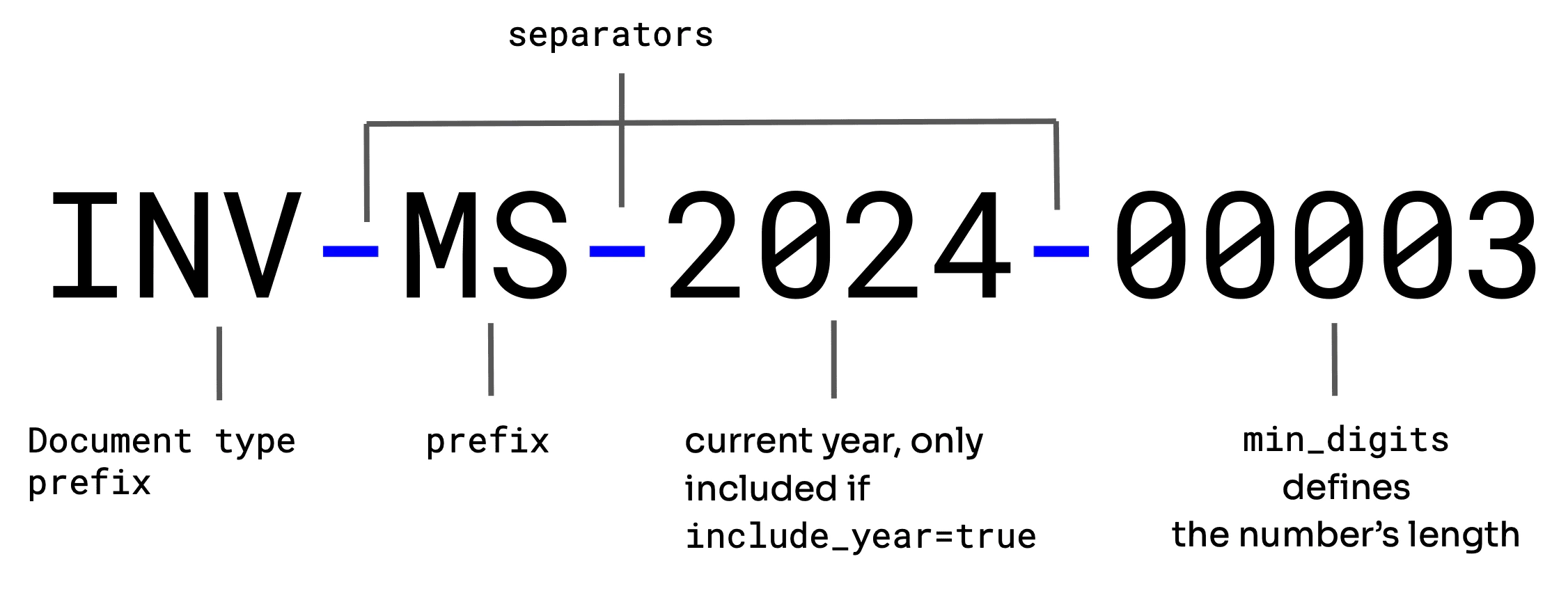 There is no way to customize the order of prefixes in Tesouro documents. For example, all invoices
issued by an organization that opted to include the current year and has a custom prefix will be
of the following format: `IN/EX-ORG/2024/00003`.
The following snippet shows a `PATCH` request to the `/organizations/{organization_id}/settings` endpoint updating the `document_ids` object:
```sh expandable lines theme={null}
curl -X PATCH 'https://api.sandbox.tesouro.com/identity/v1/organizations/5b031d0c...44df31ebf0db/settings' \
-H 'X-Finops-Version: 2025-06-23' \
-H 'Authorization: Bearer YOUR_ACCESS_TOKEN' \
-H 'Content-Type: application/json' \
-d '{
"document_ids": {
"include_date": true,
"prefix": null,
"separator": "-",
"min_digits": 3,
"document_type_prefix": {
"credit_note": "CN",
"delivery_note": "DN",
"invoice": "INV",
"purchase_order": "PO",
"quote": "Q"
},
"next_number": {
"credit_note": 7,
"delivery_note": 3,
"invoice": 20,
"purchase_order": 10,
"quote": 5
}
}
}'
```
* The `document_type_prefix` and `next_number` fields allow you to customize for individual document types. Tesouro will apply updates to any other fields within the `document_ids` object across all document types.
* The `separator` field refers to the character that separates document prefixes from the document number or document prefixes from other document prefixes. Its value can either be an empty string or one of the following: `/`, `-`, `|`, `.`.
## Manage document prefixes
Document prefixes refer to the characters before the document number. This includes the current year, the organization's custom prefix, and the document type prefix. All prefixes are separated by the defined `separator` character.
Updating document prefixes does not reset the document number for any document. For example,
suppose the `document_id` of the organization's last issued invoice was `INV-00007`, and the
organization updated the document prefix for invoices to `INV/EX-ORG`. In that case, the invoice
number for the next invoice issued by the organization will be `INV/EX-ORG/00008`.
### Document type prefix
Document type prefixes are document identifiers used to denote the type of the document. They are represented by the `document_type_prefix` field of the `document_ids` object.
The default prefixes are:
* `INV` – for sales invoices
* `Q` – for quotes
* `CN` – for credit notes
* `DN` – for delivery notes
* `PO` – for purchase orders
Tesouro allows organizations to modify the value of this field. Its value must be a non-empty string; `null` and empty strings are not accepted.
To update a document type prefix:
```sh lines theme={null}
curl -X PATCH 'https://api.sandbox.tesouro.com/identity/v1/organizations/5b031d0c...44df31ebf0db/settings' \
-H 'X-Finops-Version: 2025-06-23' \
-H 'Authorization: Bearer YOUR_ACCESS_TOKEN' \
-H 'Content-Type: application/json' \
-d '{
"document_ids": {
"document_type_prefix": {
"quote": "QU",
"invoice": "IN"
}
}
}'
```
### Custom prefix
A custom prefix refers to any prefix defined by the organization. This is represented by the `prefix` field of the `document_ids` object. These prefixes are optional, but when provided, they apply to all document types provided by the Tesouro API.
Whenever a custom prefix is used, Tesouro will combine this value with the value of the `document_type_prefix` for all documents. For example, an invoice issued by *Example Organization* could have a `document_id` of `IN/EX-ORG/00003`.
### Including the current year
Organizations can also opt to include the current year in document prefixes by setting the `include_date` field of the `document_ids` object to `true`.
## Manage the document number
The document number refers to the unique identifier for a particular document type. Tesouro allows you to set the minimum number of digits and choose the next number for all documents.
### Update the minimum number of digits
You can update the minimum number of digits for all document types. This is useful when an organization needs to adjust the number of leading zeros on issued documents.
To update the minimum number of digits, use the `min_digits` field of the `document_ids` object. If the value provided is more than the number of digits in the document ID number, the document number is padded with zeros. For example, if an organization set a `min_digits` value of `3`, the third invoice issued by this organization will have a `document_id` of `IN/EX-ORG/003`, while the twelfth invoice has a `document_id` of `IN/EX-ORG/012`.
The value of the `min_digits` field applies to all document types. This value does not affect the
maximum number of digits in the document number. Therefore, organizations with a `min_digits`
value of `3` can have document numbers greater than or equal to `1000`.
### Get or set the next document number
Organizations can explicitly set the next document number for their invoices and other document types.
This is useful when an organization migrates from another accounts payable or accounts receivable platform and wants to continue with its existing numbering system.
Set the next number for various document types in the [`document_ids.next_number`](/finops/reference/openapi/identity/patch-organizations-id-settings#request.body.document_ids.next_number) object in organization settings:
```sh lines theme={null}
curl -X PATCH 'https://api.sandbox.tesouro.com/identity/v1/organizations/5b031d0c...44df31ebf0db/settings' \
-H 'X-Finops-Version: 2025-06-23' \
-H 'Authorization: Bearer YOUR_ACCESS_TOKEN' \
-H 'Content-Type: application/json' \
-d '{
"document_ids": {
"next_number": {
"credit_node": 15,
"delivery_note": 5,
"invoice": 42,
"purchase_order": 3,
"quote": 12
}
}
}'
```
The new numbers must exceed the current number for each document type.
Using a lower number will result in an error.
To get the next document numbers for an organization, call [`GET /entities/{entity_id}/settings/next_document_numbers`](/finops/reference/openapi/entities/get-entities-id-settings-next-document-numbers).
You can use these values as minimums when updating the next numbers.
```json GET /entities/{entity_id}/settings/next_document_numbers lines theme={null}
{
"credit_node": 15,
"delivery_note": 5,
"invoice": 42,
"purchase_order": 3,
"quote": 12
}
```
There is no way to customize the order of prefixes in Tesouro documents. For example, all invoices
issued by an organization that opted to include the current year and has a custom prefix will be
of the following format: `IN/EX-ORG/2024/00003`.
The following snippet shows a `PATCH` request to the `/organizations/{organization_id}/settings` endpoint updating the `document_ids` object:
```sh expandable lines theme={null}
curl -X PATCH 'https://api.sandbox.tesouro.com/identity/v1/organizations/5b031d0c...44df31ebf0db/settings' \
-H 'X-Finops-Version: 2025-06-23' \
-H 'Authorization: Bearer YOUR_ACCESS_TOKEN' \
-H 'Content-Type: application/json' \
-d '{
"document_ids": {
"include_date": true,
"prefix": null,
"separator": "-",
"min_digits": 3,
"document_type_prefix": {
"credit_note": "CN",
"delivery_note": "DN",
"invoice": "INV",
"purchase_order": "PO",
"quote": "Q"
},
"next_number": {
"credit_note": 7,
"delivery_note": 3,
"invoice": 20,
"purchase_order": 10,
"quote": 5
}
}
}'
```
* The `document_type_prefix` and `next_number` fields allow you to customize for individual document types. Tesouro will apply updates to any other fields within the `document_ids` object across all document types.
* The `separator` field refers to the character that separates document prefixes from the document number or document prefixes from other document prefixes. Its value can either be an empty string or one of the following: `/`, `-`, `|`, `.`.
## Manage document prefixes
Document prefixes refer to the characters before the document number. This includes the current year, the organization's custom prefix, and the document type prefix. All prefixes are separated by the defined `separator` character.
Updating document prefixes does not reset the document number for any document. For example,
suppose the `document_id` of the organization's last issued invoice was `INV-00007`, and the
organization updated the document prefix for invoices to `INV/EX-ORG`. In that case, the invoice
number for the next invoice issued by the organization will be `INV/EX-ORG/00008`.
### Document type prefix
Document type prefixes are document identifiers used to denote the type of the document. They are represented by the `document_type_prefix` field of the `document_ids` object.
The default prefixes are:
* `INV` – for sales invoices
* `Q` – for quotes
* `CN` – for credit notes
* `DN` – for delivery notes
* `PO` – for purchase orders
Tesouro allows organizations to modify the value of this field. Its value must be a non-empty string; `null` and empty strings are not accepted.
To update a document type prefix:
```sh lines theme={null}
curl -X PATCH 'https://api.sandbox.tesouro.com/identity/v1/organizations/5b031d0c...44df31ebf0db/settings' \
-H 'X-Finops-Version: 2025-06-23' \
-H 'Authorization: Bearer YOUR_ACCESS_TOKEN' \
-H 'Content-Type: application/json' \
-d '{
"document_ids": {
"document_type_prefix": {
"quote": "QU",
"invoice": "IN"
}
}
}'
```
### Custom prefix
A custom prefix refers to any prefix defined by the organization. This is represented by the `prefix` field of the `document_ids` object. These prefixes are optional, but when provided, they apply to all document types provided by the Tesouro API.
Whenever a custom prefix is used, Tesouro will combine this value with the value of the `document_type_prefix` for all documents. For example, an invoice issued by *Example Organization* could have a `document_id` of `IN/EX-ORG/00003`.
### Including the current year
Organizations can also opt to include the current year in document prefixes by setting the `include_date` field of the `document_ids` object to `true`.
## Manage the document number
The document number refers to the unique identifier for a particular document type. Tesouro allows you to set the minimum number of digits and choose the next number for all documents.
### Update the minimum number of digits
You can update the minimum number of digits for all document types. This is useful when an organization needs to adjust the number of leading zeros on issued documents.
To update the minimum number of digits, use the `min_digits` field of the `document_ids` object. If the value provided is more than the number of digits in the document ID number, the document number is padded with zeros. For example, if an organization set a `min_digits` value of `3`, the third invoice issued by this organization will have a `document_id` of `IN/EX-ORG/003`, while the twelfth invoice has a `document_id` of `IN/EX-ORG/012`.
The value of the `min_digits` field applies to all document types. This value does not affect the
maximum number of digits in the document number. Therefore, organizations with a `min_digits`
value of `3` can have document numbers greater than or equal to `1000`.
### Get or set the next document number
Organizations can explicitly set the next document number for their invoices and other document types.
This is useful when an organization migrates from another accounts payable or accounts receivable platform and wants to continue with its existing numbering system.
Set the next number for various document types in the [`document_ids.next_number`](/finops/reference/openapi/identity/patch-organizations-id-settings#request.body.document_ids.next_number) object in organization settings:
```sh lines theme={null}
curl -X PATCH 'https://api.sandbox.tesouro.com/identity/v1/organizations/5b031d0c...44df31ebf0db/settings' \
-H 'X-Finops-Version: 2025-06-23' \
-H 'Authorization: Bearer YOUR_ACCESS_TOKEN' \
-H 'Content-Type: application/json' \
-d '{
"document_ids": {
"next_number": {
"credit_node": 15,
"delivery_note": 5,
"invoice": 42,
"purchase_order": 3,
"quote": 12
}
}
}'
```
The new numbers must exceed the current number for each document type.
Using a lower number will result in an error.
To get the next document numbers for an organization, call [`GET /entities/{entity_id}/settings/next_document_numbers`](/finops/reference/openapi/entities/get-entities-id-settings-next-document-numbers).
You can use these values as minimums when updating the next numbers.
```json GET /entities/{entity_id}/settings/next_document_numbers lines theme={null}
{
"credit_node": 15,
"delivery_note": 5,
"invoice": 42,
"purchase_order": 3,
"quote": 12
}
```