> ## Documentation Index
> Fetch the complete documentation index at: https://docs.tesouro.com/llms.txt
> Use this file to discover all available pages before exploring further.
# Projects
> Enable your users to implement a comprehensive project tracking and finance management in their business.
## Overview
Projects allow organizations to aggregate and track [payables](/finops/guides/accounts-payable/payables/index), [purchase orders](/finops/guides/accounts-payable/purchase-orders), and [receivables](/finops/guides/accounts-receivable/index) under the same work scope, improving spending control, resource allocation, timelines, and communication. The characteristics of the project includes start and end dates, identifier code, color, tags, and metadata.
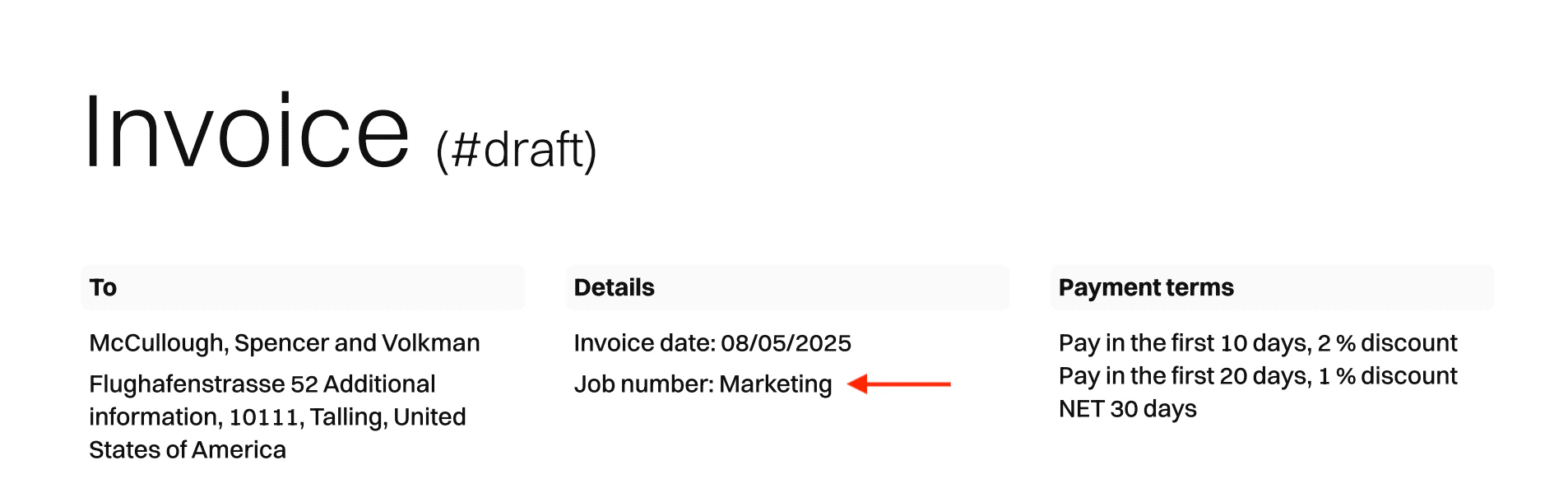
PDF receivables display the associated project name in the document header:
 ## Roles and permissions
To use the `/projects*` endpoints with an [organization user token](/finops/guides/organizations/users#get-organization-user-token), this organization user must have a [role](/finops/guides/organizations/users#create-role) with the `project` permission.
If using a [partner-level token](/finops/guides/authentication/client-credentials), no special permissions are needed.
## Create a project
To create a new project, call the [`POST /projects`](/finops/reference/openapi/projects/post-projects) endpoint:
```sh expandable lines theme={null}
curl -X POST 'https://api.sandbox.tesouro.com/v1/projects' \
-H 'X-Finops-Version: 2025-06-23' \
-H 'X-Organization-Id: ORGANIZATION_ID' \
-H 'Authorization: Bearer ACCESS_TOKEN' \
-H 'Content-Type: application/json' \
-d '{
"code": "6pJ8Grew3zvtVFkZWDYY",
"color": "#ABCDEF",
"description": "Project description",
"end_date": "2025-09-09",
"name": "Marketing",
"parent_id": "3fa85f64-5717-4562-b3fc-2c963f66afa6",
"partner_metadata": {},
"start_date": "2024-09-09",
"tag_ids": []
}
```
The successful response contains all the information about the project:
```json expandable lines theme={null}
{
"id": "3fa85f64-5717-4562-b3fc-2c963f66afa6",
"created_at": "2024-09-09T09:48:11.301Z",
"updated_at": "2024-09-09T09:48:11.301Z",
"code": "6pJ8Grew3zvtVFkZWDYY",
"color": "#ABCDEF",
"created_by_entity_user_id": "3fa85f64-5717-4562-b3fc-2c963f66afa6",
"description": "Project description",
"end_date": "2025-09-09",
"entity_id": "3fa85f64-5717-4562-b3fc-2c963f66afa6",
"name": "Marketing",
"parent_id": "3fa85f64-5717-4562-b3fc-2c963f66afa6",
"partner_metadata": {},
"start_date": "2024-09-09",
"tags": []
}
```
### Create a document within a project
It is possible to create a new payable or receivable directly connected to a project.
* To [create a payable](/finops/guides/accounts-payable/payables/collect), call [`POST /payables`](/finops/reference/openapi/payables/post-payables) informing the specific `project_id` in the payload.
* To [create a purchase order](/finops/guides/accounts-payable/purchase-orders), call [`POST /payable-purchase-orders`](/finops/reference/openapi/purchase-orders/post-payable-purchase-orders) informing the specific `project_id` in the payload.
* To [create a receivable](/finops/guides/accounts-receivable/invoices/create), call [`POST /receivables`](/finops/reference/openapi/receivables/post-receivables) informing the specific `project_id` in the payload.
### Assign existing documents to a project
You can also assign an already existing payable or receivable to a project.
* To [assign an existing payable](/finops/guides/accounts-payable/payables/manage#update-a-payable) to a project, call [`PATCH /payables/{payable_id}`](/finops/reference/openapi/payables/patch-payables-id) informing the specific `project_id` in the payload.
* To [assign an existing purchase order](/finops/guides/accounts-payable/purchase-orders#edit) to a project, call [`PATCH /payable-purchase-orders/{purchase_order_id}`](/finops/reference/openapi/purchase-orders/patch-payable-purchase-orders-id) informing the specific `project_id` in the payload.
* To [assign an existing receivable](/finops/guides/accounts-receivable/invoices/manage#update-an-invoice) to a project, call [`PATCH /receivables/{receivable_id}`](/finops/reference/openapi/receivables/patch-receivables-id) informing the specific `project_id` in the payload.
### List all documents of a project
To list all documents of a specific project, send a `GET` request to:
* [`/payables?project_id={project_id}`](/finops/reference/openapi/payables/get-payables) for listing all payables of a specific project.
* [`/payable-purchase-orders?project_id={project_id}`](/finops/reference/openapi/purchase-orders/get-payable-purchase-orders) for listing all purchase orders of a specific project.
* [`/receivables?project_id={project_id}`](/finops/reference/openapi/receivables/get-receivables) for listing all receivables of a specific project.
## Update a project
To update specific information on an existing project, call [`PATCH /projects/{project_id}`](/finops/reference/openapi/projects/patch-projects-id) endpoint. These are the fields that can be updated:
* `name`
* `description`
* `start_date`
* `end_date`
* `code`
* `color`
* `tag_ids`
```sh lines theme={null}
curl -X PATCH 'https://api.sandbox.tesouro.com/v1/projects/{project_id}' \
-H 'X-Finops-Version: 2025-06-23' \
-H 'X-Organization-Id: ORGANIZATION_ID' \
-H 'Authorization: Bearer ACCESS_TOKEN' \
-H 'Content-Type: application/json' \
-d '{
"start_date": "2024-08-25",
"end_date": "2024-10-28"
}
```
The successful response contains all the information about the project, including the updated fields.
```json expandable lines theme={null}
{
"id": "12345678-1234-1234-1234-123456789012",
"name": "Project name",
"description": "Project description",
"start_date": "2024-08-25",
"end_date": "2024-10-28",
"code": "ABC",
"color": "#ABCDEF",
"created_at": "2024-07-31T11:55:37.866Z",
"updated_at": "2024-07-31T11:55:37.866Z",
"created_by_entity_user_id": "12345678-1234-1234-1234-123456789012",
"tags": [],
"partner_metadata": {
"key": "value",
"integer": 123,
"float": 0.22
}
}
```
## List all projects
To get information about all projects associated with the specified organization, call the [`GET /projects`](/finops/reference/openapi/projects/get-projects) endpoint.
## Retrieve a project
To get information about a specific project, call the [`GET /projects/{project_id}`](/finops/reference/openapi/projects/get-projects-id) endpoint.
## Delete a project
To delete an existing project, call the [`DELETE /projects/{project_id}`](/finops/reference/openapi/projects/delete-projects-id) endpoint. The system will check for any associated payables or receivables. If any are found, a `204 - No Content` response will be returned, and the project will **not** be deleted.
## Roles and permissions
To use the `/projects*` endpoints with an [organization user token](/finops/guides/organizations/users#get-organization-user-token), this organization user must have a [role](/finops/guides/organizations/users#create-role) with the `project` permission.
If using a [partner-level token](/finops/guides/authentication/client-credentials), no special permissions are needed.
## Create a project
To create a new project, call the [`POST /projects`](/finops/reference/openapi/projects/post-projects) endpoint:
```sh expandable lines theme={null}
curl -X POST 'https://api.sandbox.tesouro.com/v1/projects' \
-H 'X-Finops-Version: 2025-06-23' \
-H 'X-Organization-Id: ORGANIZATION_ID' \
-H 'Authorization: Bearer ACCESS_TOKEN' \
-H 'Content-Type: application/json' \
-d '{
"code": "6pJ8Grew3zvtVFkZWDYY",
"color": "#ABCDEF",
"description": "Project description",
"end_date": "2025-09-09",
"name": "Marketing",
"parent_id": "3fa85f64-5717-4562-b3fc-2c963f66afa6",
"partner_metadata": {},
"start_date": "2024-09-09",
"tag_ids": []
}
```
The successful response contains all the information about the project:
```json expandable lines theme={null}
{
"id": "3fa85f64-5717-4562-b3fc-2c963f66afa6",
"created_at": "2024-09-09T09:48:11.301Z",
"updated_at": "2024-09-09T09:48:11.301Z",
"code": "6pJ8Grew3zvtVFkZWDYY",
"color": "#ABCDEF",
"created_by_entity_user_id": "3fa85f64-5717-4562-b3fc-2c963f66afa6",
"description": "Project description",
"end_date": "2025-09-09",
"entity_id": "3fa85f64-5717-4562-b3fc-2c963f66afa6",
"name": "Marketing",
"parent_id": "3fa85f64-5717-4562-b3fc-2c963f66afa6",
"partner_metadata": {},
"start_date": "2024-09-09",
"tags": []
}
```
### Create a document within a project
It is possible to create a new payable or receivable directly connected to a project.
* To [create a payable](/finops/guides/accounts-payable/payables/collect), call [`POST /payables`](/finops/reference/openapi/payables/post-payables) informing the specific `project_id` in the payload.
* To [create a purchase order](/finops/guides/accounts-payable/purchase-orders), call [`POST /payable-purchase-orders`](/finops/reference/openapi/purchase-orders/post-payable-purchase-orders) informing the specific `project_id` in the payload.
* To [create a receivable](/finops/guides/accounts-receivable/invoices/create), call [`POST /receivables`](/finops/reference/openapi/receivables/post-receivables) informing the specific `project_id` in the payload.
### Assign existing documents to a project
You can also assign an already existing payable or receivable to a project.
* To [assign an existing payable](/finops/guides/accounts-payable/payables/manage#update-a-payable) to a project, call [`PATCH /payables/{payable_id}`](/finops/reference/openapi/payables/patch-payables-id) informing the specific `project_id` in the payload.
* To [assign an existing purchase order](/finops/guides/accounts-payable/purchase-orders#edit) to a project, call [`PATCH /payable-purchase-orders/{purchase_order_id}`](/finops/reference/openapi/purchase-orders/patch-payable-purchase-orders-id) informing the specific `project_id` in the payload.
* To [assign an existing receivable](/finops/guides/accounts-receivable/invoices/manage#update-an-invoice) to a project, call [`PATCH /receivables/{receivable_id}`](/finops/reference/openapi/receivables/patch-receivables-id) informing the specific `project_id` in the payload.
### List all documents of a project
To list all documents of a specific project, send a `GET` request to:
* [`/payables?project_id={project_id}`](/finops/reference/openapi/payables/get-payables) for listing all payables of a specific project.
* [`/payable-purchase-orders?project_id={project_id}`](/finops/reference/openapi/purchase-orders/get-payable-purchase-orders) for listing all purchase orders of a specific project.
* [`/receivables?project_id={project_id}`](/finops/reference/openapi/receivables/get-receivables) for listing all receivables of a specific project.
## Update a project
To update specific information on an existing project, call [`PATCH /projects/{project_id}`](/finops/reference/openapi/projects/patch-projects-id) endpoint. These are the fields that can be updated:
* `name`
* `description`
* `start_date`
* `end_date`
* `code`
* `color`
* `tag_ids`
```sh lines theme={null}
curl -X PATCH 'https://api.sandbox.tesouro.com/v1/projects/{project_id}' \
-H 'X-Finops-Version: 2025-06-23' \
-H 'X-Organization-Id: ORGANIZATION_ID' \
-H 'Authorization: Bearer ACCESS_TOKEN' \
-H 'Content-Type: application/json' \
-d '{
"start_date": "2024-08-25",
"end_date": "2024-10-28"
}
```
The successful response contains all the information about the project, including the updated fields.
```json expandable lines theme={null}
{
"id": "12345678-1234-1234-1234-123456789012",
"name": "Project name",
"description": "Project description",
"start_date": "2024-08-25",
"end_date": "2024-10-28",
"code": "ABC",
"color": "#ABCDEF",
"created_at": "2024-07-31T11:55:37.866Z",
"updated_at": "2024-07-31T11:55:37.866Z",
"created_by_entity_user_id": "12345678-1234-1234-1234-123456789012",
"tags": [],
"partner_metadata": {
"key": "value",
"integer": 123,
"float": 0.22
}
}
```
## List all projects
To get information about all projects associated with the specified organization, call the [`GET /projects`](/finops/reference/openapi/projects/get-projects) endpoint.
## Retrieve a project
To get information about a specific project, call the [`GET /projects/{project_id}`](/finops/reference/openapi/projects/get-projects-id) endpoint.
## Delete a project
To delete an existing project, call the [`DELETE /projects/{project_id}`](/finops/reference/openapi/projects/delete-projects-id) endpoint. The system will check for any associated payables or receivables. If any are found, a `204 - No Content` response will be returned, and the project will **not** be deleted.