> ## Documentation Index
> Fetch the complete documentation index at: https://docs.tesouro.com/llms.txt
> Use this file to discover all available pages before exploring further.
# Send e-invoices
> Create and send e-invoices through PEPPOL and other electronic invoicing networks using the Tesouro API.
## Overview
Creating e-invoices in Tesouro is similar to [creating regular invoices](/finops/guides/accounts-receivable/invoices/create), with a few key differences.
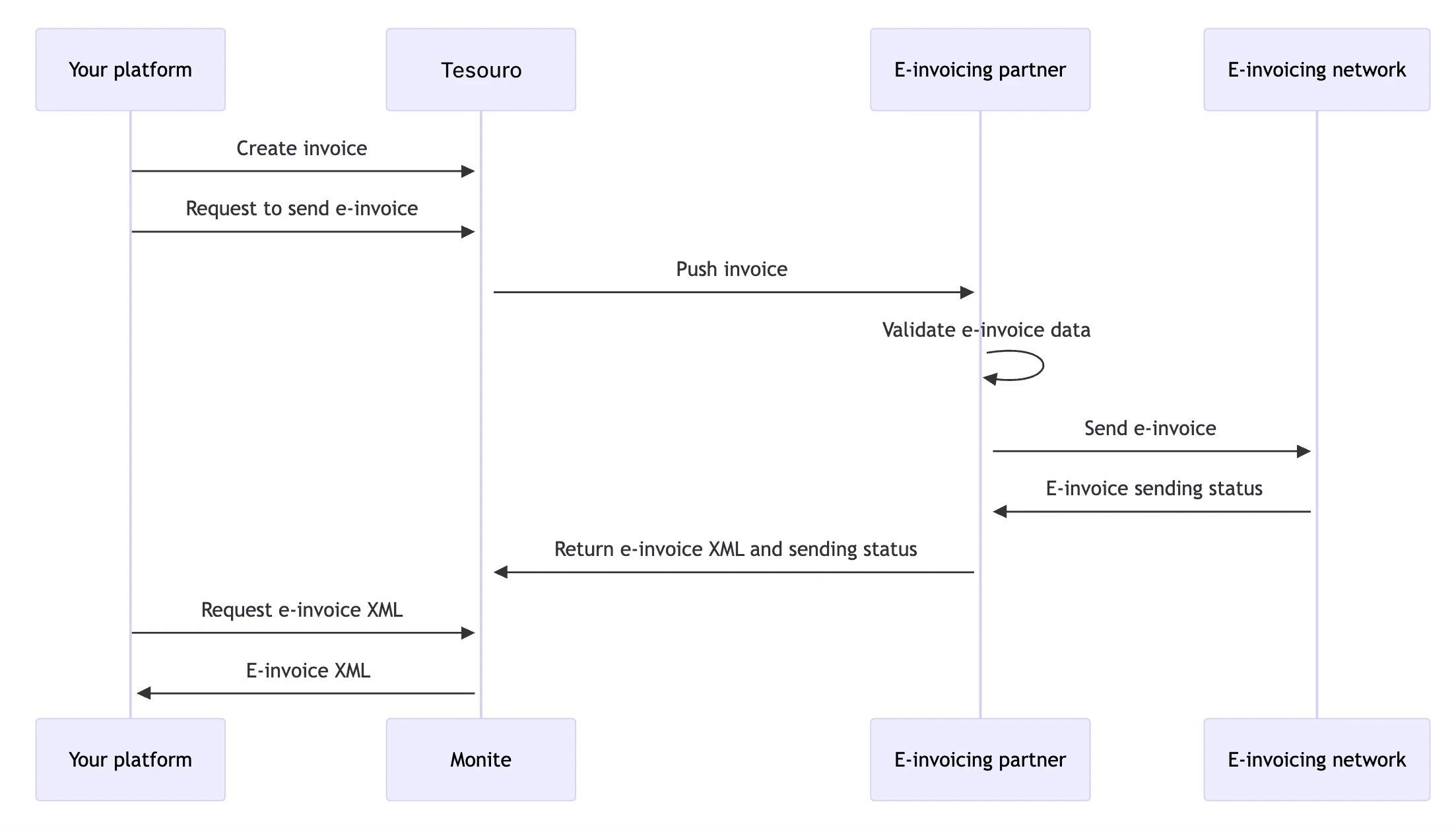
One of the differences is that e-invoices go through additional [statuses](/finops/guides/accounts-receivable/invoices/index#invoice-statuses) - `issuing` and (optionally) `failed`.
Only `draft` and newly created invoices can be sent as e-invoices. Already issued invoices cannot
be re-sent as e-invoices. However, issued e-invoices can be resent via email.
## Before you begin
This guide assumes that:
* Both the organization (sender) and the counterpart (recipient) are from the [supported countries](/finops/guides/e-invoicing/index#countries).
* The organization has completed [e-invoicing onboarding](/finops/guides/e-invoicing/onboarding) in Tesouro.
* Counterparts are already registered in the PEPPOL network through their access point of choice.
* The organization knows the counterpart's [PEPPOL ID](/finops/guides/e-invoicing/peppol-ids).
## How to create and send an e-invoice
The following diagram shows the basic flow of the e-invoice sending process in Tesouro:
 ### 1. Specify the counterpart's PEPPOL ID
Before creating an e-invoice, the organization needs to specify the PEPPOL ID of its [counterpart](/finops/guides/common/counterparts/index).
Counterpart PEPPOL IDs can be filled in even before the organization has completed e-invoicing onboarding.
**Counterpart lookup**
You can use [`GET /einvoice-search`](/finops/reference/openapi/einvoicing-search/get-einvoice-search) to check if a counterpart is registered in PEPPOL.
This tells you whether the counterpart's PEPPOL ID is their VAT number, business number, or both.
Another way to find the PEPPOL ID of a company is to search the [public PEPPOL directory](https://directory.peppol.eu/public/) for the company name or address.
You can specify counterpart PEPPOL IDs in two ways:
* [Specify the PEPPOL ID directly](#specify-peppol-id-directly)
* [Add from VAT ID](#add-from-vat-id)
If a counterpart has several PEPPOL IDs with different schemes, you can add them all and later have the organization users choose the PEPPOL ID to send the e-invoice to.
#### Specify PEPPOL ID directly
Companies usually share their PEPPOL IDs in the format `
### 1. Specify the counterpart's PEPPOL ID
Before creating an e-invoice, the organization needs to specify the PEPPOL ID of its [counterpart](/finops/guides/common/counterparts/index).
Counterpart PEPPOL IDs can be filled in even before the organization has completed e-invoicing onboarding.
**Counterpart lookup**
You can use [`GET /einvoice-search`](/finops/reference/openapi/einvoicing-search/get-einvoice-search) to check if a counterpart is registered in PEPPOL.
This tells you whether the counterpart's PEPPOL ID is their VAT number, business number, or both.
Another way to find the PEPPOL ID of a company is to search the [public PEPPOL directory](https://directory.peppol.eu/public/) for the company name or address.
You can specify counterpart PEPPOL IDs in two ways:
* [Specify the PEPPOL ID directly](#specify-peppol-id-directly)
* [Add from VAT ID](#add-from-vat-id)
If a counterpart has several PEPPOL IDs with different schemes, you can add them all and later have the organization users choose the PEPPOL ID to send the e-invoice to.
#### Specify PEPPOL ID directly
Companies usually share their PEPPOL IDs in the format `:`, such as `9930:DE087095777`.
To add this identifier to a counterpart, do the following:
1. Split the string by `:`.
* The first element – a 4-digit number – is the scheme code. Use [this table](/finops/guides/e-invoicing/peppol-ids#schemes) to convert this code to the *scheme name*.
* The second element is the *identifier*.
2. Call [`POST /counterparts/{counterpart_id}/einvoicing_credentials`](/finops/reference/openapi/counterpart-einvoicing-credentials/post-counterparts-id-einvoicing-credentials). In the request body, provide the scheme name and identifier obtained on the previous step:
```sh {7-8} lines theme={null}
curl -X POST 'https://api.sandbox.tesouro.com/v1/counterparts/104db...443/einvoicing-credentials' \
-H 'X-Finops-Version: 2025-06-23' \
-H 'X-Organization-Id: ORGANIZATION_ID' \
-H 'Authorization: Bearer ACCESS_TOKEN' \
-H 'Content-Type: application/json' \
-d '{
"network_schema": "DE:VAT",
"network_identifier": "DE087095777"
}'
```
In case of the `:VAT` schemes, the identifier value starts with a two-letter country prefix.
Do not remove this prefix.
A successful response contains a Tesouro `id` assigned the counterpart's PEPPOL ID.
Note down this `id` - you will need it later when creating e-invoices for this counterpart.
```json {2} lines theme={null}
{
"id": "a0bb9d89-9064-4af8-affa-3be052d07594",
"network_identifier": "DE087095777",
"network_schema": "DE:VAT"
}
```
#### Add from VAT ID
If the counterpart has a [VAT ID](/finops/guides/common/counterparts/vat-ids) defined and you know that the counterpart is registered in PEPPOL using this VAT ID, you can send the `id` of the VAT ID object in the request to [`POST /counterparts/{counterpart_id}/einvoicing_credentials`](/finops/reference/openapi/counterpart-einvoicing-credentials/post-counterparts-id-einvoicing-credentials):
```sh {7} lines theme={null}
curl -X POST 'https://api.sandbox.tesouro.com/v1/counterparts/104db...443/einvoicing-credentials' \
-H 'X-Finops-Version: 2025-06-23' \
-H 'X-Organization-Id: ORGANIZATION_ID' \
-H 'Authorization: Bearer ACCESS_TOKEN' \
-H 'Content-Type: application/json' \
-d '{
"counterpart_vat_id_id": "ad01f529-0e93-4ee7-88b1-e67f1afee1a8"
}'
```
In this case, Tesouro infers the scheme name (`network_schema`) of the PEPPOL ID from the `country` of the VAT ID object.
A successful response contains a Tesouro `id` assigned the counterpart's PEPPOL ID.
Note down this `id` - you will need it later when creating e-invoices for this counterpart.
```json {2} lines theme={null}
{
"id": "a0bb9d89-9064-4af8-affa-3be052d07594",
"network_identifier": "087095777",
"network_schema": "DE:VAT"
}
```
#### Counterpart PEPPOL ID validation
When you add a counterpart's PEPPOL identifier, Tesouro validates the [format](/finops/guides/e-invoicing/peppol-ids#schemes) and length of the specified `network_identifier` and checks if it is actually registered on the PEPPOL network.
If the specified identifier is not registered in PEPPOL or has incorrect length or format, you will receive an HTTP 409 error from `POST /counterparts/{counterpart_id}/einvoicing_credentials`.
Identifier is not registered in PEPPOL:
```json lines theme={null}
{
"error": {
"message": "Credentials DE900072345, schema: DE:VAT does not exist in PEPPOL."
}
}
```
Wrong identifier length or format:
```json lines theme={null}
{
"error": {
"message": "Error while validating credentials: {'errors': [{'source': 'identifier', 'details': 'invalid identifier, regex is ^DE\\\\d{9}$'}]}"
}
}
```
In the sandbox environment, the predefined [test counterpart identifiers](#test) pass the validations.
### 2. Create an e-invoice
Create a new draft invoice [in the usual way](/finops/guides/accounts-receivable/invoices/create), but with the following additional fields:
| Field | Description |
| --------------------------------------- | ---------------------------------------------------------------------------------------------------------- |
| `is_einvoice` | Must be `true`. |
| `network_credentials_id` | UUID of the [organization's PEPPOL identifier](/finops/guides/e-invoicing/onboarding#add-new-credentials). |
| `counterpart_einvoicing_credentials_id` | UUID of the counterpart's PEPPOL identifier that you [obtained previously](#counterpart-peppol-id). |
Example:
```json {9-11} lines theme={null}
{
"type": "invoice",
"currency": "EUR",
"counterpart_id": "104db547-6aa6-4e22-ad25-c2809ccbf443",
"line_items": [
...
],
...
"is_einvoice": true,
"network_credentials_id": "3c33e8af-d093-42d7-9269-66b32a679060",
"counterpart_einvoicing_credentials_id": "a0bb9d89-9064-4af8-affa-3be052d07594"
}
```
**Notes**
* Organization address and VAT number that will be included in the e-invoice XML are taken from the organization's e-invoicing registration (`/einvoicing-connections`) and its PEPPOL identifier (`network_credentials_id`) rather than from the address and VAT ID of the organization object itself.
* While an invoice is still in the `draft` status, you can change its `is_einvoice` field to turn e-invoicing on or off for this invoice.
The response returns the full invoice data, along with the PEPPOL ID details of the organization and counterpart:
```json expandable lines theme={null}
{
"id": "457fed28-7434-4578-8a01-ddcf51eed463",
"type": "invoice",
"status": "draft",
...
"is_einvoice": true,
"einvoice_error_comment": null,
"network_credentials": {
"id": "3c33e8af-d093-42d7-9269-66b32a679060",
"network_identifier": "123456789",
"network_schema": "DE:VAT"
},
"counterpart_network_credentials": {
"id": "a0bb9d89-9064-4af8-affa-3be052d07594",
"network_identifier": "087095777",
"network_schema": "DE:VAT"
}
}
```
### 3. Send an e-invoice
Before issuing an invoice, call [`POST /receivables/{receivable_id}
/verify`](/finops/reference/openapi/receivables/post-receivables-id-verify) to make sure all required fields are
filled in.
After a draft invoice has been finalized, call [`POST /receivables/{receivable_id}/issue`](/finops/reference/openapi/receivables/post-receivables-id-issue) to send the e-invoice through the e-invoicing network.
When an invoice has `is_einvoice`=`true`, the `/receivables/{receivable_id}/issue` endpoint works as follows:
1. Tesouro checks again if the counterpart's PEPPOL ID exists on the PEPPOL network.
If not, `/issue` returns an HTTP 409 error containing a substring "No action taken".
The invoice remains in the `draft` status.
```json HTTP 409 error lines theme={null}
{
"error": {
"message": "An error occurred while sending E-invoice: {'errors': [{'source': 'routing', 'details': 'No action taken'}], 'guid': '4540dbdd-702e-48a2-9a0a-43affc68b63a'}"
}
}
```
1. Tesouro checks if all data required for an e-invoice is filled in.
If not, `/issue` returns an HTTP 409 error and the invoice remains in the `draft` status.
Users can fill in the missing data and attempt to send the e-invoice again.
```json HTTP 409 error lines theme={null}
{
"error": {
"message": "An error occurred while sending E-invoice: {'errors': [{'source': '[:accountingSupplierParty]', 'details': 'Sending an invoice with VAT (or a taxExemptReason), but sender has no VAT number'}]}"
}
}
```
1. If the previous checks succeed, `/issue` returns HTTP 200 OK.
The invoice is moved from the `draft` to `issuing` [status](/finops/guides/accounts-receivable/invoices/index#invoice-statuses), and the `receivable.issuing` [webhook](/finops/guides/getting-started/webhooks/index) is triggered.
2. Tesouro attemts to send the document to the counterpart through the e-invoicing network.
3. If the e-invoice is successfully sent (that is, successfully routed to the counterpart's PEPPOL access point):
* Invoice status becomes `issued` and the `receivable.issued` webhook is triggered.
* The rest of the [invoice lifecycle](/finops/guides/accounts-receivable/invoices/index) applies as usual.
4. If the invoice failed to be sent via e-invoicing:
* Invoice status becomes `failed` and the `receivable.failed` webhook is triggered.
* The error message from the e-invoicing network is saved to the `einvoice_error_comment` field of the invoice.
It may take a few minutes for an invoice to move from the `issuing` status to `issued` or
`failed`.
If you need to send an e-invoice both as an e-invoice and via email, do not use `/receivables/ {receivable_id}/send` for a draft invoice as a shortcut for `/issue` + `/send`. Instead, call
`/issue` as explained above, wait until the invoice status becomes `issued`, and only after that
call `/send`.
## View e-invoice XML
When an e-invoice or credit note gets issued, Tesouro generates the e-invoice XML document in the PEPPOL BIS Billing format and stores a link to this file in `einvoice_file_url` field of the invoice or credit note.
This is the same XML document that gets sent to the counterpart over the e-invoicing network.
```json {6} lines theme={null}
{
"id": "457fed28-7434-4578-8a01-ddcf51eed463",
"type": "invoice",
...
"is_einvoice": true,
"einvoice_file_url": "https://.s3.amazonaws.com/path/to//.xml",
...
}
```
Example file contents:
```xml lines theme={null}
1.0
9930:DE123456789
9930:DE087095777
...
```
If the partner setting [`mail.attach_documents_as_pdf`](/finops/reference/openapi/partner-settings/patch-settings#request.body.mail.attach_documents_as_pdf) it `true`,
this XML file is also automatically attached to invoice and credit note emails sent by [`POST /receivables/{receivable_id}/send`](/finops/reference/openapi/receivables/post-receivables-id-send).
## Credit notes and e-invoicing
[Credit notes](/finops/guides/accounts-receivable/credit-notes) inherit e-invoicing details (such as the counterpart's PEPPOL ID) from the invoice they are based on.
If the original invoice was configured for e-invoicing delivery, the credit note will also be sent via e-invoicing, and vice versa.
Like e-invoices, credit notes go through [additional statuses](#send-einvoice) when sent via e-invoicing.
## Test e-invoicing
**Sandbox note**
E-invoicing connections and organization PEPPOL IDs created in the [sandbox environment](/finops/api/concepts/environments) are erased periodically and should be considered temporary.
Other organization data in the sandbox - users, e-invoices, and so on - is preserved.
In the sandbox environment, send e-invoices and credit notes to the following test counterparts:
| Counterpart country | `network_schema` | `network_identifier` |
| ------------------- | ---------------- | -------------------- |
| Belgium | BE:EN | 0112233453 |
| Germany | DE:VAT | DE010101010 |
| Netherlands | NL:KVK | 012345677 |
| Netherlands | NL:VAT | NL000000000B45 |
E-invoicing webhooks `receivable.issuing` and `receivable.failed` are not triggered in sandbox.
Dutch Peppol authority has [additional guidelines](https://www.peppolautoriteit.nl/documenten/2021/03/15/guideline-for-the-use-of-peppol-test-infrastructure) for e-invoice testing in the Netherlands, in particular:
**Sensitive data**
In accordance with AVG/GDPR regulations test messages should not contain any references to personal information.
Any content of messages sent via the Peppol test infrastructure referring to personal information must be redacted or faked.
## Limitations
* The following invoice fields are not included in e-invoices:
* [attachments](/finops/guides/accounts-receivable/customization/attachments)
* `commercial_condition_description`
* `deductions`, `deduction_amount`, and `deduction_memo`
* `footer`
* `memo`
* `tax_exempt`=`false` and `tax_exemption_rationale`
* `withholding_tax_rate`
* Units of measure in e-invoices are sent as the generic [`C62`](https://docs.peppol.eu/poacc/billing/3.0/codelist/UNECERec20/#C62) code ("one", "unit") instead of the specific codes (such as hour, kg, or meter).