> ## Documentation Index
> Fetch the complete documentation index at: https://docs.tesouro.com/llms.txt
> Use this file to discover all available pages before exploring further.
# Payment intents
> Learn about the payment intent object and the statuses that a payment goes through inside Tesouro.
## Overview
Tesouro aggregates the most popular [payment methods](/finops/guides/payments/payment-methods) and providers and allows you to define the right payment method for each transaction. This enables bill pay, invoice payment links, and other payments for the organization's customers.
The organization must be [onboarded in order to accept payments](/finops/guides/payments/onboarding/index).
## Payment intent
The payment intent is the intention of a customer to execute a payment. In our system, a payment intent is an object that represents the payment itself. It is used to track the lifecycle of the payment flow. This gives you full control over the payment journey.
A new payment intent is created automatically every time a [payment link](/finops/guides/payments/payment-links) is created.
The payment intent object can also be used to see the history of a specific payment.
## Payment intent lifecycle
Each payment intent is allocated with a status that indicates its progress throughout the payment lifecycle, from its creation until its conclusion.
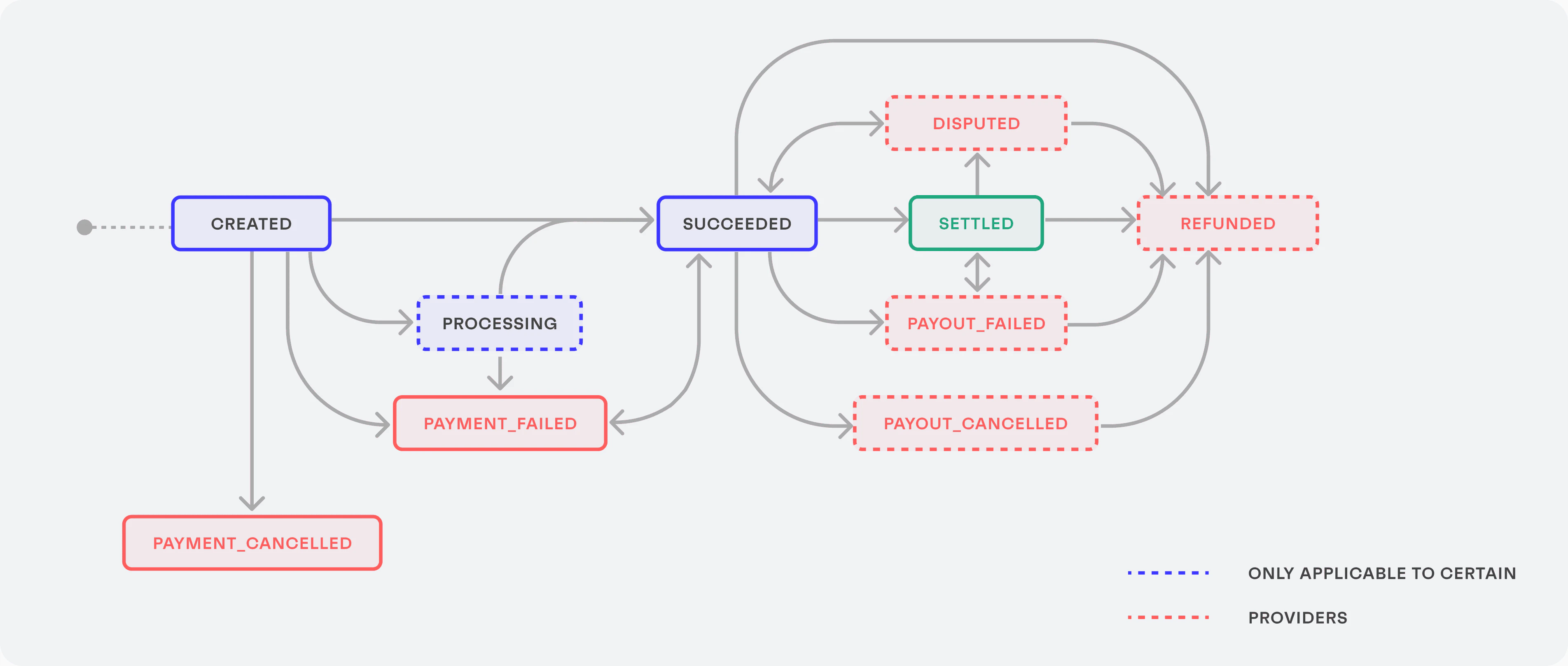 | Status | Description | Next status |
| ------------------- | ------------------------------------------------------------------------------------------------------------------------------------------------------------------------------------------------------------------------------------------------------------------------------------------------------------------------------------------- | ---------------------------------------------------------------------------------------------------------------- |
| `created` | The initial status for all newly created payment intents. | `processing`,
| Status | Description | Next status |
| ------------------- | ------------------------------------------------------------------------------------------------------------------------------------------------------------------------------------------------------------------------------------------------------------------------------------------------------------------------------------------- | ---------------------------------------------------------------------------------------------------------------- |
| `created` | The initial status for all newly created payment intents. | `processing`,
`succeeded`,
`payment_cancelled`,
`payment_failed` |
| `processing` | The payer has accomplished the required actions for the payment on their side and the payment is being processed. Some payment methods, such as cards, can be processed very quickly, while other payment methods can take a few days. | `succeeded`,
`payment_failed` |
| `payment_cancelled` | A payment intent gets canceled when the associated payment link [expires](/finops/guides/payments/payment-links#expiration). Canceled payment intents cannot be used for future payment attempts. This is a final status. | |
| `payment_failed` | The payment attempt failed for some reason. For example, the payer's bank declined the transaction. | `succeeded` |
| `succeeded` | The payment was successfully authorized and is ready to be settled. That is, the bank transfer can be initiated by the bank or the payout can be triggered to the recipient's bank account. | `settled`,
`payment_failed`,
`payout_failed`,
`payout_canceled`,
`disputed`,
`refunded` |
| `settled` | The funds have been sent to the recipient's bank account. | `payout_failed`,
`disputed`,
`refunded` |
| `payout_cancelled` | The payout of funds to the recipient's account was canceled. | `refunded` |
| `payout_failed` | The funds could not be delivered to the recipient's account. This can happen for various reasons, including (but not limited to):
- The recipient's bank account details are incorrect.
- The recipient's bank account has been closed or restricted.
- The recipient's bank has declined the transaction.
| `settled`,
`refunded` |
| `disputed` | Occurs when a payer contests your charge with their bank for any reason. This status is only available for certain providers. | `succeeded`,
`refunded` |
| `refunded` | The payment that was previously processed has been refunded. Funds will be refunded to the credit or debit card or bank account that was originally charged. This is a final status. Refunds cannot be reversed once issued. | |
## Find an existing payment intent for an invoice
To check if there is an existing payment intent for a specific [accounts receivable invoice](/finops/guides/accounts-receivable/invoices/create), call `GET /payment-intents?object_id=INVOICE_ID`:
```sh lines theme={null}
curl 'https://api.sandbox.tesouro.com/v1/payment-intents?object_id=INVOICE_ID' \
-H 'X-Finops-Version: 2025-06-23' \
-H 'X-Organization-Id: ORGANIZATION_ID' \
-H 'Authorization: Bearer ACCESS_TOKEN'
```
You can also query multiple invoices at once:\
`GET /payment-intents?object_id__in=INVOICE_1&object_id__in=INVOICE_2`
The `data` array in the response contains all payment intents associated with the specified invoices.
```json expandable lines theme={null}
{
"data": [
{
"id": "6f1a0e95-059b-4095-9264-b8a600e79a61",
...
"object": {
"id": "539ed691-821a-4c70-9a0f-ded6e64d72d2",
"type": "payable"
},
"payment_link_id": "0b971087-a15e-4946-a6c8-be230e297004",
"selected_payment_method": "sepa_credit",
"status": "processing"
},
{
...
}
]
}
```
After you have obtained the payment intent, you can use it to:
* Check the payment status (`status` of the payment intent).
* Find the [payment link](/finops/guides/payments/payment-links) for the invoice: extract the `payment_link_id` from the payment intent, then call [`GET /payment-links/{payment_link_id}`](/finops/reference/openapi/payment-links/get-payment-links-id), and get the `url` from the response.
## Track the payment intent
There are several ways to track the payment intent transition between statuses.
### Webhooks
You can subscribe to the `payment_intent.status_updated` [webhook](/finops/guides/getting-started/webhooks/index) to get notified of every change in the status of the payment intent. To subscribe to this webhook, call [`POST /webhook-subscriptions`](/finops/reference/openapi/webhook-subscriptions/post-webhook-subscriptions) with the following request body, replacing the `url` with the URL of your webhook listener endpoint:
```sh lines theme={null}
curl -X POST 'https://api.sandbox.tesouro.com/v1/webhook-subscriptions' \
-H 'X-Finops-Version: 2025-06-23' \
-H 'Authorization: Bearer YOUR_ACCESS_TOKEN' \
-H 'Content-Type: application/json' \
-d '{
"object_type": "payment_intent",
"url": "https://yourendpointurl.com"
}'
```
The events sent by Tesouro contain `entity_id`, `object_type`, and `object_id`, which can be used to identify the affected payment intent:
```json lines theme={null}
{
"id": "06c003f1-6b05-415f-be6d-39ecacdddbd3",
"created_at": "2024-03-04T20:06:48.593225+00:00",
"action": "payment_intent.status_updated",
"api_version": "2025-06-23",
"entity_id": "ce0e9fc7-b3e7-4f12-ad86-bfb0725a99f0",
"description": "payment_intent_status_updated",
"object": {
"id": "6f1a0e95-059b-4095-9264-b8a600e79a61"
},
"object_type": "payment_intent",
"webhook_subscription_id": "c7f37127-44e5-494a-833a-21e60585f187"
}
```
### Get information about the payment intent
The payment intent ID received from the webhook can be used to check the progress of the actual payment, by calling [`GET /payment-intents/{payment_intent_id}`](/finops/reference/openapi/payment-intents/get-payment-intents-id):
```sh lines theme={null}
curl -X GET 'https://api.sandbox.tesouro.com/v1/payment-intents/6f1a0...a61' \
-H 'X-Finops-Version: 2025-06-23' \
-H 'X-Organization-Id: ORGANIZATION_ID' \
-H 'Authorization: Bearer YOUR_ACCESS_TOKEN'
```
The successful response contains information about the payment intent:
```json expandable lines theme={null}
{
"id": "6f1a0e95-059b-4095-9264-b8a600e79a61",
"updated_at": "2023-01-18T08:52:04.120Z",
"amount": 12500,
"application_fee_amount": 0,
"batch_payment_id": null,
"currency": "USD",
"object": {
"id": "9db02d38-ae6e-492f-8544-705dccf08bd0",
"type": "payable"
},
"payer": {
"id": "ce0e9fc7-b3e7-4f12-ad86-bfb0725a99f0",
"type": "entity",
"name": "Acme Inc.",
"bank_accounts": [
{
"id": "799fd800-64d8-47d1-8de6-a349f368bf60",
"account_holder_name": "Acme Inc.",
"account_number": "12345678",
"bic": "",
"country": "US",
"currency": "USD",
"display_name": "Primary account",
"is_default": true,
"name": "Primary account",
"routing_number": "000000000",
"was_created_by_user_id": null
}
]
},
"payment_link_id": "0b971087-a15e-4946-a6c8-be230e297004",
"payment_methods": ["card", "sepa_credit"],
"payment_reference": "INV-00042",
"provider": null,
"recipient": {
"id": "1d3d6fec-d8af-42e8-9b19-0c58a7a797e1",
"type": "counterpart",
"bank_accounts": [
{
"id": "3fa85f64-5717-4562-b3fc-2c963f66afa6",
"account_number": "12345678",
"routing_number": "000000000",
"name": "Testbank Fiducia",
"is_default": true
}
],
"name": "Alayna Corkery"
},
"selected_payment_method": null,
"status": "created"
}
```
### Get the payment intent history
You can check the full status transition history of a specific payment intent by calling [`GET /payment-intents/{payment_intent_id}/history`](/finops/reference/openapi/payment-intents/get-payment-intents-id-history):
```sh lines theme={null}
curl -X GET 'https://api.sandbox.tesouro.com/v1/payment-intents/3fa85f...f66afa6/history' \
-H 'X-Finops-Version: 2025-06-23' \
-H 'X-Organization-Id: ORGANIZATION_ID' \
-H 'Authorization: Bearer YOUR_ACCESS_TOKEN'
```
The successful response returns one data item for each change in the payment intent status:
```json expandable lines theme={null}
{
"data": [
{
"id": "3fa85f64-4626-8255-b5dd-2c963f649fcd5",
"payment_intent_id": "3fa85f64-5717-4562-b3fc-2c963f66afa6",
"status": "created",
"created_at": "2023-01-30T15:46:41.106Z",
"updated_at": "2023-01-30T15:46:41.106Z"
},
{
"id": "3fa85f64-5717-4562-b3fc-2c963f66afa6",
"payment_intent_id": "3fa85f64-5717-4562-b3fc-2c963f66afa6",
"status": "succeeded",
"created_at": "2023-01-30T18:27:30.115Z",
"updated_at": "2023-01-30T18:27:30.115Z"
}
]
}
```
## Payment methods
When the payment process is initiated, Tesouro allows the partner's platform to control the available payment methods to be displayed to the payer on the payment page so they can select their preferred one during the payment act. Check the [full list of payment methods Tesouro supports](/finops/guides/payments/payment-methods).
## Payment links
The payment process can also be started through a [payment link](/finops/guides/payments/payment-links) sent to the customer. This link can be customized and shared as many times as you want on any channel you prefer.