> ## Documentation Index
> Fetch the complete documentation index at: https://docs.tesouro.com/llms.txt
> Use this file to discover all available pages before exploring further.
# Payment links
> Create a custom payment link to share with your customers and receive online payments.
## Overview
The payment process can also be started through a payment link sent to the customer. This link can be customized and shared as many times as you want on any channel you prefer.
## Requirements
### Partner requirements
Before integrating payment links, Tesouro partners must provide their logo to be displayed in the "[Powered by](/finops/guides/payments/payment-page-customization#powered-by-logo)" badge at the bottom of the payment page. Partners must also specify their website that the logo will link to. To get these setup - reach out to your account manager at Tesouro.
### Roles and permissions
If you create payment links with an [organization user token](/finops/guides/organizations/users#get-organization-user-token), this user must have a role with the following permissions:
* To create payment links for receivable invoices: `read` permission for `entity_bank_account` and `receivable`.
* To create payment links for payables: `read` permission for `counterpart` and `payable`.
When using a [partner-level token](/finops/guides/authentication/client-credentials), no extra permissions are required.
## Payment link lifecycle
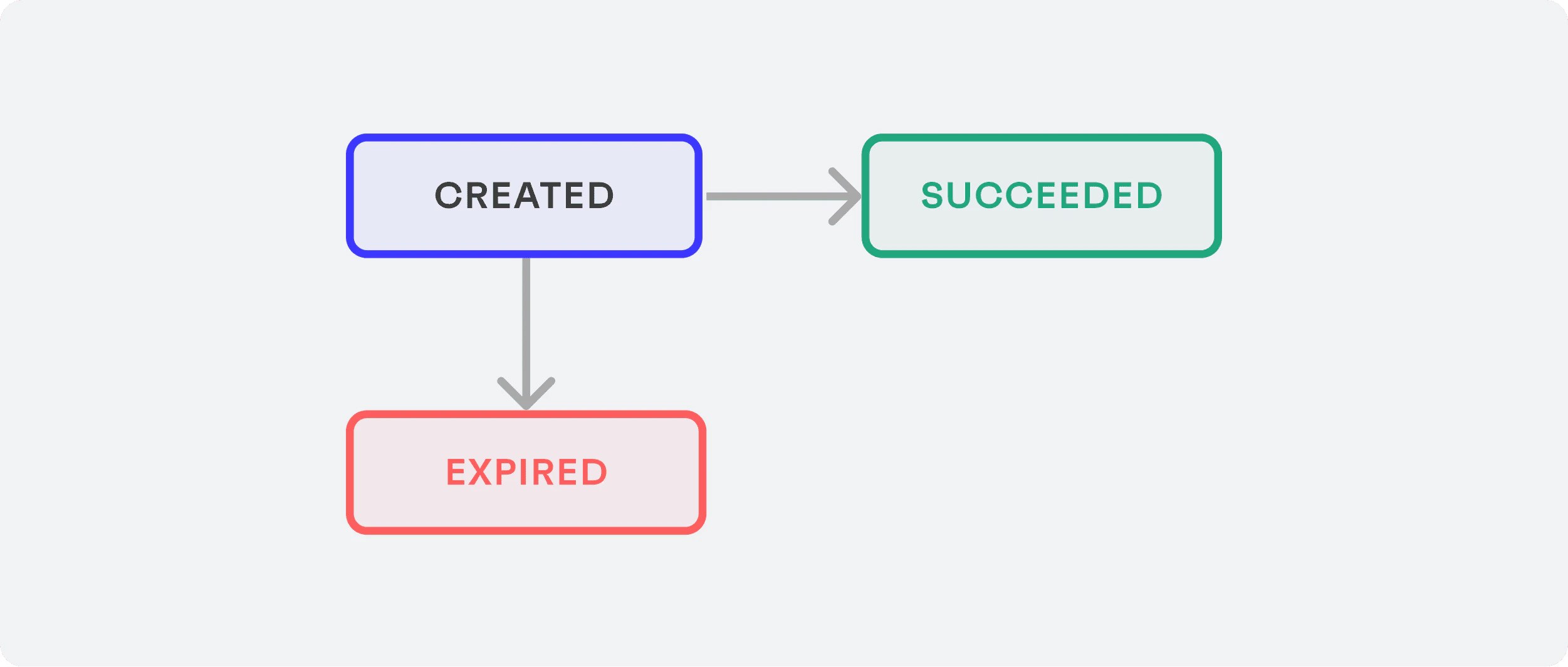
The possible status of a payment link during its lifecycle are as follows:
 | Status | Description | Next status | Webhook triggered |
| ----------- | ------------------------------------------------------------------------------------------------------------------------------------------------------------------------------------------------------------------- | --------------------------- | ----------------------------- |
| `created` |
| Status | Description | Next status | Webhook triggered |
| ----------- | ------------------------------------------------------------------------------------------------------------------------------------------------------------------------------------------------------------------- | --------------------------- | ----------------------------- |
| `created` | This is the initial status of a recently created payment link.
Every time a payment link is created, an associated payment intent is also automatically created.
| `succeeded`,
`expired` | `payment_link.created` |
| `succeeded` | This status means the payment provider has accepted the payment method.
A succeeded payment link does not mean the payment itself was succeeded. | | `payment_link.status_updated` |
| `expired` | Expired payment links cannot be reactivated. Check [payment link expiration](#expiration) for further information. | | `payment_link.status_updated` |
The [payment intent](/finops/guides/payments/payment-intents) is the object that represents the payment itself and the
one that must be used to track the payment.
## Receive a payment through a payment link
The steps below describe how to receive a payment through a payment link:
1. Get the available payment methods. (Recommended)
2. Create a payment link.
3. Share the payment link with the payer.
4. Track the payment.
### 1. Get the available payment methods (Recommended)
This step is not mandatory but **highly recommended**.
Some payment methods may be rejected by the payment provider, even if you [assign all payment methods to the organization](/finops/guides/payments/onboarding/enable-payment-methods). In these cases, if you request a payment link with rejected or inactive payment methods, an error message will be returned.
The payment link object contains the payment methods to be displayed to the payer on the payment page so they can select their preferred one during the payment act.
Learn how to [get all available payment methods for a specific organization](/finops/guides/payments/onboarding/enable-payment-methods#get-enabled-payment-methods) and check the [full list of payment methods Tesouro supports](/finops/guides/payments/payment-methods).
If you know in advance which payment methods to display to the payer, you can directly request the payment link without having to retrieve the whole list of available payment methods first.
### 2. Create a payment link
The payer must access a specific link to initialize the payment. To generate this payment link, call [`POST /payment-links`](/finops/reference/openapi/payment-links/post-payment-links), which will return you a `payment_page_url` that can be used to make the payment. The payment link can be up to 400 characters long.
The request body varies depending on whether the payment link is created for an invoice stored in Tesouro platform (as a payable or receivable), or for an arbitrary external invoice.
The common fields for all payment links are:
* `return_url` - Optional. The URL where to redirect the user after the payment.
* `expires_at` - Optional. The date and time when the payment link will expire. For more information, see [Payment link expiration](#expiration).
* `payment_methods` - Required. A list of [payment methods](/finops/guides/payments/payment-methods) to show on the payment page. These payment methods [must be enabled](/finops/guides/payments/onboarding/enable-payment-methods) for the organization that will make or accept the payment.
* Receivables can be paid using any [payment method](/finops/guides/payments/payment-methods) with `direction`=`receive`.
* External invoices can be paid using the same payment methods as payables (in case an organization pays to its counterpart) or receivables (in case an organization accepts a payment from its counterpart).
Other required fields and values depend on the use case and are explained below:
* [Payment link for a receivable](#for-receivable)
* [Payment link for an external invoice](#for-external-invoice)
The successful response contains the URL to the payment page (`payment_page_url`). This URL can be up to 400 characters long.
```json Example: payment link response for a receivable invoice expandable lines theme={null}
{
"id": "3fa85f64-5717-4562-b3fc-2c963f66afa6",
"amount": 1000,
"currency": "USD",
"expires_at": "2024-09-30T13:53:49.198Z",
"invoice": {
"issue_date": "2024-09-19",
"due_date": "2024-09-30",
"file": {
"name": "invoice.pdf",
"mimetype": "application/pdf",
"url": "https://bucketname.s3.com/12345/invoice.pdf"
}
},
"payer": null,
"payment_intent": {
"id": "9400893a-1ad7-4154-9bc5-7bd4744902ee",
"updated_at": "2024-09-19T10:40:59.052011+00:00",
"application_fee_amount": null,
"object": null,
"provider": null,
"selected_payment_method": null,
"status": "created"
},
"payment_intent_id": "9400893a-1ad7-4154-9bc5-7bd4744902ee",
"payment_methods": ["card"],
"payment_page_url": "https://pay.sandbox.tesouro.com?data=eyJpZ...",
"payment_reference": "INV-00042",
"recipient": {
"id": "cff85bcf-bd28-472a-93a7-317f9cbbc96f",
"type": "entity",
"name": "Acme Inc.",
"bank_accounts": [
{
"id": "24049bec-bcd6-4590-9750-974fb75233d6",
"account_holder_name": "Acme Inc.",
"account_number": 12345678,
"bic": "",
"country": "US",
"currency": "USD",
"display_name": "Primary account",
"is_default": true,
"name": "Primary account",
"routing_number": 123456789,
"was_created_by_user_id": null
}
]
},
"return_url": "https://example.com/where-to-redirect-after-payment",
"status": "created"
}
```
Once the payment link is created, an associated [payment intent](/finops/guides/payments/payment-intents) is also automatically created. The payment intent ID returned will be used to track the actual payment.
#### 2.1. Payment link for a receivable
Payment links can be created only for receivable invoices in the `issued` and `partially_paid` [statuses](/finops/guides/accounts-receivable/invoices#invoice-lifecycle). You can create a single payment link for the full invoice amount, or several payment links for partial amounts.
To create a payment link, specify the following data in the request body for [`POST /payment-links`](/finops/reference/openapi/payment-links/post-payment-links):
* `object.type` - Must be `"receivable"`.
* `object.id` - Required. ID of the receivable invoice.
* `amount` - Optional. If omitted, the payment link will be for the total remaining amount due of the invoice. Specify a partial `amount` value to create a partial payment link. The total amount of all active (non-paid, non-expired) partial payment links for an invoice must not exceed the `amount_to_pay` value of that invoice.
PDF invoice displays the payment link and QR code only in case of a single full payment link. If
a partial payment link exists, those blocks are not included in the PDF invoice.
* `recipient.type` - Must be `"entity"`.
* `recipient.id` - Required. ID of the entity that issued the receivable. The value must be the same as specified in `X-Organization-Id` request header.
* [Other fields](#create) as necessary.
```sh expandable lines theme={null}
curl -X POST 'https://api.sandbox.tesouro.com/v1/payment-links' \
-H 'X-Finops-Version: 2025-06-23' \
-H 'X-Organization-Id: ORGANIZATION_ID' \
-H 'Authorization: Bearer YOUR_ACCESS_TOKEN' \
-H 'Content-Type: application/json' \
-d '{
"object": {
"type": "receivable",
"id": "RECEIVABLE_INVOICE_ID"
},
"recipient": {
"type": "entity",
"id": "ENTITY_ID"
},
"payment_methods": [
"card",
"eps",
"ideal",
"sepa_credit",
"sepa_debit"
],
"return_url": "https://example.com/where-to-redirect-after-payment"
}'
```
```sh expandable {11} lines theme={null}
curl -X POST 'https://api.sandbox.tesouro.com/v1/payment-links' \
-H 'X-Finops-Version: 2025-06-23' \
-H 'X-Organization-Id: ORGANIZATION_ID' \
-H 'Authorization: Bearer YOUR_ACCESS_TOKEN' \
-H 'Content-Type: application/json' \
-d '{
"object": {
"type": "receivable",
"id": "RECEIVABLE_INVOICE_ID"
},
"amount": 45000,
"recipient": {
"type": "entity",
"id": "ENTITY_ID"
},
"payment_methods": [
"card"
],
"return_url": "https://example.com/where-to-redirect-after-payment"
}'
```
#### 2.2. Payment link for an external invoice
This example shows how to create a payment link for an arbitrary invoice (stored outside of Tesouro platform) or arbitrary payment amount. You need to call [`POST /payment-links`](/finops/reference/openapi/payment-links/post-payment-links) and provide the following data in the request body:
* `currency` - Required. The payment currency. See the [list of currencies](/finops/support/currencies) supported by Tesouro.
* `amount` - Required. The amount to be paid, in [minor units](/finops/support/currencies#minor-units).
* `payment_reference` - Required. Invoice number or payment reference number. The value will be [normalized](/finops/guides/payments/payment-references) when passed to the payment processing provider.
* `invoice` - Optional. An object containing information about the invoice, such as the issue date, due date, URL of the invoice file. If provided, this information will be displayed on the payment page. If invoice file URL is provided, the payment page will also display the invoice file. For a list of `invoice` object fields, see the description of the [`POST /payment-links`](/finops/reference/openapi/payment-links/post-payment-links) endpoint.
* [Other fields](#create) as necessary.
```sh Payment link for an external invoice expandable lines theme={null}
curl -X POST 'https://api.sandbox.tesouro.com/v1/payment-links' \
-H 'X-Finops-Version: 2025-06-23' \
-H 'X-Organization-Id: ORGANIZATION_ID' \
-H 'Authorization: Bearer YOUR_ACCESS_TOKEN' \
-H 'Content-Type: application/json' \
-d '{
"payment_methods": [
"card"
],
"recipient": {
"id": "",
"type": "entity|counterpart"
},
"return_url": "https://example.com/where-to-redirect-after-payment",
"expires_at": "2023-12-03T13:53:49.198Z",
"amount": 1000,
"currency": "USD",
"payment_reference": "Inv 102",
"invoice": {
"issue_date": "2022-10-17",
"due_date": "2022-10-17",
"file": {
"name": "invoice.pdf",
"mimetype": "application/pdf",
"url": "https://bucketname.s3.com/12345/invoice.pdf"
}
}
}'
```
### 3. Share the payment link
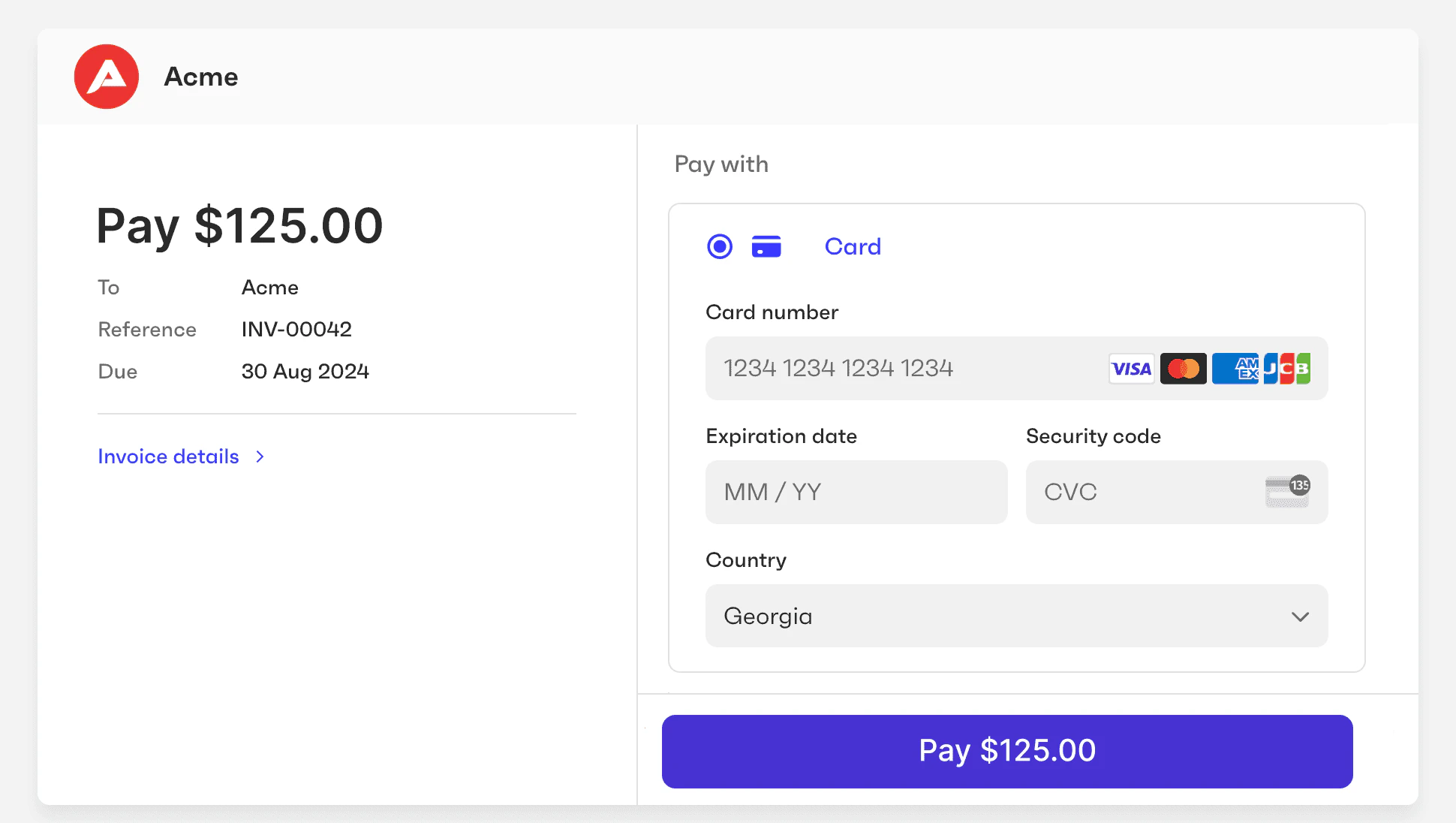
After a payment link is created, you can share its URL (`payment_page_url`) with the payer. When a payer navigates to this URL, they will see the payment page displaying information about the invoice and payment amount. The payer can select their preferred payment method and enter their payment information to initialize the payment.
 ### 4. Track the payment
Use the payment intent ID obtained in [step 2](#create) to [watch the payment transition](/finops/guides/payments/payment-intents#track) from status to status and get information about the actual payment.
## Find an existing payment link for an invoice
Given an invoice ID, you can find an existing payment link that was previously created for that invoice.
To do this, first call [`GET /payment-intents?object_id=INVOICE_ID`](/finops/reference/openapi/payment-intents/get-payment-intents). Or, to query multiple invoices at once:
`GET /payment-intents?object_id__in=INVOICE_1&object_id__in=INVOICE_2`
This gives you a list of [payment intents](/finops/guides/payments/payment-intents) associated with the specified invoices. Each invoice can have more than one payment intent - for example, one canceled intent and another settled.
```json expandable lines theme={null}
{
"data": [
{
"id": "6f1a0e95-059b-4095-9264-b8a600e79a61",
...
"object": {
"id": "539ed691-821a-4c70-9a0f-ded6e64d72d2",
"type": "payable"
},
"payment_link_id": "0b971087-a15e-4946-a6c8-be230e297004",
"status": "processing"
},
{
...
}
]
}
```
Each payment intent has the `payment_link_id` field containing the ID of the associated payment link. You can pass this ID to [`GET /payment-links/{payment_link_id}`](/finops/reference/openapi/payment-links/get-payment-links-id) to get the payment link details, such as the URL and expiration date.
```json lines theme={null}
{
"id": "0b971087-a15e-4946-a6c8-be230e297004",
...
"expires_at": "2024-08-30T10:52:45.785Z",
"payment_page_url": "https://pay.sandbox.tesouro.pay/?data=..."
}
```
## Watch the payment link
You can track the payment link transition from status to status in two different ways:
#### 1. Webhooks
You can be notified of every change in the status of the payment by subscribing to the `payment_link.status_updated` [webhook](/finops/guides/getting-started/webhooks/index). Call [`POST /webhook-subscriptions`](/finops/reference/openapi/webhook-subscriptions/post-webhook-subscriptions) with the following request body, replacing the `url` with the URL of your webhook listener endpoint:
```sh lines theme={null}
curl -X POST 'https://api.sandbox.tesouro.com/v1/webhook-subscriptions' \
-H 'X-Finops-Version: 2025-06-23' \
-H 'Authorization: Bearer YOUR_ACCESS_TOKEN' \
-H 'Content-Type: application/json' \
-d '{
"object_type": "payment_link",
"url": "https://example.com/your-webhook-listener"
}'
```
The event sent by Tesouro contains `entity_id`, `object_type`, and `object_id`, which can be used to identify the affected payment intent:
```json lines theme={null}
{
"id": "06c003f1-6b05-415f-be6d-39ecacdddbd3",
"created_at": "2024-03-04T20:06:48.593225+00:00",
"action": "payment_link.status_updated",
"api_version": "2025-06-23",
"entity_id": "ce0e9fc7-b3e7-4f12-ad86-bfb0725a99f0",
"description": "payment_link_status_updated",
"object": {
"id": "f7dcd6bc-2cc9-4cb9-be9c-d7bf2404acd7"
},
"object_type": "payment_link",
"webhook_subscription_id": "c7f37127-44e5-494a-833a-21e60585f187"
}
```
#### 2. Get information about the payment link
The payment link ID received from the webhook can be used to check the status of the payment link, by calling [`GET /payment-links/{payment_link_id}`](/finops/reference/openapi/payment-links/get-payment-links-id):
```sh lines theme={null}
curl -X GET 'https://api.sandbox.tesouro.com/v1/payment-links/3fa85f6...f66afa6' \
-H 'X-Finops-Version: 2025-06-23' \
-H 'Authorization: Bearer YOUR_ACCESS_TOKEN'
```
The successful response contains information about the payment link:
```json lines theme={null}
{
"id": "3fa85f64-5717-4562-b3fc-2c963f66afa6",
"amount": 11781,
"currency": "USD",
"expires_at": "2023-03-01T10:52:45.785Z",
...
"payment_intent_id": "9400893a-1ad7-4154-9bc5-7bd4744902ee",
"payment_page_url": "https://pay.sandbox.tesouro.com?data=eyJpZ...",
...
"return_url": "https://example.com/where-to-redirect-after-payment",
"status": "created"
}
```
## Custom domain for payment links
By default, payment pages are served from `pay.tesouro.com`, but partners can use their own domain instead (for example, `pay.mycompany.com`). To do this, follow these steps:
1. Register the desired domain name with your DNS provider. We recommend that you register two different domains - one for the Production [environment](/finops/api/concepts/environments), and another one for the Sandbox environment. For example, `pay.mycompany.com` and `pay.sandbox.mycompany.com`.
2. Create [CNAME](https://en.wikipedia.org/wiki/CNAME_record) records to point your production domain to `pay.tesouro.com`, and the sandbox domain to `pay.sandbox.tesouro.com`.
3. Specify your custom domain name in the [partner setting](/finops/reference/openapi/partner-settings/patch-settings) `payments.payment_page_domain`. Set the corresponding value for the Sandbox and Production environments.
```sh Sandbox example lines theme={null}
curl -X PATCH 'https://api.sandbox.tesouro.com/v1/settings' \
-H 'X-Finops-Version: 2025-06-23' \
-H 'Authorization: Bearer YOUR_ACCESS_TOKEN' \
-H 'Content-Type: application/json' \
-d '{
"payments": {
"payment_page_domain": "pay.sandbox.mycompany.com"
}
}'
```
4. [Contact us](/finops/support/) to complete the setup.
From now on, payment links generated by Tesouro will use your custom domain in their URLs.
## Payment link expiration
By default, payment links created for invoices stored in Tesouro expire 30 days after the invoice due date, and payment links created for [external invoices](#for-external-invoice) expire 30 days after the link creation time.
You can also specify a custom `expires_at` timestamp (up to 70 days) when creating a payment link. Once set, the expiration time cannot be changed.
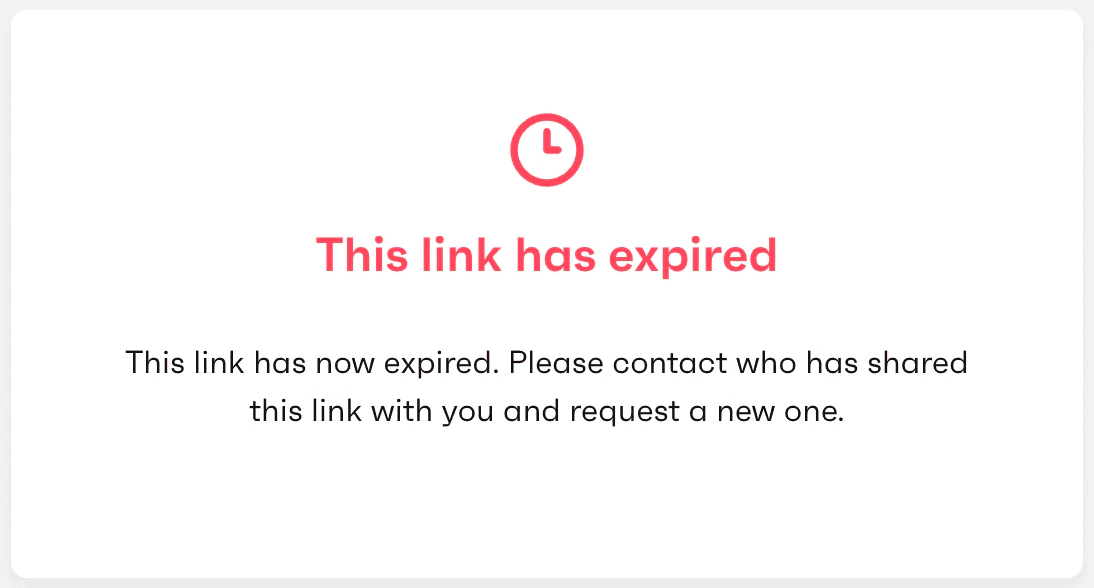
After a payment link expires, visiting its `payment_page_url` in a browser will show an expiration message instead of a payment page. Expired payment links cannot be reactivated, but you can create a new payment link if needed.
### 4. Track the payment
Use the payment intent ID obtained in [step 2](#create) to [watch the payment transition](/finops/guides/payments/payment-intents#track) from status to status and get information about the actual payment.
## Find an existing payment link for an invoice
Given an invoice ID, you can find an existing payment link that was previously created for that invoice.
To do this, first call [`GET /payment-intents?object_id=INVOICE_ID`](/finops/reference/openapi/payment-intents/get-payment-intents). Or, to query multiple invoices at once:
`GET /payment-intents?object_id__in=INVOICE_1&object_id__in=INVOICE_2`
This gives you a list of [payment intents](/finops/guides/payments/payment-intents) associated with the specified invoices. Each invoice can have more than one payment intent - for example, one canceled intent and another settled.
```json expandable lines theme={null}
{
"data": [
{
"id": "6f1a0e95-059b-4095-9264-b8a600e79a61",
...
"object": {
"id": "539ed691-821a-4c70-9a0f-ded6e64d72d2",
"type": "payable"
},
"payment_link_id": "0b971087-a15e-4946-a6c8-be230e297004",
"status": "processing"
},
{
...
}
]
}
```
Each payment intent has the `payment_link_id` field containing the ID of the associated payment link. You can pass this ID to [`GET /payment-links/{payment_link_id}`](/finops/reference/openapi/payment-links/get-payment-links-id) to get the payment link details, such as the URL and expiration date.
```json lines theme={null}
{
"id": "0b971087-a15e-4946-a6c8-be230e297004",
...
"expires_at": "2024-08-30T10:52:45.785Z",
"payment_page_url": "https://pay.sandbox.tesouro.pay/?data=..."
}
```
## Watch the payment link
You can track the payment link transition from status to status in two different ways:
#### 1. Webhooks
You can be notified of every change in the status of the payment by subscribing to the `payment_link.status_updated` [webhook](/finops/guides/getting-started/webhooks/index). Call [`POST /webhook-subscriptions`](/finops/reference/openapi/webhook-subscriptions/post-webhook-subscriptions) with the following request body, replacing the `url` with the URL of your webhook listener endpoint:
```sh lines theme={null}
curl -X POST 'https://api.sandbox.tesouro.com/v1/webhook-subscriptions' \
-H 'X-Finops-Version: 2025-06-23' \
-H 'Authorization: Bearer YOUR_ACCESS_TOKEN' \
-H 'Content-Type: application/json' \
-d '{
"object_type": "payment_link",
"url": "https://example.com/your-webhook-listener"
}'
```
The event sent by Tesouro contains `entity_id`, `object_type`, and `object_id`, which can be used to identify the affected payment intent:
```json lines theme={null}
{
"id": "06c003f1-6b05-415f-be6d-39ecacdddbd3",
"created_at": "2024-03-04T20:06:48.593225+00:00",
"action": "payment_link.status_updated",
"api_version": "2025-06-23",
"entity_id": "ce0e9fc7-b3e7-4f12-ad86-bfb0725a99f0",
"description": "payment_link_status_updated",
"object": {
"id": "f7dcd6bc-2cc9-4cb9-be9c-d7bf2404acd7"
},
"object_type": "payment_link",
"webhook_subscription_id": "c7f37127-44e5-494a-833a-21e60585f187"
}
```
#### 2. Get information about the payment link
The payment link ID received from the webhook can be used to check the status of the payment link, by calling [`GET /payment-links/{payment_link_id}`](/finops/reference/openapi/payment-links/get-payment-links-id):
```sh lines theme={null}
curl -X GET 'https://api.sandbox.tesouro.com/v1/payment-links/3fa85f6...f66afa6' \
-H 'X-Finops-Version: 2025-06-23' \
-H 'Authorization: Bearer YOUR_ACCESS_TOKEN'
```
The successful response contains information about the payment link:
```json lines theme={null}
{
"id": "3fa85f64-5717-4562-b3fc-2c963f66afa6",
"amount": 11781,
"currency": "USD",
"expires_at": "2023-03-01T10:52:45.785Z",
...
"payment_intent_id": "9400893a-1ad7-4154-9bc5-7bd4744902ee",
"payment_page_url": "https://pay.sandbox.tesouro.com?data=eyJpZ...",
...
"return_url": "https://example.com/where-to-redirect-after-payment",
"status": "created"
}
```
## Custom domain for payment links
By default, payment pages are served from `pay.tesouro.com`, but partners can use their own domain instead (for example, `pay.mycompany.com`). To do this, follow these steps:
1. Register the desired domain name with your DNS provider. We recommend that you register two different domains - one for the Production [environment](/finops/api/concepts/environments), and another one for the Sandbox environment. For example, `pay.mycompany.com` and `pay.sandbox.mycompany.com`.
2. Create [CNAME](https://en.wikipedia.org/wiki/CNAME_record) records to point your production domain to `pay.tesouro.com`, and the sandbox domain to `pay.sandbox.tesouro.com`.
3. Specify your custom domain name in the [partner setting](/finops/reference/openapi/partner-settings/patch-settings) `payments.payment_page_domain`. Set the corresponding value for the Sandbox and Production environments.
```sh Sandbox example lines theme={null}
curl -X PATCH 'https://api.sandbox.tesouro.com/v1/settings' \
-H 'X-Finops-Version: 2025-06-23' \
-H 'Authorization: Bearer YOUR_ACCESS_TOKEN' \
-H 'Content-Type: application/json' \
-d '{
"payments": {
"payment_page_domain": "pay.sandbox.mycompany.com"
}
}'
```
4. [Contact us](/finops/support/) to complete the setup.
From now on, payment links generated by Tesouro will use your custom domain in their URLs.
## Payment link expiration
By default, payment links created for invoices stored in Tesouro expire 30 days after the invoice due date, and payment links created for [external invoices](#for-external-invoice) expire 30 days after the link creation time.
You can also specify a custom `expires_at` timestamp (up to 70 days) when creating a payment link. Once set, the expiration time cannot be changed.
After a payment link expires, visiting its `payment_page_url` in a browser will show an expiration message instead of a payment page. Expired payment links cannot be reactivated, but you can create a new payment link if needed.
 You can also force the expiration of a payment link by calling [`POST /payment-links/{payment_link_id}/expire`](/finops/reference/openapi/payment-links/post-payment-links-id-expire). This may be needed, for example, if the related invoice was updated or canceled, making the original payment link outdated.
```sh lines theme={null}
curl -X POST 'https://api.sandbox.tesouro.com/v1/payment-links/{payment_link_id}/expire' \
-H 'X-Finops-Version: 2025-06-23' \
-H 'X-Organization-Id: ORGANIZATION_ID' \
-H 'Authorization: YOUR_ACCESS_TOKEN'
```
This changes the payment link's `status` to `"expired"`. The response returns the payment link details with the updated `status`:
```json lines theme={null}
{
"id": "3fa85f64-5717-4562-b3fc-2c963f66afa6",
"amount": 1000,
"currency": "USD",
...
"status": "expired"
}
```
When a payment link expires (whether automatically or upon request), a `payment_link.status_updated` [webhook](/finops/guides/getting-started/webhooks/index) is triggered. Also, the associated [payment intent](/finops/guides/payments/payment-intents) is automatically moved to the `payment_cancelled` status.
You can also force the expiration of a payment link by calling [`POST /payment-links/{payment_link_id}/expire`](/finops/reference/openapi/payment-links/post-payment-links-id-expire). This may be needed, for example, if the related invoice was updated or canceled, making the original payment link outdated.
```sh lines theme={null}
curl -X POST 'https://api.sandbox.tesouro.com/v1/payment-links/{payment_link_id}/expire' \
-H 'X-Finops-Version: 2025-06-23' \
-H 'X-Organization-Id: ORGANIZATION_ID' \
-H 'Authorization: YOUR_ACCESS_TOKEN'
```
This changes the payment link's `status` to `"expired"`. The response returns the payment link details with the updated `status`:
```json lines theme={null}
{
"id": "3fa85f64-5717-4562-b3fc-2c963f66afa6",
"amount": 1000,
"currency": "USD",
...
"status": "expired"
}
```
When a payment link expires (whether automatically or upon request), a `payment_link.status_updated` [webhook](/finops/guides/getting-started/webhooks/index) is triggered. Also, the associated [payment intent](/finops/guides/payments/payment-intents) is automatically moved to the `payment_cancelled` status.