

This guide covers credit notes in accounts receivable. Tesouro also supports credit notes for
accounts payable.
Overview
A credit note, also known as a credit memo, is a legal document used to reduce the amount owed on an invoice after it’s been issued. Organizations typically use credit notes in the following cases:- An issued invoice contains a mistake (for example, wrong product or quantity).
- The order needs to change after the invoice has been issued.
- The organization or the customer (counterpart) canceled the order.
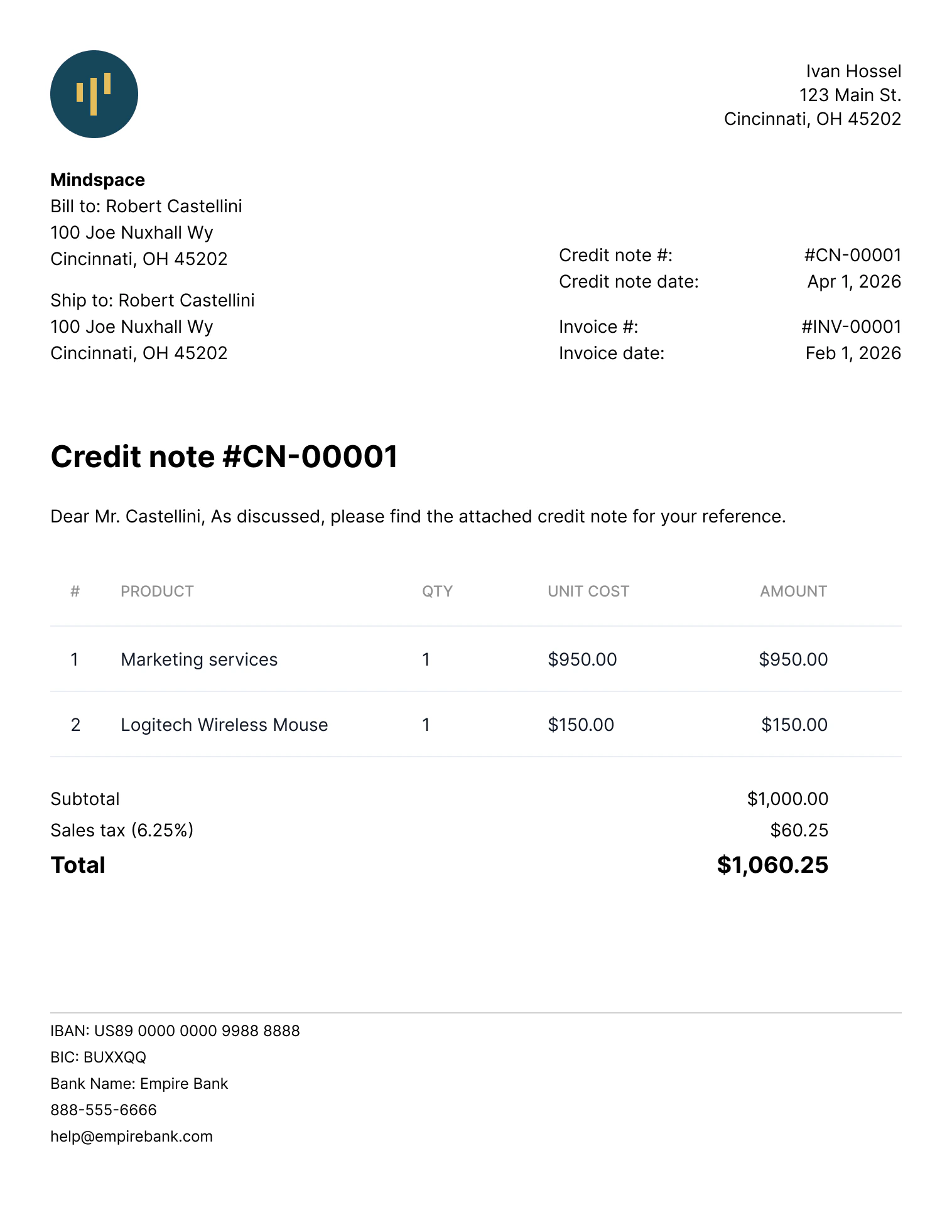
A credit note
generate_paid_invoice_pdf.
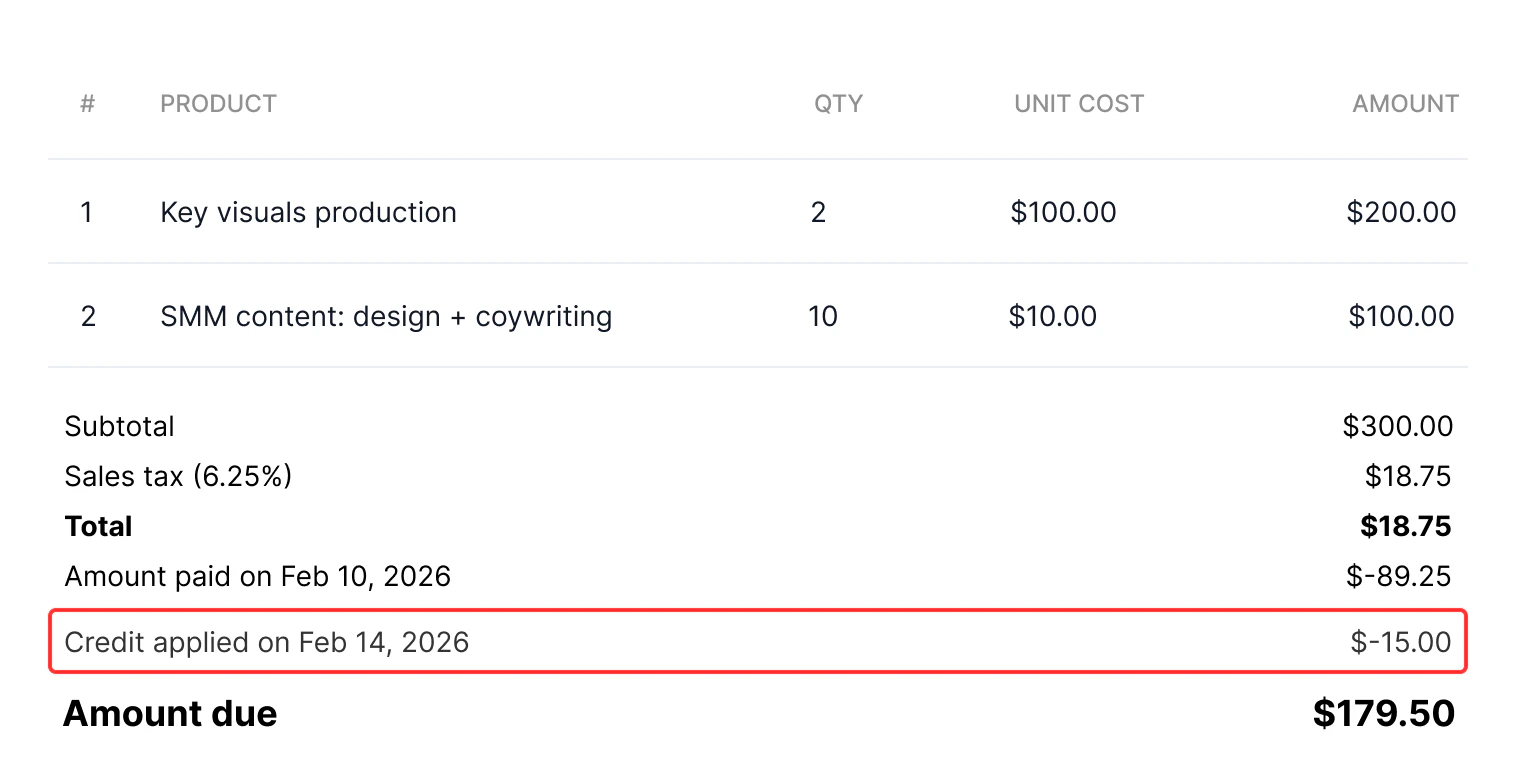
An invoice with a list of credits applied
Roles and permissions
To create and manage credit notes using an organization user token, this organization user must have a role with theinvoice:write:org permission.
If a partner-level token is used, no special permissions are needed.
Use cases
Tesouro API supports the following use cases for credit notes:- Reduce quantities of line items.
Example: the organization issued an invoice for 10 laptops, but only eight were actually delivered. A credit note can “cancel” the remaining two laptops that weren’t delivered. - Reduce the price of some or all units within a line item. (Essentially applying a discount.)
Example: The invoice mistakenly billed a product at $210 instead of $200. A credit note corrects the price back to $200. - Credit the full remaining amount of an invoice. This cancels an unpaid invoice, or marks a partially paid invoice as paid.
Credit notes can’t add new line items or increase the unit quantity and price in line items.
Instead, the organization should issue a new invoice for the additional amount.
Considerations and limitations
- Credit notes can only be created for invoices in the
issued,partially_paid, andoverduestatuses. Creditingpaidinvoices isn’t supported. - Credit notes for overdue and partially paid invoices can be used to reduce only the quantity of line items, but not the unit prices.
- If a credit note cancels the full remaining amount of an invoice:
issuedand unpaidoverdueinvoices are automatically moved to thecanceledstatus,partially_paidand partially paidoverdueinvoices are automatically moved to thepaidstatus.
- Changing line item tax rates via credit notes isn’t supported.
- If the original invoice contained any form of discounts or special deductions, you can only issue a credit note once. Partial adjustments of discounted invoices via credit notes aren’t supported.
- If an invoice includes several line items for the same product, credit notes can’t update those specific line items. However, other line items on the invoice can be updated.
- If a counterpart’s address or contact information changed after an invoice was issued, you can provide the updated details via a credit note. However, the updated information only appears in the credit note — the original invoice isn’t changed.
- A credit note inherits the bank account of the invoice it credits. You can’t set or change it on the credit note itself.
Credit note lifecycle
Credit notes can have one of two statuses,draft or issued.
Draft credit notes can be deleted. Deleted documents can no longer be accessed via the API.
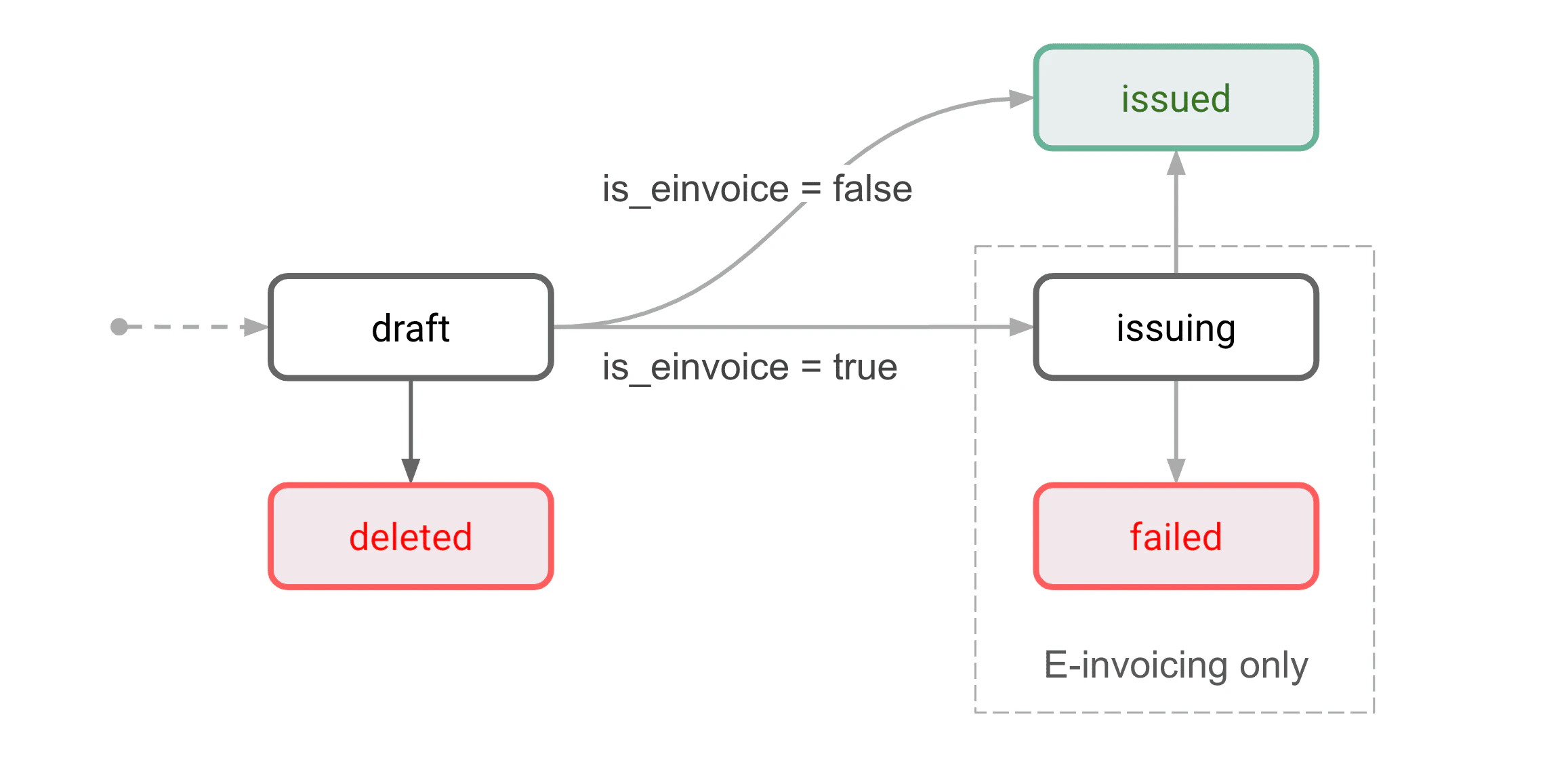
Credit note lifecycle
Draft
This is the initial status for all new credit notes. A draft credit note isn’t issued yet and can still be edited. Draft credit notes can be either issued or deleted.Only one draft credit note can exist per invoice. Before you can create the second draft credit
note for the same invoice, you need to issue (or delete) the previous draft credit note.
Issued
The credit note is finalized and issued to a counterpart.Ways to create a credit note
There are two ways to create credit notes:- Create a credit note directly. Use this to manually adjust the credited amount (for example, to credit a partial amount).
- Cancel an invoice. If the organization setting
receivable_edit_flowis “compliant”, a new credit note will be automatically created and issued for the remaining invoice amount.
Credit notes aren’t automatically sent to counterparts. Use
POST /receivables/{credit_note_id} /send to send credit notes via email.Create a credit note manually
For the full remaining invoice amount
To create a credit note, callPOST /receivables and specify the invoice ID in the based_on field in the request body:
id assigned to the credit note. The based_on and based_on_document_id properties of the credit note point to the original invoice:
Full credit note response
Full credit note response
By default, a newly created credit note cancels the full remaining amount of an invoice. If this
is what you need, you can proceed to issue the credit note.
For a partial amount
The first step is the same as when creating a full amount credit note - callPOST /receivables and specify the invoice ID in the based_on field in the request body:
id assigned to the created draft credit note:
PATCH /receivables/{credit_note_id} and provide the updated values. The general PATCH request format for credit notes is as follows.
- The structure of the
line_itemsfield in credit notePATCHrequests differs from that in invoice objects. - The
quantityfield represents the number of products you want to remove or apply a discount via the credit note. This number must always be less than or equal to the current total on the invoice object. - The
price_difffield defines the discount on the product. It represents the amount to be deducted from the current price on the invoice. - The
old_pricefield defines the price of a previously discounted product. This field should only be used when applying a further discount on a product item.
Example 1: Reduce line item quantity
Consider an invoice line item object with product ID9ccaf14e-c14d-48eb-8801-4217d52b6114, the price is $5 (500 in minor units), and the quantity is 10.
To reduce the product quantity from 10 to 8 (in other words, to remove 2 items), update the credit note data as follows:
Example 2: Reduce the unit price of a line item
Consider an invoice line item object with product ID9ccaf14e-c14d-48eb-8801-4217d52b6114, the price is $5 (500 in minor units), and the quantity is 10.
To reduce the unit price from 5 to $4, update the credit note data as follows:
Example 3: Reduce the price of some units within a line item
Consider an invoice line item object with product ID9ccaf14e-c14d-48eb-8801-4217d52b6114, the price is $5 (500 in minor units), and the quantity is 10.
Suppose you want to reduce the price of 2 units from 5 to $4. The other 8 units should keep the original price. To achieve this, update the credit note data as follows:
Example 4: Apply a further discount to an already discounted item
Consider an invoice line item object with product ID9ccaf14e-c14d-48eb-8801-4217d52b6114, the price is $5 (500 in minor units), and the quantity is 10.
Suppose you had already reduced the price of 2 items from $5 to $4 (400 in minor units). Now, you want to further reduce the price of 2 units from $4 to $2. To achieve this, update the credit note data as follows:
Issue a credit note
Once you’ve finalized the credit note, mark it as issued by callingPOST /receivables/{credit_note_id}/issue:
- The credit note
statuschanges to"issued". - A document number in the format
CN-<number>is assigned to thedocument_idfield. - The
issue_dateis set to the current date. - The credit note becomes read-only.
Issuing a credit note doesn’t automatically send it to the counterpart. See Send a credit note
via email below.
Download a credit note as PDF
Tesouro automatically generates the PDF version of credit notes in the counterpart language and the organization language, and returns links to these files in thefile_url and original_file_url fields of credit note responses:
If
file_url or original_file_url is null, repeat the request to GET /receivables/ {credit_note_id} after some time.GET /receivables/{credit_note_id}/pdf-link:
Customize the PDF file
Tesouro provides several built-in PDF templates for receivables. Organizations can change their default template or customize their chosen templates at any time. For more information, see PDF templates.Send a credit note via email
Bothdraft and issued credit notes can be sent via email. Sending a draft credit note also automatically issues it.
To send a credit note to a counterpart via email, call POST /receivables/{credit_note_id}/send and provide the email subject and body text. The language of the email template used is determined by the counterpart’s language.
You can also specify additional recipients, CC, and BCC addresses:
The
subject_text and body_text fields are email template variables that represent the email
subject and body. For more information, see Create and manage email
templates.To email address is taken from the Counterpart object associated with the credit note. This address is also returned in the counterpart_contact.email field of the Receivable object that represents the credit note.
All credit note emails are sent from the noreply@tesouro.com email address by default. You can customize the email domain name—@exampleCompany.com— by configuring a mailbox for the organization. You can also customize the email sender name and username by updating your Tesouro partner settings.
A 200 OK response from POST /receivables/{credit_note_id}/send means the email was successfully sent from the Tesouro email server.
Resend a credit note
To resend a credit note, you can callPOST /receivables/{credit_note_id}/send again, optionally with different subject_text and body_text templates.
Resending a credit note does not change its
issued_date.Miscellaneous
List all credit notes
To list all credit notes, callGET /receivables?type=credit_note. You can optionally filter the returned results by the credit note status or other parameters.
Find all credit notes for an invoice
To get a list of credit notes created for an invoice, callGET /receivables?type=credit_note&based_on=INVOICE_ID:
related_documents.credit_note_ids field in an invoice:
GET /receivables/{receivable_id}