

Overview
Tesouro supports card and ACH payment methods. Every payment made through Tesouro, such as an invoice paid through a payment link, is tracked by a payment intent.The organization must be onboarded in order to accept
payments.
Payment intent
The payment intent is the intention of a customer to execute a payment. In our system, a payment intent is an object that represents the payment itself. It is used to track the lifecycle of the payment flow. This gives you full control over the payment journey. A new payment intent is created automatically every time a payment link is created. The payment intent object can also be used to see the history of a specific payment.Payment intent lifecycle
Each payment intent is allocated with a status that indicates its progress throughout the payment lifecycle, from its creation until its conclusion.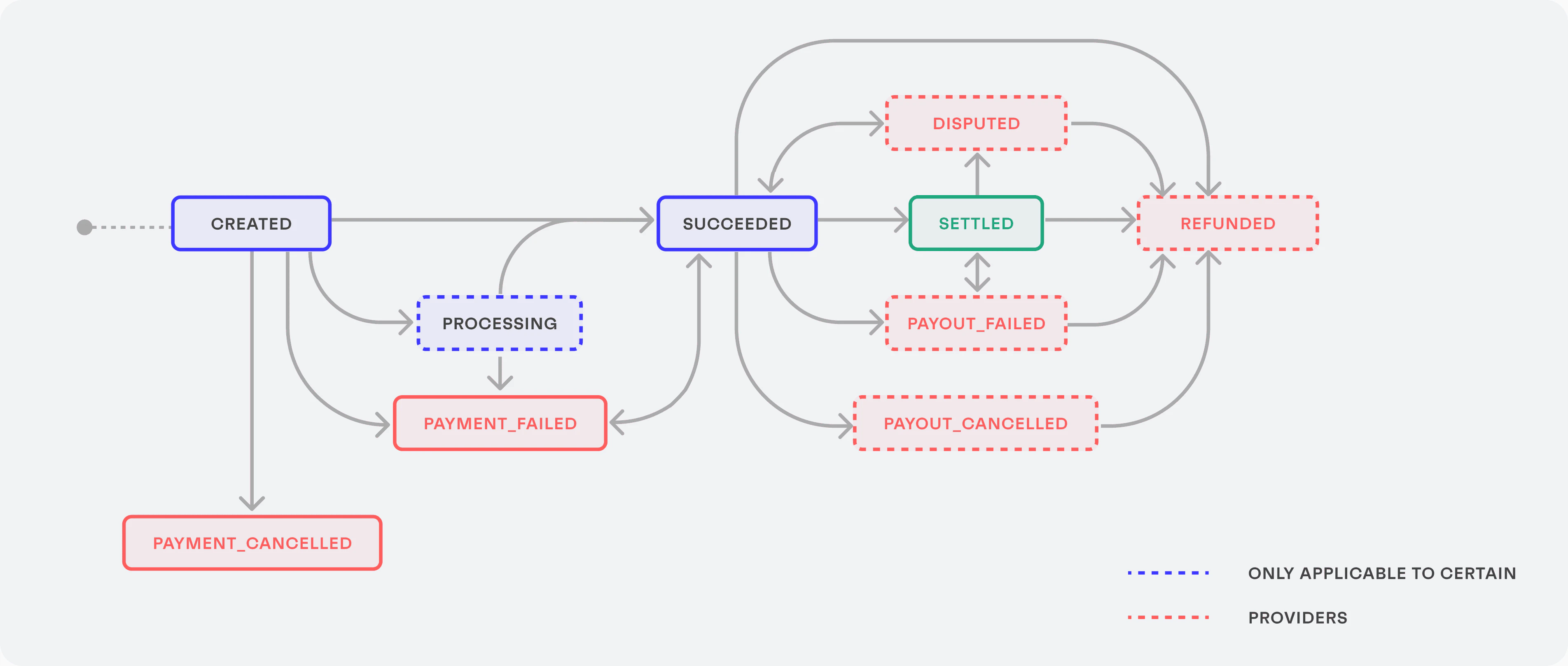
Overview of the payment intent lifecycle
Find an existing payment intent for an invoice
To check if there is an existing payment intent for a specific accounts receivable invoice, callGET /payment-intents?object_id=INVOICE_ID:
GET /payment-intents?object_id__in=INVOICE_1&object_id__in=INVOICE_2
The data array in the response contains all payment intents associated with the specified invoices.
- Check the payment status (
statusof the payment intent). - Find the payment link for the invoice: extract the
payment_link_idfrom the payment intent, then callGET /payment-links/{payment_link_id}, and get theurlfrom the response.
Track the payment intent
There are several ways to track the payment intent transition between statuses.Webhooks
You can subscribe to thepayment_intent.status_updated webhook to get notified of every change in the status of the payment intent. To subscribe to this webhook, call POST /webhook-subscriptions with the following request body, replacing the url with the URL of your webhook listener endpoint:
entity_id, object_type, and object_id, which can be used to identify the affected payment intent:
Get information about the payment intent
The payment intent ID received from the webhook can be used to check the progress of the actual payment, by callingGET /payment-intents/{payment_intent_id}:
Get the payment intent history
You can check the full status transition history of a specific payment intent by callingGET /payment-intents/{payment_intent_id}/history: