

Overview
Expense management lets you offer expense tracking and approval to your customers. Transactions are matched to an uploaded receipt, and then move through each customer’s approval workflow—categorized and readied for export to their accounting system. The setup has two parts. First, your system pushes transactions into Tesouro (typically from a card feed). Then your customer’s admin configures the rules—what employees must provide before submitting, who needs to approve, and how expenses map to their chart of accounts. Once setup is complete, employees can upload receipts and submit expenses for approval. Note: Tesouro currently accepts transactions from an external feed. Native card support is on the roadmap.Key concepts
Expense status lifecycle
Each transaction carries anexpense_status field that moves through the following states:
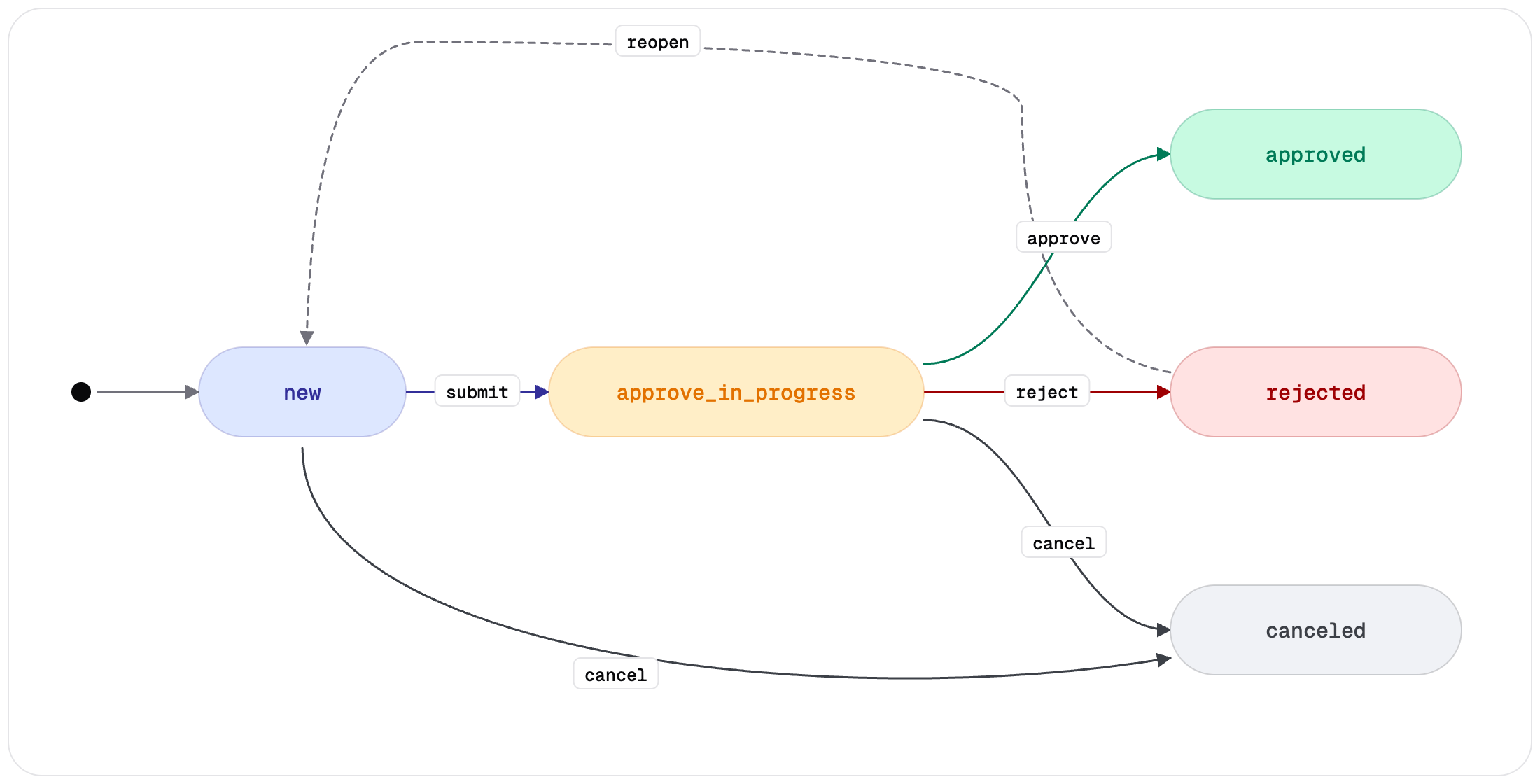
expense_status tracks the approval workflow. payment_processing_status tracks the card payment
lifecycle (created, processing, succeeded, declined, refunded, failed). Both fields
appear on every transaction response.What’s next
Setup
Configure the transaction feed, validation requirements, approval policies, and accounting fields. Run this once per organization.
Expense lifecycle
Follow the runtime flow for each expense: auto-categorization, employee submission, approval, and
accounting field mapping.
Receipts & OCR
Upload paths, AI auto-matching, the receipt bank, and how the
source_of_data field tracks
receipt provenance.Expense history
Read the audit trail of an expense: every event type, the payload each one carries, and who made the change.